
tailings
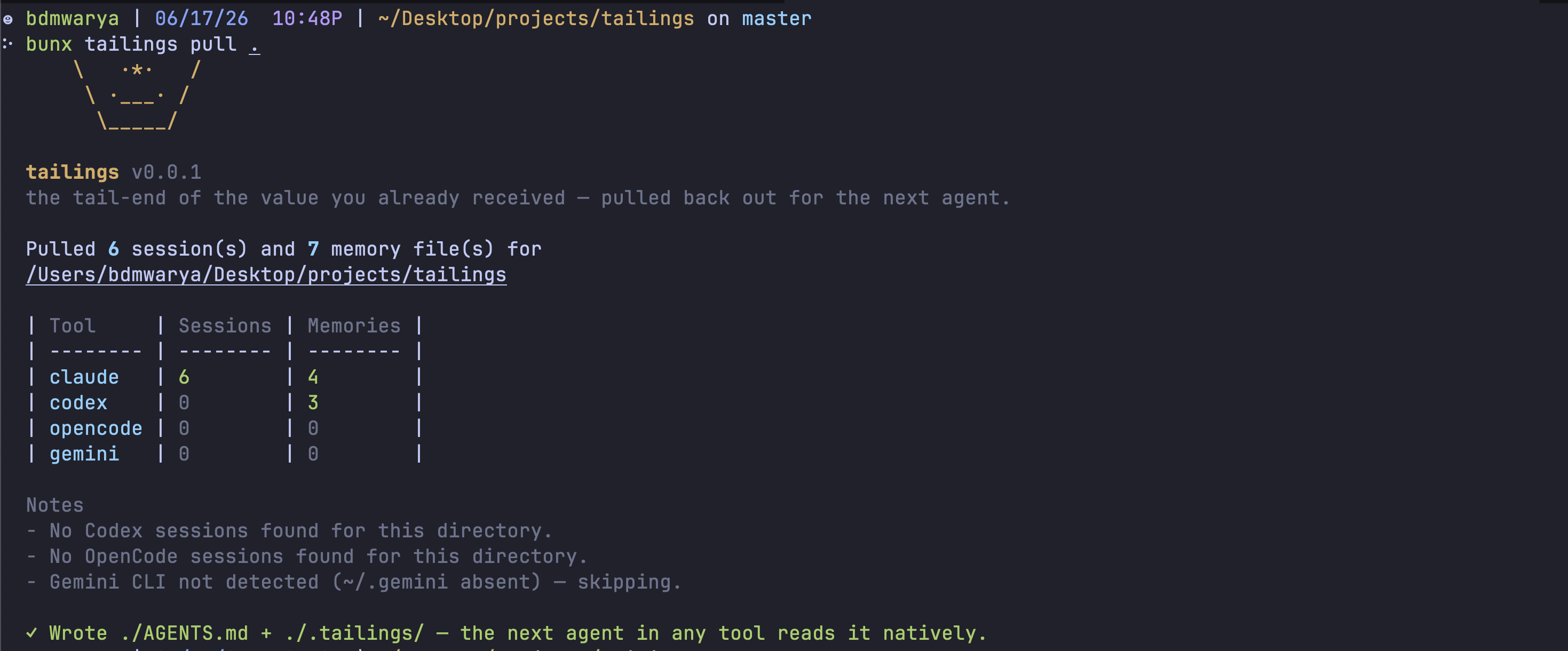
tailings gathers a directory's coding-agent history — the sessions and memories that Claude Code, Codex, OpenCode, and Gemini produced for that folder — and drops them into the folder as plain text, so the next agent reads them and is instantly caught up on the prior work and decisions.
The name is from mining: tailings are the material left over after the valuable ore is extracted. Here the "waste" — your pruned agent transcripts and the memories agents wrote — is the gold. The tools throw it away on a clock; this pans it back out and keeps it next to your code.
Use it when you switch agents (or hand off to a weaker one) and don't want to re-explain the project. Run tailings pull from a project directory and it writes a tight cross-tool digest into ./AGENTS.md plus the full per-session transcripts and memories into ./.tailings/. Every agent tool auto-reads AGENTS.md on startup, so the next agent — in any tool — picks it up natively. A weaker model with this folder beats a stronger model starting cold.
It is per-directory, not global: pull returns only the sessions whose working directory is this one (and its subdirs). It never dumps your whole chat history into a folder.
It reads local agent storage and never modifies it:
- Claude Code —
~/.claude/projects/<encoded-cwd>/<session-id>.jsonl+ per-projectmemory/ - Codex —
~/.codex/sessions/**/*.jsonl+~/.codex/memories/ - OpenCode —
~/.local/share/opencode/opencode.db+~/.config/opencode/ - Gemini —
~/.gemini/(best-effort; skips cleanly when absent)
It only reads transcripts, stores, and their modification times. It does not edit, move, or delete anything under those directories.
Install
Install it globally from npm if you want the tailings command available everywhere:
npm install --global tailingsThen run it from the project directory whose history you want to gather:
tailings pullYou can also run it without installing anything globally:
npx tailings pullOr with Bun:
bunx tailings pullAll forms use the current working directory as the project to gather history for.
Build
pnpm install
pnpm build
This bundles the CLI to dist/cli.js (shebang'd). From a checkout you can run it directly with node dist/cli.js, or pnpm link --global to expose the tailings command.
Pull
From any project directory:
tailings pullOr from this checkout without installing:
node dist/cli.js pullA run gathers only this directory's sessions and memories from every agent tool that touched it, then:
- Writes the full transcripts to
./.tailings/sessions/<tool>/, one markdown file per session. - Co-locates the agent-written memories under
./.tailings/memories/. - Splices a tight cross-tool digest into
./AGENTS.mdbetween<!-- tailings:start -->markers — never clobbering hand-written content above or below them. - Drops a self-ignoring
./.tailings/.gitignoreso old pasted secrets in transcripts don't get committed.
If no matching history is found, it says so for the current directory.
Options
Restrict how far back to look (default: all):
tailings pull --since 30d            # last 30 days
tailings pull --since 2026-05-01     # since an ISO date
Restrict which tools to read (default: all four):
tailings pull --tools claude,codex
tailings pull --tools all
Print the digest to stdout instead of writing files (good for piping):
tailings pull --out -Gather a directory other than the current one:
tailings pull --dir ../some-projectDoctor
Check which agent stores are present on this machine:
tailings doctorInteractive
Run with no arguments to confirm, then pull the current directory:
tailingsHelp
Show CLI help and version (real --help / --version / shell completions, from Effect's CLI framework):
tailings -h
tailings --help
tailings --version
Normal use does not require any path flags; the current working directory is used automatically.
Related tools
Companion tools that read the same local agent storage for different ends.
Looking for a specific lost chat to resume, rather than gathering all history into the folder? These find missing or hard-to-locate sessions that match the current directory and print the command to resume them:
claude-relink— for Claude Code chatscodex-relink— for Codex CLI chats
Want to see what your agents have been up to? This turns that same local history into usage analytics:
ai-hr— local "performance reviews" for your coding agents: normalizes token usage across Claude Code, Codex, and OpenCode and generates playful report cards, leaderboards, and cost breakdowns, all from local metadata.
Author
Built by Warya Wayne, @waryawayne.
- GitHub: @WaryaWayne
- X: @waryawayne