
ShinBucketDeployment
Rust-backed alternative to AWS CDK's official BucketDeployment construct.
ShinBucketDeployment is a near drop-in replacement for BucketDeployment, intended for S3 static asset deployment when you want faster deployments, a leaner custom resource, and fewer full-archive extraction costs than the upstream construct.
The published package ships prebuilt Rust provider binaries for both Lambda architectures (arm64 and x86_64), so consumers do not need a Rust toolchain. Swapping from the upstream construct is a one-line import change.
Quick Start
Install the package in an existing CDK v2 app, then swap the import you already use for BucketDeployment. The package includes prebuilt provider binaries, so application code does not need a Rust toolchain or a provider build step.
npm install shin-bucket-deploymentMigrating from BucketDeployment
The props map closely to the upstream construct, so migration is usually a one-line import change:
-import { BucketDeployment, Source } from "aws-cdk-lib/aws-s3-deployment";
+import { ShinBucketDeployment as BucketDeployment, Source } from "shin-bucket-deployment";
See What It Supports for the small set of upstream props that are intentionally unsupported.
Example
import { Distribution } from "aws-cdk-lib/aws-cloudfront";
import { S3BucketOrigin } from "aws-cdk-lib/aws-cloudfront-origins";
import { Bucket } from "aws-cdk-lib/aws-s3";
import { Stack } from "aws-cdk-lib";
import { Construct } from "constructs";
import { ShinBucketDeployment, Source } from "shin-bucket-deployment";

export class DemoStack extends Stack {
  constructor(scope: Construct, id: string) {
    super(scope, id);

    const bucket = new Bucket(this, "WebsiteBucket");
    const distribution = new Distribution(this, "Distribution", {
      defaultBehavior: {
        origin: S3BucketOrigin.withOriginAccessControl(bucket),
      },
    });

    new ShinBucketDeployment(this, "DeployWebsite", {
      sources: [Source.asset("site")],
      destinationBucket: bucket,
      destinationKeyPrefix: "site",
      distribution,
      prune: true,
      waitForDistributionInvalidation: true,
    });
  }
}
Why Build This
The official BucketDeployment is a good default for many stacks, but its provider is built around AWS CLI copy/sync orchestration. This construct keeps the familiar CDK surface while using a purpose-built Rust Lambda function for static asset deployment.
| Advantage | What changes |
|---|---|
| Leaner runtime | This custom resource provider runs on the Lambda Rust runtime (provided.al2023) rather than the Python runtime used by the upstream provider. In practice, the lower runtime overhead can mean faster cold starts and lower memory footprint; see lambda-perf. |
| Direct AWS SDK operations | Copy, upload, delete, and CloudFront invalidation are executed through SDK calls instead of shelling out to aws s3 cp / aws s3 sync. |
| Archive-aware planning | For extracted assets, the provider plans directly from the zip archive instead of extracting the whole archive to a working directory before syncing. |
ETag-based skip decisions |
The provider lists the destination prefix once and compares planned content MD5 values with destination ETag values to skip unchanged single-part static objects. |
| Marker-free streaming path | Missing sources without deploy-time markers stream directly from archive entries; replacement buffers are only used for sources that declare markers. |
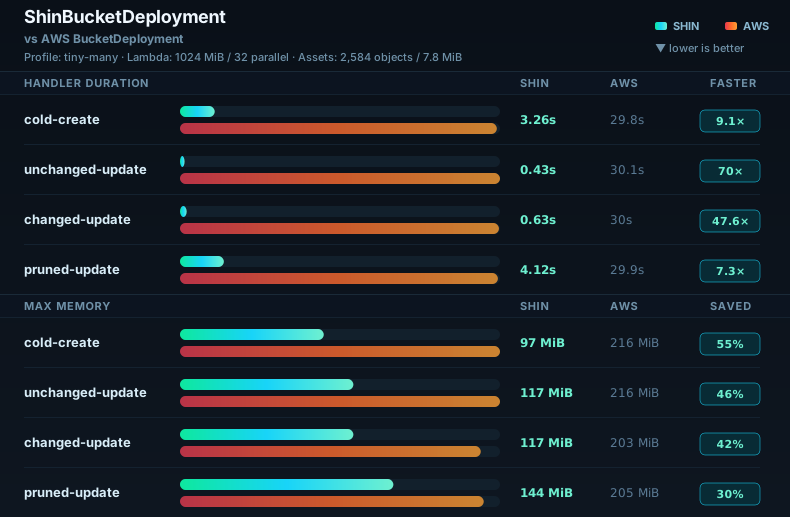
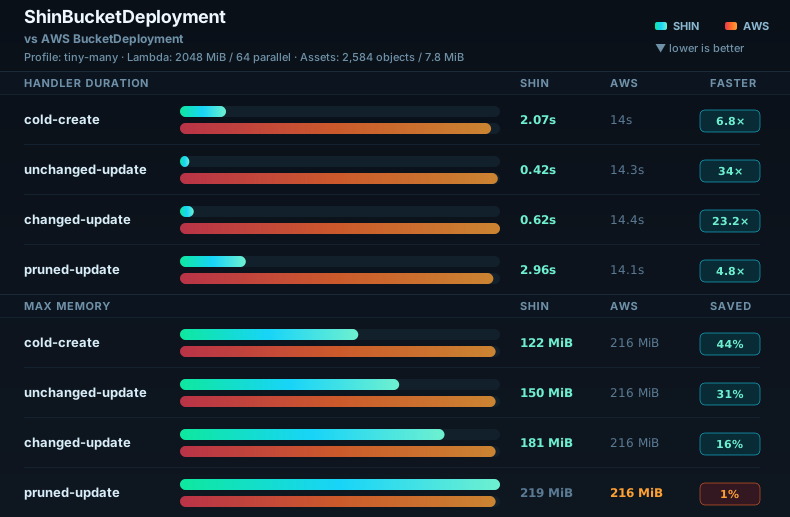
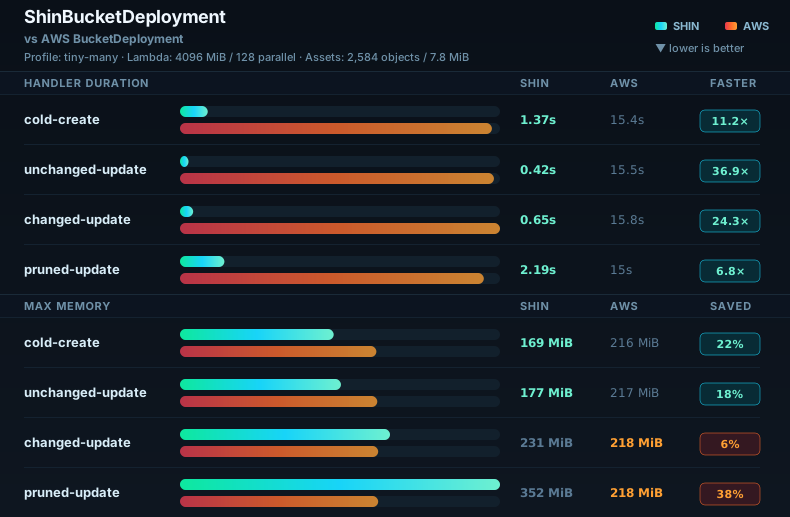
Benchmark Snapshots
What It Supports
The construct follows the upstream BucketDeployment API where the behavior maps cleanly to the Rust provider.
| Area | Supported |
|---|---|
| Sources | sources, Source.data, Source.jsonData, Source.yamlData, embeddedCatalog |
| Destination | destinationBucket, destinationKeyPrefix, deployedBucket, objectKeys |
| Filtering | include, exclude |
| Update behavior | extract, prune, retainOnDelete, outputObjectKeys |
| S3 metadata | accessControl, cacheControl, contentDisposition, contentEncoding, contentLanguage, contentType, metadata, serverSideEncryption, serverSideEncryptionAwsKmsKeyId, storageClass, websiteRedirectLocation |
| CloudFront | distribution, distributionPaths, waitForDistributionInvalidation |
| Provider Lambda | architecture, bundling, ephemeralStorageSize, logGroup, logRetention, memoryLimit, role, securityGroups, vpc, vpcSubnets |
| Runtime tuning | maxParallelTransfers, advancedRuntimeTuning |
Unsupported upstream props:
| Prop | Reason |
|---|---|
expires |
Prefer cacheControl for deployment-time cache behavior. |
serverSideEncryptionCustomerAlgorithm |
SSE-C is intentionally not implemented; use SSE-S3 or SSE-KMS. |
signContent |
The provider uses AWS SDK calls directly, not the upstream AWS CLI upload path. |
useEfs |
EFS is not needed because the provider streams data with bounded memory instead of staging archives or extracted files on disk. |
How It Works
Archive Planning
For extract=true, the provider reads each source zip's central directory with ranged S3 GetObject requests, walks the archive entries, applies filters, and builds the deployment plan from the archive contents. Directory Source.asset inputs are packaged with an embedded .shin/catalog.v1.json MD5 catalog so unchanged marker-free files can be skipped from destination metadata. Entry data is read through coalesced source blocks with a bounded resident window. Source GET concurrency and the source window are derived from memoryLimit by default and can be overridden through advancedRuntimeTuning when diagnosing unusual workloads. It does not download the whole archive and does not write the archive or extracted entries to Lambda /tmp.
ephemeralStorageSize is accepted for upstream BucketDeployment API compatibility, but it is rarely useful for this provider because ZIP planning, extraction, hashing, and uploads avoid Lambda /tmp.
For extract=false, each source object is copied directly with S3 CopyObject.
Change Detection
Before uploading or copying, the provider lists the destination prefix. Destination keys are used for prune=true, and destination ETag values are used to skip unchanged objects.
For existing marker-free zip entries with catalog MD5s, the provider compares destination size and ETag before reading entry bytes. Without a usable catalog match, it reads and decompresses the entry from ranged source blocks, validates size and CRC32, computes MD5, and compares it with the destination ETag. Missing marker-free objects stream directly to S3 without pre-hashing. Entries with deploy-time markers are materialized after decompression and replacement so the final bytes can be hashed and uploaded when changed.
Memory Model
Marker-free ZIP entry streaming uses the same small-buffer defaults as the local s3-unspool extraction path: 64 KiB entry read buffers, 256 KiB S3 body chunks, and a 1 MiB body pipe between entry production and the SDK upload body. With the default 32 parallel transfers, this keeps entry stream buffering around 44 MiB, leaving the 1024 MiB default provider Lambda memory for the Rust runtime, AWS SDK, source block window, and ZIP metadata.
At the default 1024 MiB memory limit, adaptive source scheduling reserves about 64 MiB for runtime/base overhead, 384 MiB for 32 transfer workers, 32 MiB for four in-flight source range requests, and 2 KiB per ZIP entry for metadata. The remaining source block window is clamped to the actual source ZIP size and capped by the adaptive model; for large enough archives it is about 160 MiB minus the file reserve after large-archive RSS slack. The default moved from 512 MiB to 1024 MiB because the large-few benchmark made cold-create provider duration roughly 2x faster while billed compute cost stayed in the same range; current benchmark comparisons use 512, 1024, and 2048 MiB.
Invalidation and Logs
CloudFront invalidation is created after S3 changes when distribution is provided. If distributionPaths is omitted, the default path is the destination prefix plus *, for example /site/*.
The provider logs one sanitized shin_deployment_summary JSON line per custom-resource request plus structured source scheduler and destination PutObject diagnostics to CloudWatch Logs. The summary includes phase timings and aggregate counters, but excludes bucket names, object keys, account IDs, distribution IDs, URLs, and ETags.
Limits
ETag-based Skips
The unchanged-object optimization depends on S3 ETag values behaving like MD5 content hashes. That is generally true for simple single-part static objects, but not for all S3 configurations.
Uploads or copies may not be skipped correctly for metadata-only changes, multipart objects, SSE-KMS or SSE-C objects, or any case where MD5-like ETag metadata is unavailable.
Cataloged Source.asset Assets
Zip entries with deploy-time marker replacements are fully materialized in memory after replacement so the final bytes can be hashed and uploaded. Plain zip entries are read and uploaded in chunks. Cataloged directory assets currently do not support CDK asset bundling or symlink-following options; pass embeddedCatalog: false to Source.asset to use the upstream CDK asset path for those cases.
- It applies to local directory assets only. Local
.zipfiles andSource.bucketarchives are consumed as provided and only benefit from a catalog if they already contain one. - It does not run CDK asset
bundling. Use your own pre-bundled directory, or passembeddedCatalog: falseto delegate packaging to CDK. - It currently rejects symlinks instead of following or materializing them.
- It creates a temporary ZIP during synth/package time on the local machine, not inside the provider Lambda.
- It changes the staged ZIP bytes compared with upstream CDK packaging because the catalog entry is added.
- Catalog MD5s are only valid for marker-free files. Deploy-time marker replacement still requires reading and materializing final bytes.
Object Size and Scope
Source archives are read with S3 ranges and do not need to fit in Lambda memory or ephemeral storage. Individual files inside the asset ZIP must be <= 5 GiB because extracted uploads currently use S3 PutObject, not multipart upload.
This construct targets static asset deployment to S3. It is not a general-purpose sync engine and does not provide byte-range diffing, persistent manifests, or non-S3 backend behavior.
Development
To rebuild the Rust provider binaries or use a local checkout in your CDK app, see Building from source.