
JavaScript Game Launcher
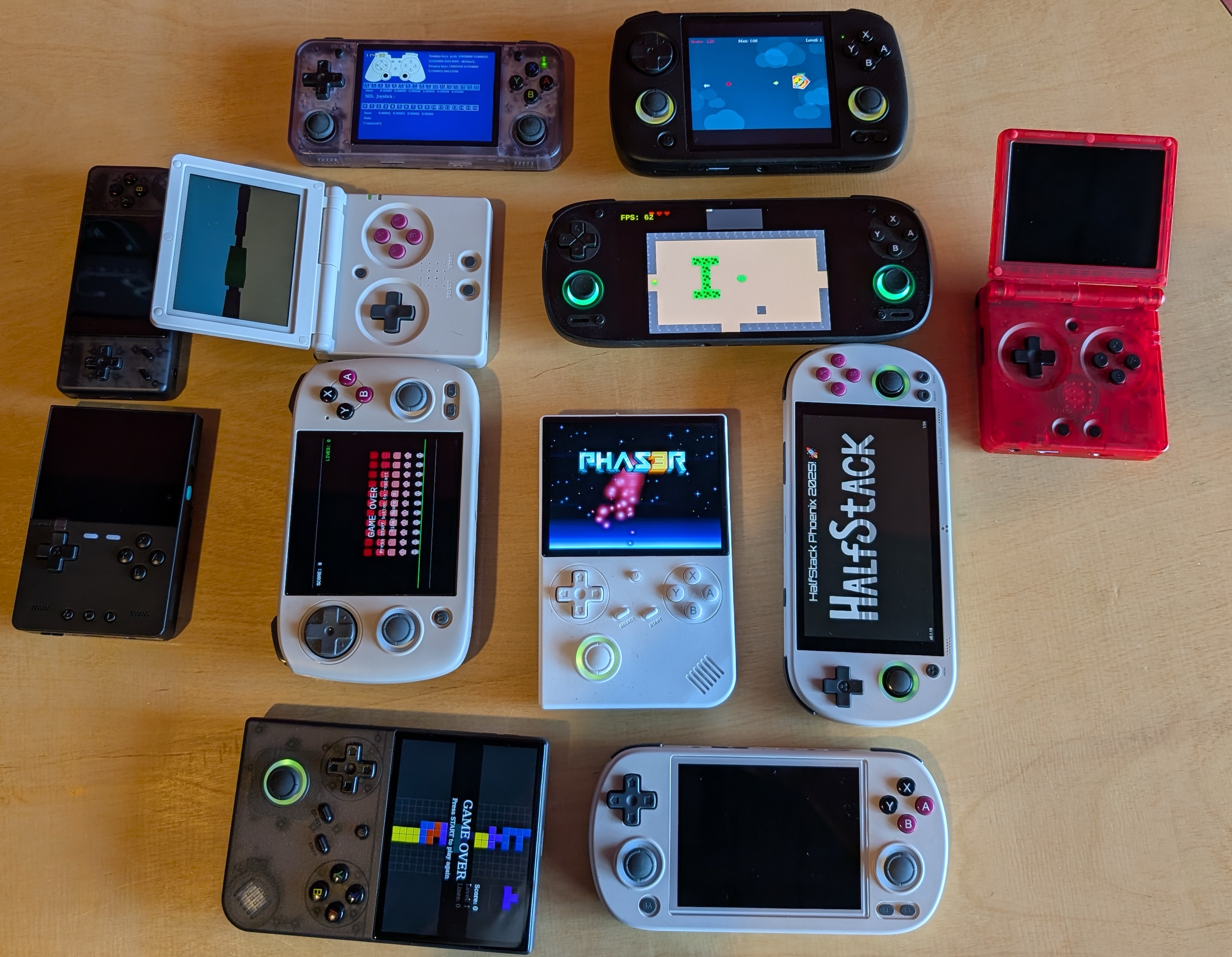
A compatibility layer for JavaScript games to run WITHOUT a browser or electron using standard web APIs.
The goal is to run games on cheap ($50) retro devices (or even not so cheap ones as long as they run Linux . . . for now!) that will also run in browsers without any changes. Real cross-platform!
Right now we have support for anything that runs Knulli and has wifi (so Ambernic XX devices and TrimUI Smart Pro) as well as Batocera (which can just be a old PC, a Raspberry Pi, or a ton of other handheld devices) or ROCKNIX which has a long list of supported devices. We also have it running in RetroBat which is Batocera for Windows. It can be added to anything running Emulation Station using the instructions below but we are just getting started.
Browser APIs progress
- Canvas (2d)
- WebAudio
- Keyboard events
- Gamepad API
- FontFace
- LocalStorage
- Web Assembly (WASM)
- Web Workers
- WebSockets
- Peer Connection
- WebGL (Canvas 3D)
Game making guidelines
Adding games to the launcher
Sample games / Demos / Starter projects
JS Game Engine support
Other engines might work, we just haven't tried them!
Running on a desktop OS (Mac, Linux, even Windows!)
Quickstart
- use node 22+
- clone a starter: https://github.com/monteslu/simple-jsgame-starter (2D) or https://github.com/monteslu/simple-threejs-game-starter (3D)
- point rungame at the game directory (no marker file needed):
npx rungame ./my-game
A game can be launched three ways:
- a directory —
rungame ./my-game(the folder is the game) - a
.jsgmarker file inside it —rungame ./my-game/game.jsg(this is how EmulationStation / ES-DE / Batocera list it: launchers scan by file extension, so the marker gives them one entry per game; it's just an empty pointer file) - a
.jsgamezip —rungame ./my-game.jsgame(a bundled, shareable build)
package.json and the .jsg marker are both optional — a folder with a main.js
runs with neither (entry falls back to main.js / src/main.js / …).
For contributors!
- use at least node 22
- clone this repo, cd to this directory
- npm install
rungame ./path/to/my-game(ornpm linkthenrungame …)- (clone a sample game at https://github.com/monteslu/jsgames/tree/main/simple-vite or find others at https://github.com/monteslu/jsgames)
Develop in the browser, no build step needed
The web is a first-class target: most examples run with npm run dev (vite, hot
reload) in a browser. Run that same game directory in jsgamelauncher with no build
step — node_modules are resolved, so import 'three' works directly. (For a
distributable .jsgame, npm run build first.) See the
Simple Vite example.
Security
Games run in an isolated browser sandbox (a node:vm SourceTextModule realm —
see docs/SECURITY.md): game code sees only browser APIs and
no process / require / fs — a game can't read your files or run shell
commands, just like a browser tab. Threaded WebAssembly still works.
The realm requires node to be started with --experimental-vm-modules (the
rungame CLI sets it automatically; see the embedding note below).
Programmatic use / embedding
You can import the package and launch a game from your own app instead of the
rungame CLI. Importing has no side effects — no argv is read, no host
globals are installed, and no window opens until you call launch().
import { launch } from 'rungame';

await launch('/path/to/game.jsgame', {
  fullscreen: true,
  showFps: false,
  integerScaling: false,
  // optional extras:
  // stretch: false,          // ignore aspect ratio (implies fullscreen)
  // addconcfg: '/path/es_input.cfg',
  // gameinfoxml: '/path/gameinfo.xml',
  // p1index: '0', p1name: '...', p1guid: '...',  // (and p2*/p3*/p4*)
});
launch(gamePath, opts) accepts the same three game forms as the CLI: a game
directory, a .jsg marker file inside it, or a .jsgame/.zip
archive (extracted to a temp dir). It resolves the entry (package.json
main, else main.js / src/main.js / …), runs npm install if the game has
dependencies, opens the SDL window, and runs the game loop for the lifetime of
the process. Call it once per process.
Start node with
--experimental-vm-modules. The game sandbox usesvm.SourceTextModule, which lives behind that flag. TherungameCLI sets it for you (it re-execs itself), but an app that embedslaunch()in its own process must start node with the flag:node --experimental-vm-modules your-app.js(orNODE_OPTIONS=--experimental-vm-modules).launch()throws a clear error if the flag is missing. This is the same flag Jest requires for ESM — stable and widely used, just not yet un-flagged in Node.Building your game to a bundle avoids both.
Notes on Installing to a device
For now we only support downloading the latest version of jsgamelaucher. At some point we might modify the download script to accommodate downloading specific published versions. Same goes for the different firmware versions you see below . . . generally you will need the latest.
Installing on Knulli or Batocera
Use the install script (src)!
- Make sure wifi is turned on for your Knulli device or you are otherwise connected to the internet on a Batocera device
ssh root@<myDevice>(default password: linux, default device name : KNULLI or BATOCERA, use IP from device or .local if name fails)curl -o- https://raw.githubusercontent.com/monteslu/jsgamelauncher/main/installers/install-batocera-knulli.sh | bash- That's it! Update the games list! Now you need a game! Just put that in
/userdata/roms/jsgamesif you are using the default setup. All you need is agame.jsfile as a starting point and a file called "<game name>.jsg". This could change!
Installing on ROCKNIX
Use the install script (src)!
- Make sure wifi is turned on and connected to the internet
- Make sure you enable ssh on your device
ssh root@<myDevice>(default password: rocknix, default device name depends on the device, for the retroid pocket 5 it wasSD865(which is the name of the chipset). You can also just sshroot@<IP>.curl -o- https://raw.githubusercontent.com/monteslu/jsgamelauncher/main/installers/install-rocknix.sh | bash- That's it! Update the games list! Now you need a game! Just put that in
/roms/jsgames. All you need is a game.js file as a starting point and a file called "<game name>.jsg". This could change!
Installing on RetroBat
Installer script coming soon! The config files you need are in systems/retrobat and for now you can manually copy them to the correct location.
- jsgamelaucher folder =>
C:\RetroBat\emulators\jsgamelauncher\ - systems/retrobat/es_systems_jsgames.cfg =>
C:\RetroBat\emulationstation\.emulationstation\ - games =>
C:\RetroBat\roms\jsgames\Sample Games Here - Then go to the EmulationStation Game Settings menu and choose "Update Gamelists"
Installing on muOS
Coming soon! According to joyrider3774 on this thread all we need to do is install the GNU versions of ls and tar so that the curl command for installing nvm works.
The long way (leaving this here for reference for other systems)
- Make sure wifi is turned on for your Knulli device
ssh root@<myKnullidevice>(default password: linux, default device name : KNULLI, use IP from device if name fails)touch ~/.bash_profilecurl -o- https://raw.githubusercontent.com/nvm-sh/nvm/v0.40.0/install.sh | bashsource ./.bash_profilenvm install 22- If you did npm install in jsgamelauncher on your local machine, delete the node_modules directory
- Copy this directory (jsgamelauncher) to
/userdata/systemon the knulli device (using the SMB share at \\share\system, or SFTP, etc) chmod +x ~/jsgamelauncher/systems/knulli/run.shcp ~/jsgamelauncher/systems/knulli/es_systems_jsgames.cfg ~/configs/emulationstation/mkdir /userdata/roms/jsgamescd ~/jsgamelaunchernpm install- Copy any "roms" to jsgames (can do this with samba, ftp, or onto the SD card, note that if you connected via Samba, you might have to force a refresh of the Samba share)
- Restart the system
- ENJOY!
Media
Check the MEDIA.md for a running list of places this project has been posted. Not a comprehensive list of course but it helps us keep track for sharing in the future. If you see anything you liked that is missing let us know . . . we might have missed it.