
react-native-smart-dropdown

Production-ready React Native dropdown / select with smart positioning, search, multi-select, and a full theming system. Zero runtime dependencies. TypeScript-first.
npm · GitHub · Issues · Interactive demo · Full video tour
Preview
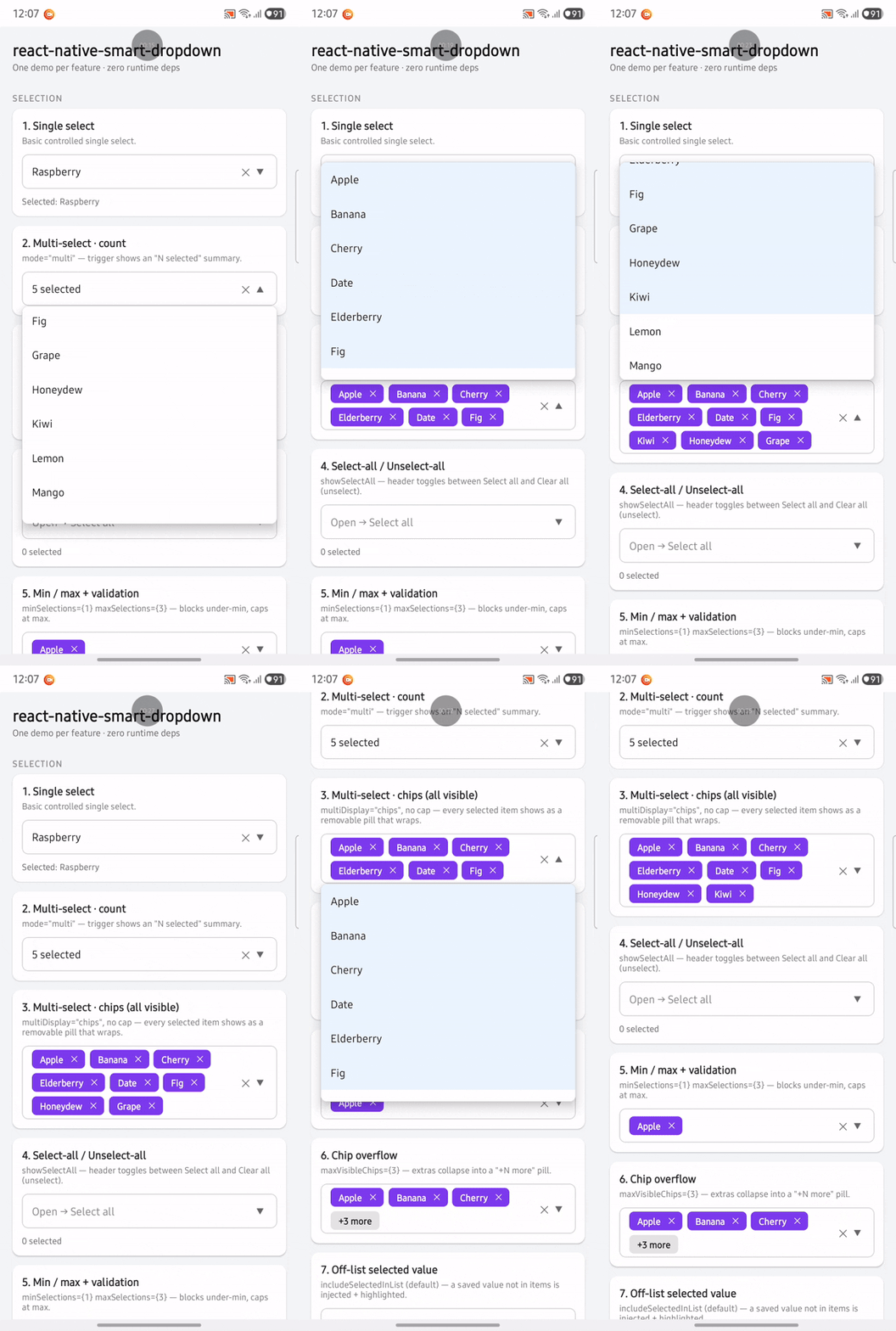
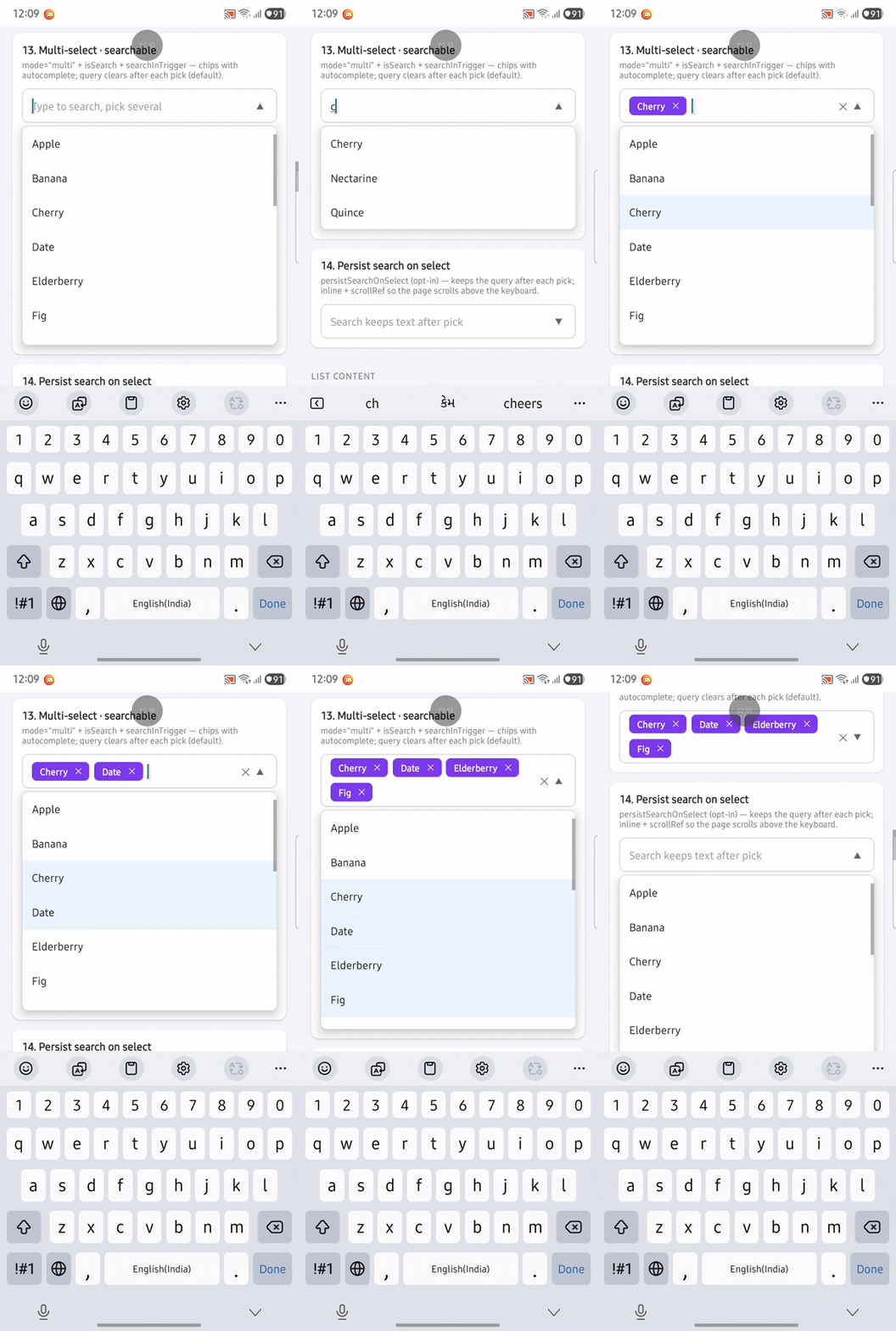
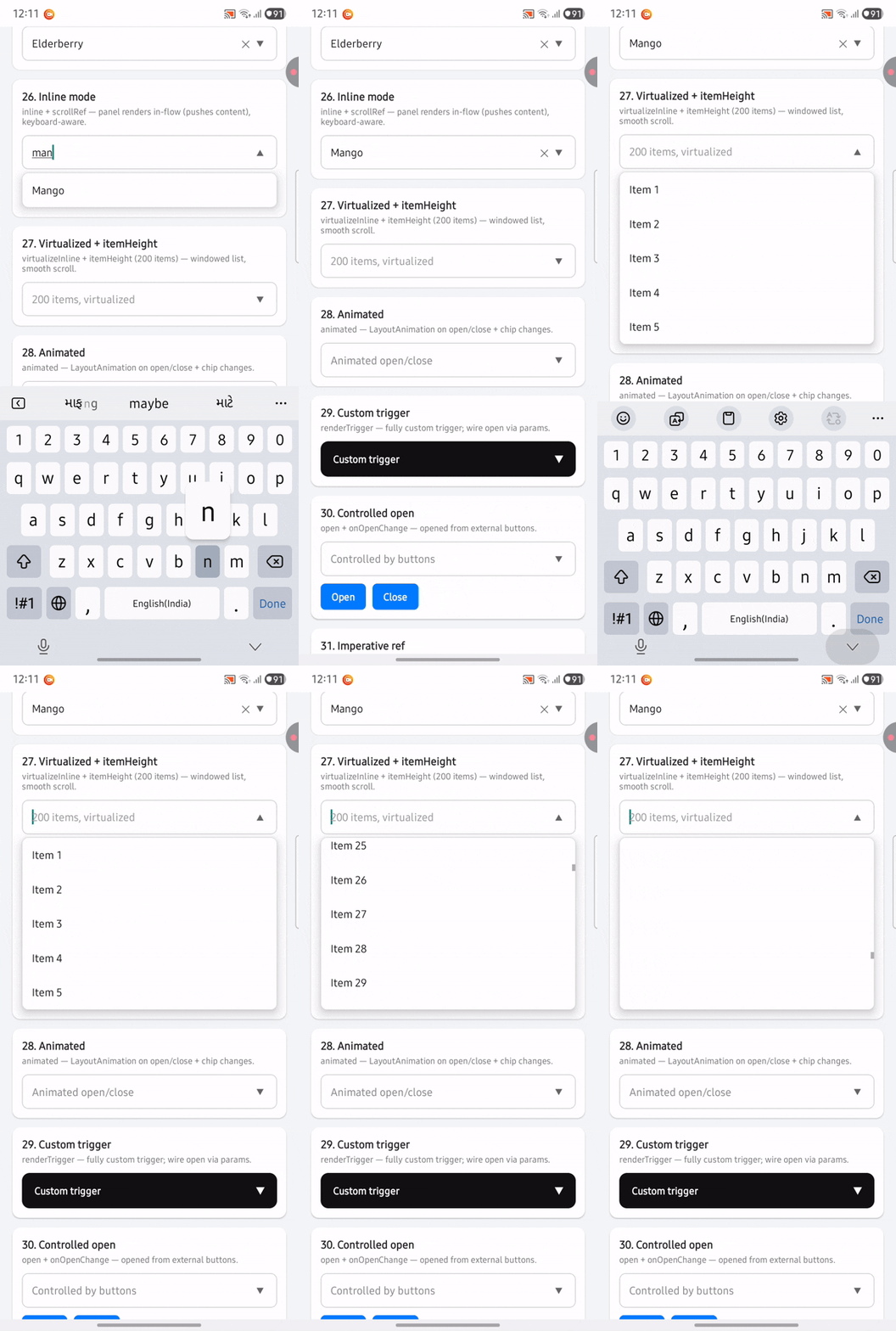
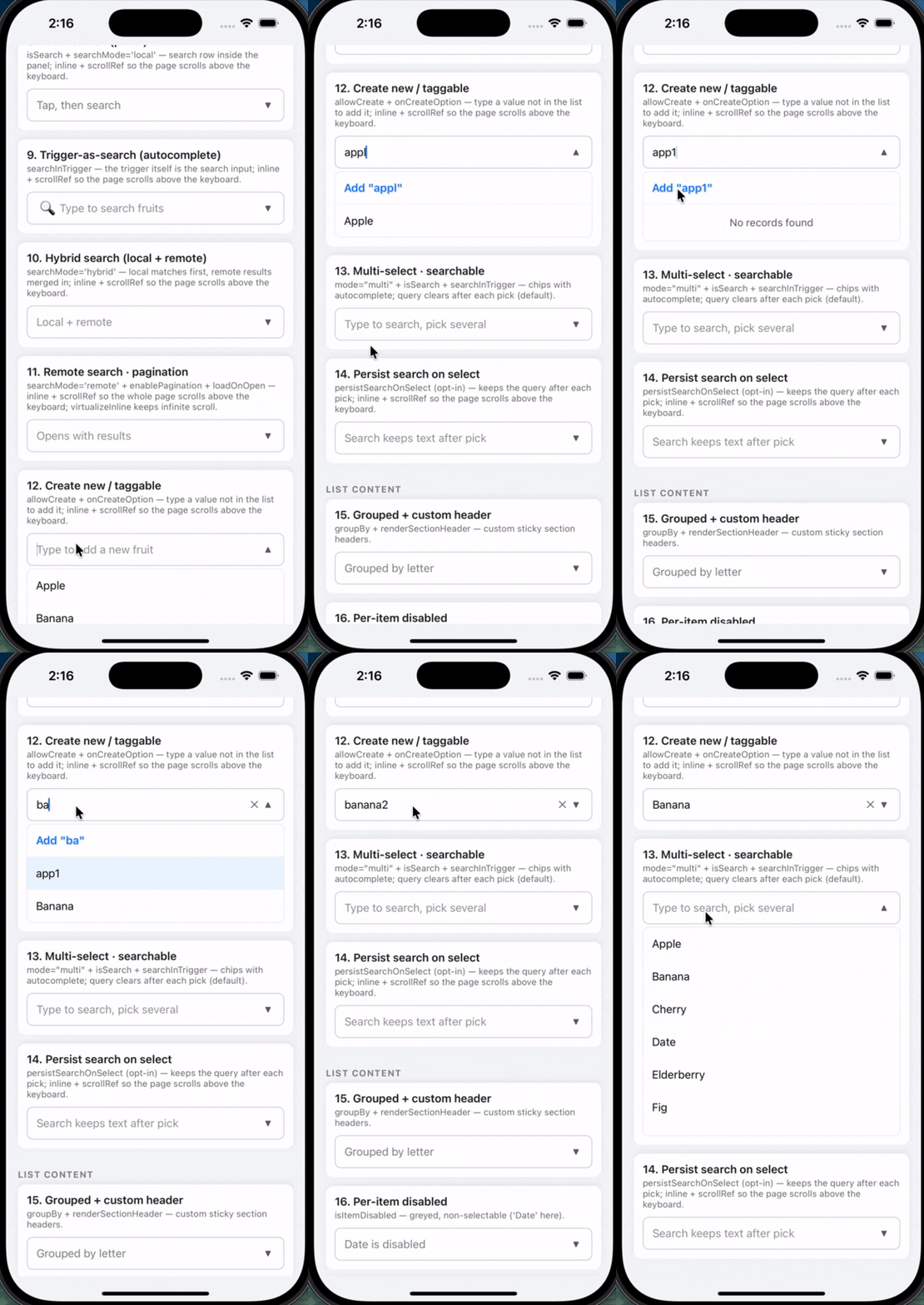
Highlights from the interactive demo on Android and iOS:
Android
| Selection (single + multi) | Multi-select · searchable | Inline + keyboard-aware |
|---|---|---|
 |
 |
 |
iOS
| Create new / taggable | Multi-select · searchable |
|---|---|
 |
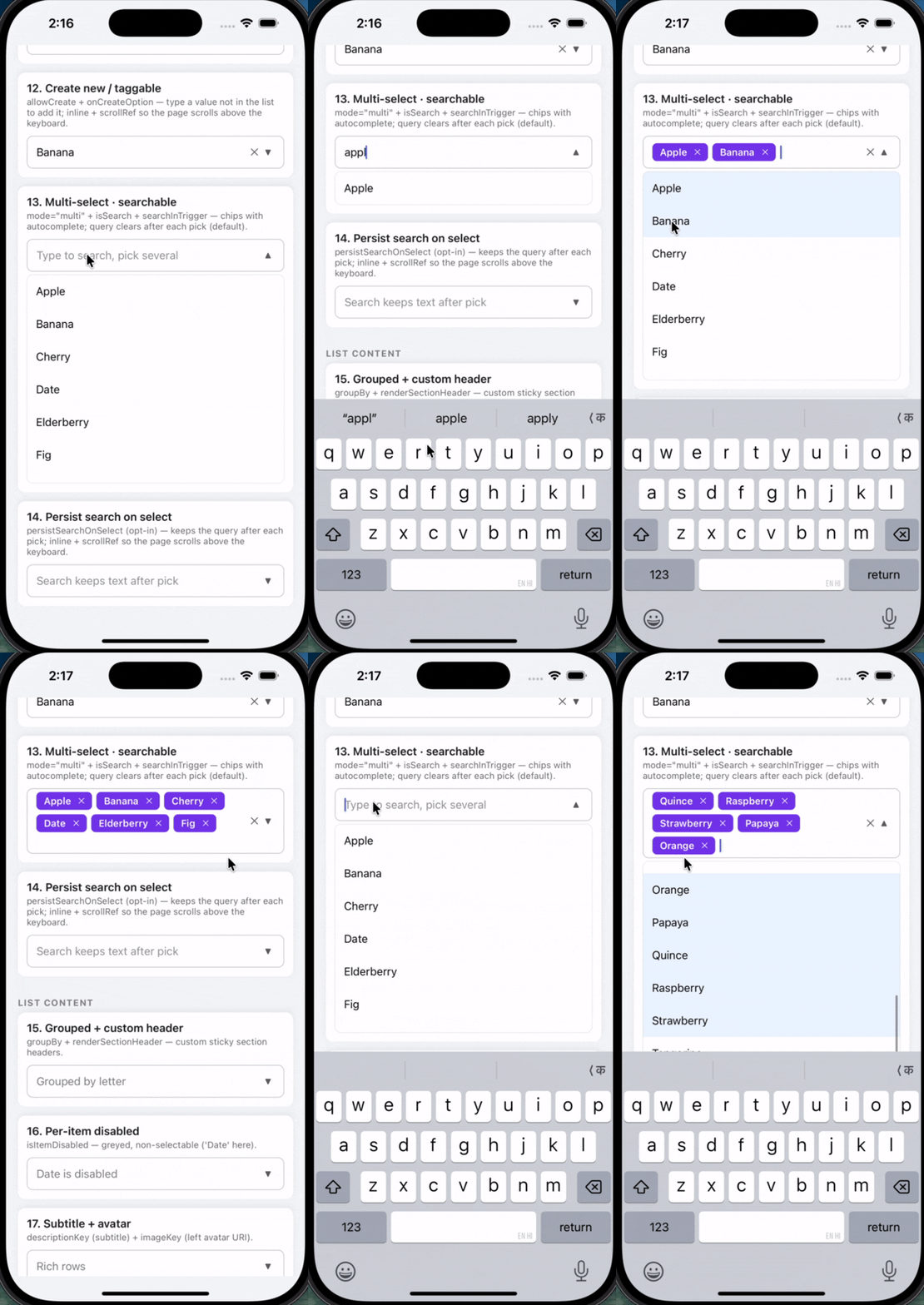 |
Watch all 32 demos on YouTube — full walkthrough of every feature in the demo app.
Features
- Single & multi-select — controlled or uncontrolled; multi shows a count or removable chips (with
+N moreoverflow). - Search —
local,remote(debounced + race-safe), orhybrid; optional pagination (infinite scroll) and load-on-open. - Autocomplete — trigger-as-search combobox; create-new / taggable items.
- Smart positioning — auto up/down, keyboard-aware, edge-clamped; floating Modal or inline (in-flow) render.
- Rich rows — section grouping, disabled items, subtitle + avatar, fully custom
renderItem. - Forms —
label/required/helperText/error(reddens the border);minSelections/maxSelections+ validity callback. - Theming — partial
themeoverride, light/dark (colorScheme), custom fonts (iOS-safe, family-based), RTL, custom icons. - Control —
renderTrigger, controlledopen, imperative ref,animatedopen/close. - Scale & web — virtualized inline lists,
getItemLayout, keyboard navigation (↑/↓/Enter/Esc) + hover.
Install
npm install react-native-smart-dropdown
# or
yarn add react-native-smart-dropdown
Peer deps: react >= 18, react-native >= 0.72. MIT license · 90 tests · ~75 kB packed · zero runtime dependencies.
Interactive demo (32 cards)
The repo includes DropdownDemo — 32 runnable cards, one feature per card:
| Category | Demos |
|---|---|
| SELECTION | 7 |
| SEARCH | 7 |
| LIST CONTENT | 4 |
| FORM FIELD | 1 |
| THEMING & ICONS | 5 |
| POSITIONING & RENDER | 7 |
| STATES | 1 |
| Total | 32 |
Run locally from example/DropdownDemo, or watch the full video tour on YouTube.
Quick start
import React from 'react';
import { DropdownSelect } from 'react-native-smart-dropdown';

type Fruit = { id: number; label: string };
const FRUITS: Fruit[] = [
  { id: 1, label: 'Apple' },
  { id: 2, label: 'Banana' },
];

function Example() {
  const [value, setValue] = React.useState<Fruit | null>(null);
  return (
    <DropdownSelect<Fruit>
      items={FRUITS}
      labelKey="label"
      valueKey="id"
      value={value}
      onChange={setValue}
      placeholder="Pick a fruit"
    />
  );
}
Recipes
Multi-select · chips + search
<DropdownSelect<Fruit>
  mode="multi"
  multiDisplay="chips"
  isSearch
  searchInTrigger
  searchMode="local"
  items={FRUITS}
  labelKey="label"
  valueKey="id"
  selectedValues={selected}
  onChangeMulti={setSelected}
  placeholder="Type to search, pick several"
/>
Search query clears after each pick by default. Pass
persistSearchOnSelectto keep it.
Multi-select · chips + search (with cap)
<DropdownSelect<Fruit>
  mode="multi"
  multiDisplay="chips"
  maxVisibleChips={3}        // extras collapse into "+N more"
  isSearch
  searchInTrigger
  searchMode="local"
  items={FRUITS}
  labelKey="label"
  valueKey="id"
  selectedValues={selected}
  onChangeMulti={setSelected}
  placeholder="Pick several"
/>
Select-all · min/max validation
<DropdownSelect<Fruit>
  mode="multi"
  multiDisplay="chips"
  showSelectAll               // header toggles Select all ↔ Clear all
  minSelections={1}
  maxSelections={3}
  onValidityChange={setValid}
  items={FRUITS} labelKey="label" valueKey="id"
  selectedValues={sel} onChangeMulti={setSel}
/>
Remote search · pagination · load on open
<DropdownSelect<Item>
  isSearch
  searchInTrigger
  searchMode="remote"
  loadOnOpen                  // fetch first page when opened
  minSearchLength={0}
  enablePagination
  pageSize={20}
  fetchData={(text, page) => api.search(text, page)}
  renderLoading={() => <MySkeleton />}
  items={[]} labelKey="label" valueKey="id"
/>
Hybrid search (local + remote)
<DropdownSelect<Item>
  isSearch
  searchInTrigger
  searchMode="hybrid"           // local matches first, remote merged in
  minSearchLength={1}
  fetchData={(text, page) => api.search(text, page)}
  items={LOCAL_ITEMS}             // seed list for instant local matches
  labelKey="label" valueKey="id"
/>
Create new / taggable
<DropdownSelect<Item>
  isSearch searchInTrigger searchMode="local"
  allowCreate
  onCreateOption={(text) => ({ id: Date.now(), label: text })}
  items={items} labelKey="label" valueKey="id"
  value={value} onChange={setValue}
/>
Grouped · disabled · subtitle + avatar
<DropdownSelect<User>
  items={users} labelKey="name" valueKey="id"
  groupBy={(u) => u.team}
  isItemDisabled={(u) => !u.active}
  descriptionKey={(u) => u.email}
  imageKey={(u) => u.avatarUrl}
/>
Form field (label / required / error)
<DropdownSelect<Fruit>
  label="Favorite fruit"
  required
  error={value ? undefined : 'This field is required'}
  items={FRUITS} labelKey="label" valueKey="id"
  value={value} onChange={setValue}
/>
Theming · dark · custom font · RTL
<DropdownSelect<Fruit>
  theme={{ colors: { accent: '#0a7', chipBg: '#0a7' }, radii: { md: 14 } }}
  colorScheme="dark"                          // 'system' | 'light' | 'dark'
  // iOS-safe: family-only per weight (NO fontWeight when a custom family is set)
  // theme={{ fonts: { regular: 'Inter-Regular', bold: 'Inter-Bold' } }}
  rtl                                         // mirror layout + right-align (Arabic/Hebrew)
  items={FRUITS} labelKey="label" valueKey="id"
/>
Fonts on iOS: iOS ignores
fontWeighton a customfontFamily— the weight is baked into the font file. So set per-weight families (Inter-Regular/Inter-Medium/Inter-Bold) viatheme.fonts; the library never emitsfontWeightalongside a custom family.
Custom trigger · controlled open
import { Pressable, Text } from 'react-native';

<DropdownSelect<Fruit>
  open={open}
  onOpenChange={setOpen}
  renderTrigger={({ toggle, label, placeholder, isOpen }) => (
    <Pressable onPress={toggle}>
      <Text>{label || placeholder} {isOpen ? '▲' : '▼'}</Text>
    </Pressable>
  )}
  items={FRUITS} labelKey="label" valueKey="id"
/>
Inline · virtualized (large lists)
<DropdownSelect<Item>
  inline
  scrollRef={scrollRef}        // the host ScrollView ref
  virtualizeInline             // windowed FlatList for big inline lists
  itemHeight={44}              // enables getItemLayout (uniform rows)
  items={bigList} labelKey="label" valueKey="id"
/>
Full prop reference
Every prop on <DropdownSelect<T>>, grouped. Optional unless marked required. See the
DropdownDemo app for 32 runnable demos (one per feature).
Data
| Prop | Type | Default | Notes |
|---|---|---|---|
items |
T[] |
— | required. Option list. |
labelKey |
keyof T | (item: T) => string |
tries label/name |
how to read the display label |
valueKey |
keyof T | (item: T) => string | number |
tries value/id |
how to read the unique id |
keyExtractor |
(item, index) => string |
from valueKey |
list key override |
descriptionKey |
keyof T | (item: T) => string |
— | secondary line (subtitle) per row |
imageKey |
keyof T | (item: T) => string |
— | left avatar image URI per row |
renderRowLeft |
(item) => ReactNode |
— | custom left accessory per row (overrides imageKey) |
Selection
| Prop | Type | Default | Notes |
|---|---|---|---|
mode |
'single' | 'multi' |
'single' |
|
value / onChange |
T | null / (item|null) => void |
— | single, controlled |
defaultValue |
T | null |
— | single, uncontrolled |
selectedValues / onChangeMulti |
T[] / (items) => void |
— | multi, controlled |
defaultSelectedValues |
T[] |
— | multi, uncontrolled |
multiDisplay |
'count' | 'chips' |
'count' |
multi trigger display |
maxVisibleChips |
number |
— | cap chips → "+N more" pill |
maxSelections |
number |
— | cap multi selections |
minSelections |
number |
— | block deselect below this |
onValidityChange |
(valid: boolean) => void |
— | fires when min/max/required validity changes |
includeSelectedInList |
boolean |
true |
inject selected value not present in items |
closeOnSelect |
boolean |
single true / multi false |
close after a pick |
Search
| Prop | Type | Default | Notes |
|---|---|---|---|
isSearch |
boolean |
false |
enable search |
searchMode |
'none' | 'local' | 'remote' | 'hybrid' |
'none' |
|
searchInTrigger |
boolean |
false |
trigger itself is the search input (autocomplete) |
searchPlaceholder |
string |
'Search…' |
|
autoFocusSearch |
boolean |
false |
focus search on open |
minSearchLength |
number |
0 |
min chars before remote fetch |
searchDebounceMs |
number |
400 |
remote debounce |
filterFunction |
(item, text) => boolean |
substring on label | local filter override |
onSearchTextChange |
(text) => void |
— | observe query |
fetchData |
(text, page?) => Promise<T[]> |
— | remote/hybrid fetch |
enablePagination |
boolean |
false |
infinite scroll (remote/hybrid) |
pageSize |
number |
— | page size for last-page detection |
loadOnOpen |
boolean |
false |
fetch first page on open |
persistSearchOnSelect |
boolean |
false |
keep query after a pick |
List content
| Prop | Type | Default | Notes |
|---|---|---|---|
groupBy |
(item) => string |
— | section grouping |
renderSectionHeader |
(group) => ReactNode |
styled label | custom section header |
isItemDisabled |
(item) => boolean |
— | greyed, non-selectable rows |
allowCreate |
boolean |
false |
show "Add …" for unmatched query |
onCreateOption |
(text) => T |
— | build a new item (required for allowCreate) |
createOptionLabel |
(text) => string |
Add "<text>" |
create-row label |
showSelectAll |
boolean |
false |
select-all / clear-all header (multi) |
selectAllText / clearAllText |
string |
'Select all' / 'Clear all' |
|
highlightSelected |
boolean |
true |
highlight selected rows |
autoScrollToSelected |
boolean |
true |
scroll to selection on open |
Form field
| Prop | Type | Default | Notes |
|---|---|---|---|
label |
string |
— | label above the trigger |
required |
boolean |
false |
adds a * |
helperText |
string |
— | helper below (hidden when error set) |
error |
string |
— | error text + reddens the trigger border |
labelStyle / helperTextStyle |
StyleProp<TextStyle> |
— |
Trigger appearance & icons
| Prop | Type | Default | Notes |
|---|---|---|---|
placeholder |
string |
'Select…' |
|
disabled |
boolean |
false |
|
triggerStyle / triggerTextStyle / placeholderStyle |
StyleProp |
— | |
chipStyle / chipTextStyle |
StyleProp |
— | multi chips |
caretUpIcon / caretDownIcon / clearIcon / leftIcon |
ReactNode |
▲ ▼ ✕ |
any node (svg/Image/vector/text) |
leftIconStyle |
StyleProp<ViewStyle> |
— | left-icon slot |
showRightAccessory |
boolean |
true |
show the caret |
isClearable |
boolean |
true |
show the clear ✕ |
showClearOnlyWhenHasValue |
boolean |
true |
hide clear when empty |
openOnClear |
boolean |
false |
reopen after clearing |
Theming
| Prop | Type | Default | Notes |
|---|---|---|---|
theme |
DeepPartial<DropdownTheme> |
— | partial token override (see below) |
colorScheme |
'system' | 'light' | 'dark' |
'system' |
base palette |
rtl |
boolean |
I18nManager.isRTL |
mirror layout + right-align text |
Positioning & sizing
| Prop | Type | Default | Notes |
|---|---|---|---|
direction |
'up' | 'down' | 'auto' |
'auto' |
open direction |
allowDirectionFallback |
boolean |
true |
flip if the chosen side lacks space |
listHeight |
number |
280 |
requested panel height |
minListHeight / maxListHeight |
number |
0 / — |
clamp |
autoAdjustHeight |
boolean |
true |
shrink/grow to available space |
shrinkToContent |
boolean |
true |
fit to actual content height |
edgeMargin |
number |
8 |
min gap from screen edges |
Render mode & behavior
| Prop | Type | Default | Notes |
|---|---|---|---|
inline |
boolean |
false |
in-flow panel instead of floating Modal |
scrollRef |
RefObject |
— | host ScrollView ref (inline keyboard-reveal) |
virtualizeInline |
boolean |
false |
windowed FlatList for big inline lists |
itemHeight |
number |
— | fixed row height → getItemLayout |
animated |
boolean |
false |
LayoutAnimation on open/close + chips |
open / onOpenChange |
boolean / (open: boolean) => void |
— | controlled open state |
showOverlay |
boolean |
false |
dim backdrop when true (Modal mode) |
overlayColor |
string |
theme overlay | backdrop color |
closeOnOutsidePress |
boolean |
true |
tap-outside closes |
initialNumToRender |
number |
10 |
FlatList perf |
listProps |
Partial<FlatListProps<T>> |
— | passthrough to the list |
States & render slots
| Prop | Type | Default | Notes |
|---|---|---|---|
loading |
boolean |
false |
parent-controlled loading |
emptyText / searchEmptyText / errorText / minSearchText |
string |
see defaults | empty/error copy |
showEmptyAction / emptyActionLabel / onEmptyActionPress |
boolean / string / () => void |
— | empty-state action button |
emptyContainerStyle / emptyTextStyle / emptyActionStyle / emptyActionTextStyle |
StyleProp |
— | |
renderEmptyState |
(params: EmptyStateParams) => ReactNode |
— | fully custom empty state |
renderLoading |
() => ReactNode |
spinner | custom loader |
renderTrigger |
(params: RenderTriggerParams<T>) => ReactNode |
— | fully custom trigger |
renderItem |
(params: RenderItemParams<T>) => ReactNode |
— | fully custom row |
renderLeftAccessory / renderRightAccessory / renderClearAccessory |
(params: AccessoryParams<T>) => ReactNode |
— | accessory slots (win over icon props) |
Accessibility / test
| Prop | Type | Notes |
|---|---|---|
accessibilityLabel |
string |
trigger a11y label |
testID |
string |
base testID (children derive <testID>-row-N, -search, -chip-N-remove, …) |
Theme tokens (DropdownTheme)
Override any subset via the theme prop.
{
  colors: { surface, text, textMuted, placeholder, inputPlaceholder, border, divider,
            chipBg, onChip, accent, error, overlay, triggerPressed, rowSelected,
            rowPressed, ripple, shadow },
  radii:     { sm, md },
  spacing:   { xs, sm, md, lg },
  fontSizes: { xs, sm, chip, body, input },
  fonts:     { regular?, medium?, bold? },   // family-only; iOS-safe (no fontWeight when set)
  sizes:     { control, row, input },        // auto-scaled 1.2× on tablets/iPad
  rtl: boolean,
}
Public exports
// Component
DropdownSelect

// Types
DropdownSelectProps, DropdownRef, Direction, ResolvedDirection,
SelectionMode, SearchMode, DataStatus,
RenderTriggerParams, RenderItemParams, AccessoryParams, EmptyStateParams

// Theming
lightTheme, darkTheme, mergeTheme, fontFor, textDir, rowDir
DropdownTheme, DropdownColors, DropdownFonts, DeepPartial

// Host integration (ScrollView / outside-tap coordination)
closeOpenDropdowns, markUserTap, subscribeOpen
Host integration (inline + ScrollView)
When using inline mode inside a host ScrollView, wire these helpers so outside taps
close the dropdown and you can react to open/close (e.g. lock page scroll while open):
import React from 'react';
import { ScrollView } from 'react-native';
import {
  DropdownSelect,
  markUserTap,
  subscribeOpen,
  closeOpenDropdowns,
} from 'react-native-smart-dropdown';

function FormScreen() {
  const scrollRef = React.useRef<ScrollView>(null);
  const [dropdownOpen, setDropdownOpen] = React.useState(false);

  React.useEffect(() => subscribeOpen(setDropdownOpen), []);

  return (
    <ScrollView
      ref={scrollRef}
      scrollEnabled={!dropdownOpen}
      onScrollBeginDrag={closeOpenDropdowns}
      onTouchStart={markUserTap}
      keyboardShouldPersistTaps="handled">
      <DropdownSelect<Fruit>
        inline
        scrollRef={scrollRef}
        items={FRUITS}
        labelKey="label"
        valueKey="id"
      />
    </ScrollView>
  );
}markUserTap— call on the host rootonTouchStart; closes inline dropdowns on outside tap (Modal dropdowns use their own backdrop).subscribeOpen— fires(open: boolean)whenever any dropdown opens or closes.closeOpenDropdowns— imperatively close the open dropdown (e.g. on host scroll).
Only one dropdown stays open at a time — opening another closes the previous one automatically.
Render-prop params
RenderTriggerParams<T> = { isOpen, disabled, hasValue, value, selectedValues,
                           label, placeholder, open, close, toggle, clear }
RenderItemParams<T>    = { item, index, isSelected, onPress }
AccessoryParams<T>     = { hasValue, isOpen, disabled, value, selectedValues }
EmptyStateParams       = { status, searchText, onActionPress? }
Imperative API (ref)
const ref = useRef<DropdownRef>(null);
ref.current?.open();
// DropdownRef: open · close · toggle · clear · focusSearch · blurSearch · remeasure · scrollToSelected
Keyboard & accessibility
Arrow ↑/↓ move the active row, Enter selects, Esc closes (while a search input is focused).
Rows expose accessibilityRole / accessibilityState; web gets hover highlighting.
License
MIT · Bhavesh Barot · npm