
pptx-vue-viewer


Show, edit, and present Microsoft PowerPoint (.pptx) files directly in a
Vue 3 app: no server, no conversion step, no PowerPoint install required. Drop
in a <PowerPointViewer> component, hand it the file's bytes, and it renders
slides as real HTML and CSS with full editing and export support.
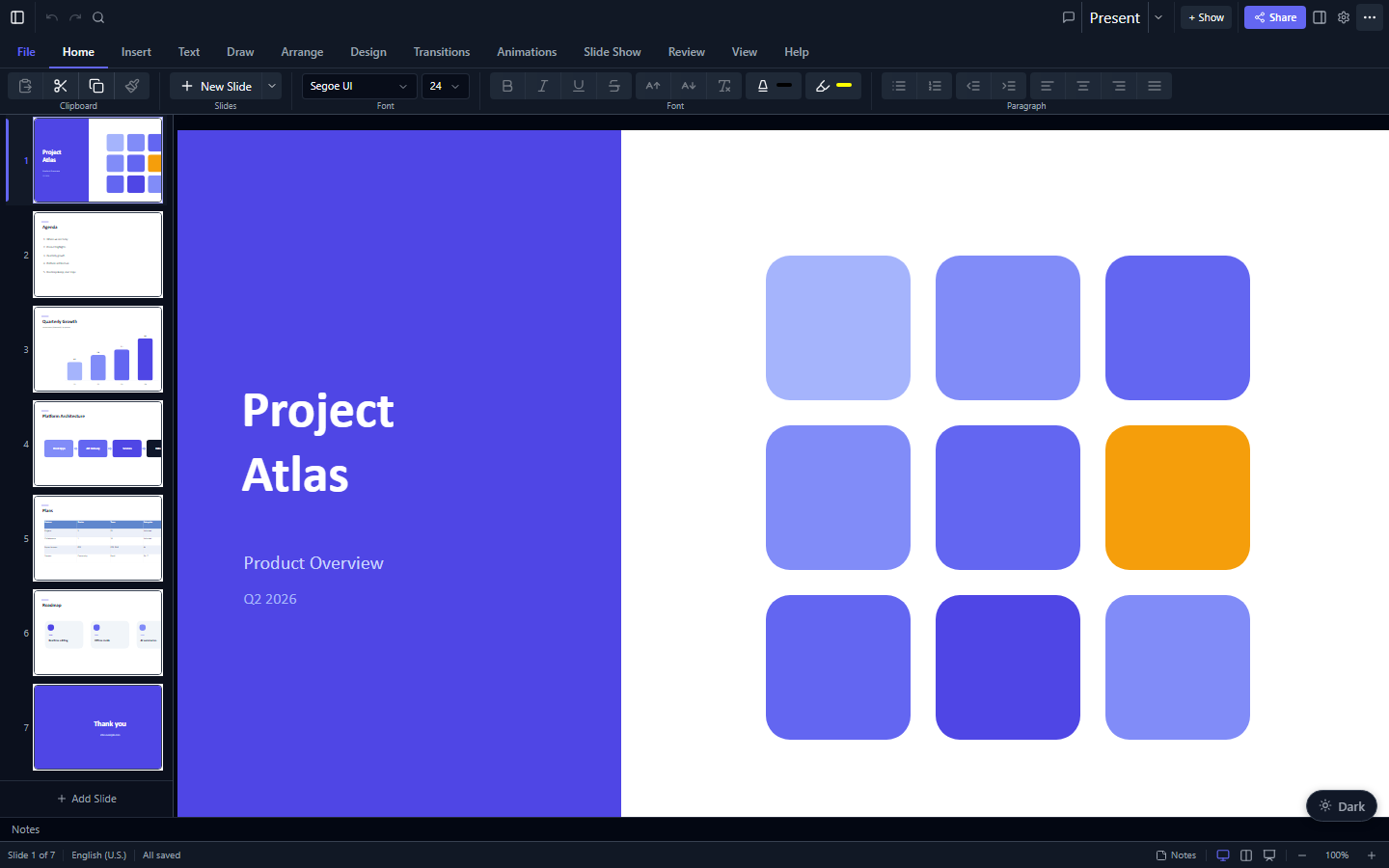
The rendering is done by the framework-agnostic pptx-viewer-core engine (also published as @christophervr/pptx-viewer -- the two names are identical releases), which turns a .pptx file into a structured slide model. This package is the Vue layer that draws that model on screen, and the engine is bundled in, so you install just one package.
Try the live demo · npm · Full docs · Core SDK
Try the live demo: open a
.pptxand render it in your browser, no install required.
Features
- A single component:
<PowerPointViewer>, written in<script setup>style. - Real HTML rendering: slides are drawn as ordinary HTML and SVG, not as a picture, so text stays sharp at any zoom and is selectable and accessible.
- Editing: select, drag, resize, rotate; inline text editing; format painter; shape adjustment handles; align, distribute, group, flip, and z-order; undo/redo; snap-to-grid, snap-to-shape, H/V guides, and rulers.
- Full Office-style ribbon: all tabs wired (Home, Insert, Draw, Design, Transitions, Animations, Slide Show, Review, View) plus a status bar and context menu.
- Inspector: element and slide property panels, including chart data editor.
- Presentation mode: animation playback, presenter view, slide transitions, rehearse timings, subtitles, and freehand ink.
- Export: PNG, PDF, GIF, and WebM video; print; Save As (pptx/ppsx/pptm).
- Collaboration: real-time Yjs-based co-editing with cursor/selection presence.
- Comments, find/replace, accessibility panel, version history, and more.
- Slide navigation: live thumbnail previews, previous/next, and a slide counter.
- Zoom: in, out, and reset.
- Themeable: change colours through CSS custom properties.
- Loads from anywhere: an
ArrayBufferorUint8Arrayfrom a file input, afetch, drag-and-drop, and so on.
Installation
npm install pptx-vue-viewerPeer requirements: Vue 3.5+ and the engine's jszip / fast-xml-parser
peers:
npm install vue jszip fast-xml-parserThe pptx-viewer-core engine is bundled in, so you don't install it
separately unless you want to call the SDK directly.
Usage
<script setup lang="ts">
import { ref, onMounted } from 'vue';
import { PowerPointViewer, type PowerPointViewerExpose } from 'pptx-vue-viewer';

// Base chrome styles (toolbar, thumbnails, layout). Import once.
import 'pptx-vue-viewer/styles';

const content = ref<Uint8Array>();
const viewer = ref<PowerPointViewerExpose>();

onMounted(async () => {
	const res = await fetch('/example.pptx');
	content.value = new Uint8Array(await res.arrayBuffer());
});

function onSlide(index: number) {
	console.log('active slide', index);
}
</script>

<template>
	<PowerPointViewer
		v-if="content"
		ref="viewer"
		:content="content"
		:theme="{ colors: { primary: '#6366f1' } }"
		@active-slide-change="onSlide"
		style="height: 100vh"
	/>
</template>
Loading from a file input
<script setup lang="ts">
import { ref } from 'vue';
const content = ref<ArrayBuffer>();

async function onFile(event: Event) {
	const file = (event.target as HTMLInputElement).files?.[0];
	if (file) content.value = await file.arrayBuffer();
}
</script>

<template>
	<input type="file" accept=".pptx" @change="onFile" />
</template>
Theming
Pass a partial theme; unset tokens fall back to the built-in dark palette.
Values accept any CSS color (hex, rgb(), hsl(), oklch(), …) and map to
--pptx-* CSS custom properties (shadcn/ui token names).
import type { ViewerTheme } from 'pptx-vue-viewer';

const theme: ViewerTheme = {
	colors: { primary: '#6366f1', background: '#0b1020' },
	radius: '0.5rem',
};
For app-wide theming you can also provide a theme to a subtree:
import { provideViewerTheme } from 'pptx-vue-viewer';
// call inside a parent component's setup()
provideViewerTheme({ colors: { primary: '#6366f1' } });
Reading the current presentation back
getContent() turns the current presentation back into .pptx bytes. Reach it
through a template ref:
const viewer = ref<PowerPointViewerExpose>();

async function save() {
	const bytes = await viewer.value!.getContent();
	// write `bytes` (Uint8Array) to a Blob / download / upload
}
API
Props
| Prop | Type | Default | Description |
|---|---|---|---|
content |
Uint8Array | ArrayBuffer |
n/a | The .pptx bytes to render. Required. |
theme |
ViewerTheme |
n/a | Color/radius overrides applied as CSS custom properties. |
class |
string |
n/a | Class applied to the root element. |
canEdit |
boolean |
false |
Enables the editor toolbar, inspector, and drag-and-drop editing. |
filePath |
string |
n/a | Passed to autosave / recovery logic. |
authorName |
string |
n/a | Displayed in comment annotations. |
collaboration |
CollaborationConfig |
n/a | Yjs real-time collaboration config (server URL, room, role). |
Events
| Event | Payload | Description |
|---|---|---|
active-slide-change |
number |
Emits the active slide index on navigation. |
content-change |
Uint8Array |
Emits updated bytes after any editing change. |
dirty-change |
boolean |
Emits true/false when the dirty state changes. |
Exposed methods (template ref)
| Method | Returns | Description |
|---|---|---|
getContent() |
Promise<Uint8Array> |
Serialise the current presentation to .pptx. |
Exported components & helpers
PowerPointViewer, SlideCanvas, SlideStage, ElementRenderer,
provideViewerTheme, useViewerTheme, and the ViewerTheme / CanvasSize /
CollaborationConfig types.
Limitations
The Vue package is at functional parity with the React package across the
editing, rendering, and presentation surface: secondary/log/display-unit chart
axes (with trendlines, error bars, and data tables), real CSS-3D extruded faces,
image clrChange chroma-key and shape effectDag duotone, interactive GLB/GLTF
3D models, slide master/layout template editing, and zoom tiles that show the
target slide's background, number, and section name (matching React; as in React,
the tile is a styled summary rather than a live re-render of the target slide).
The only differences from React are the CSS-rendering approximations the two
share by design (see the root README's Limitations: backdrop-filter and path
gradients are approximated on screen, and a few effects flatten in raster export).
The pptx-viewer-core engine parses all slide data, so anything not surfaced in
the UI is still readable from the model. Progress and design notes live in
PORTING.md.
Build (contributing)
bun run build      # Vite library build → dist (ESM + CJS + d.ts)
bun run typecheck  # vue-tsc
bun run test       # vitest
License
Apache-2.0. Please keep the NOTICE file with redistributions.