
nightingale
Logger for browser and node





Nightingale
The nightingale is a bird best known for its powerful and beautiful song.
Unlike most popular loggers (winston, bunyan) handlers (also called transporters) are not defined at the logger, but rather with the configure method in nightingale or nightingale-app-*. That means libraries can freely use the nightingale-logger package without much dependencies and letting the application to configure all loggers ! It's more closer to the debug philosophy (the DEBUG env variable is in fact supported by nightingale-console, the basic handler for node). nightingale is and always will be compatible with all versions of nightingale-logger.
Install
npm install --save nightingale
npm install --save nightingale-console # for console handler in nodejs
npm install --save nightingale-browser-console # for console handler in browser
How to use
In an application
You can also use pre-configured isomorphic nightingale-app-console. If you use react-native or expo, check out nightingale-app-react-native.
npm install --save nightingale nightingale-consoleimport { configure, Logger, Level, ConsoleHandler } from "nightingale";
configure([
{
handlers: [new ConsoleHandler(Level.WARN)],
},
{
keys: ["mylib", "myotherlib"],
handlers: [new ConsoleHandler(Level.ALL)],
},
{
pattern: /^app\.server$/,
handlers: [new ConsoleHandler(Level.ALL)],
stop: true, // means the following config won't be used, if the pattern matches.
},
{
pattern: /^app(?!\.server)/,
handlers: [new ConsoleHandler(Level.INFO)],
},
]);
// in one of your controllers
const logger = new Logger("app.controllers");
logger.debug("This is a log"); // will not be displayed
// in your server.js file
const logger = new Logger("app.server");
logger.debug("This is a log"); // will be displayedYou can configure several handlers with different Level, like console, slack, sentry.
Ensure the configure is always called before the first log! For example:
import "./configure-logger";
import "./myApp";
In a library
npm install --save nightingale-loggerimport Logger from "nightingale-logger";
const logger = new Logger("mylib");
logger.info("This is a log");
logger.warn("This is a warning !");
logger.success("It works !");In the browser
You can also use pre-configured isomorphic nightingale-app-console.
npm install --save nightingale nightingale-browser-console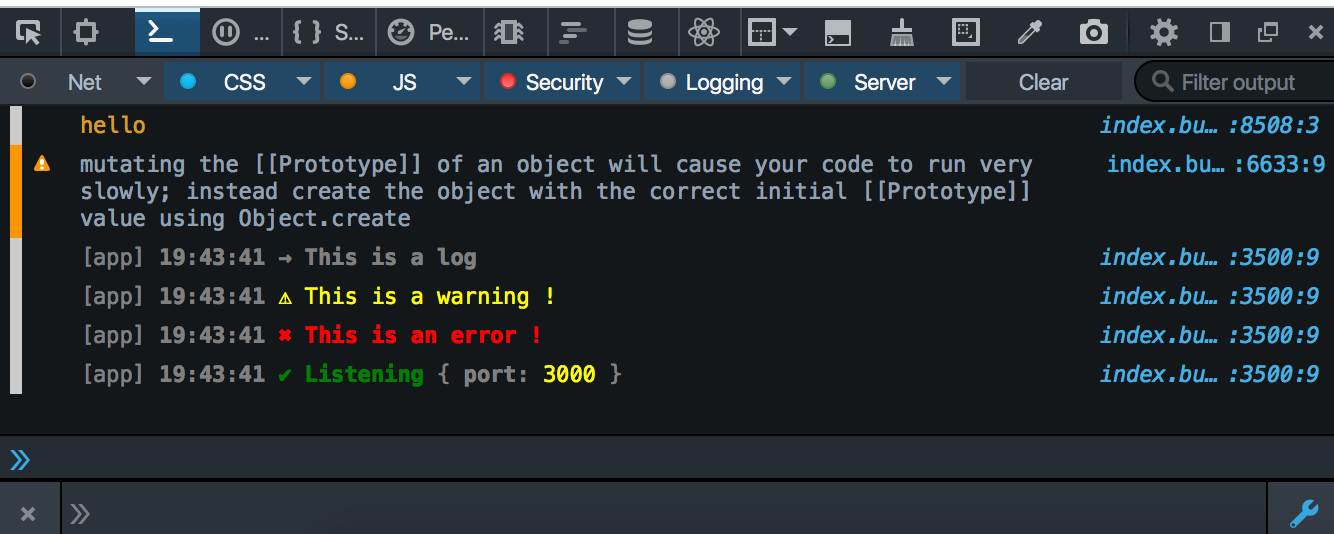
import { configure, levels } from "nightingale";
import { BrowserConsoleHandler } from "nightingale-browser-console";

configure([
  {
    key: "app",
    handlers: [new BrowserConsoleHandler(Level.INFO)],
  },
]);
The Logger class
See the Logger API, with all the methods you call to log things.
Debug
DEBUG=worker1 node example/debugIn browser
- via url :
?DEBUG=worker1 - via localStorage (in a console):
localStorage.DEBUG='worker1'
Values are minimatch patterns and separated by ,.
Processors
Add information on a request
import Koa from "koa";
import Logger, { configure, Level } from "nightingale";
import { ConsoleHandler } from "nightinale-console";
import webProcessor from "nightinale-web-processor";

const app = new Koa();
const logger = new Logger("app");

configure([
  {
    key: "app",
    handlers: [new ConsoleHandler(Level.ALL)],
    processors: [webProcessor],
  },
]);

app.use(async (ctx) => {
  logger.info("something to log !", { context: ctx });
});

app.use(async (ctx) => {
  ctx.logger.info("something to log !", { context: ctx });
});
Handler
How a log is processed: has a layout and an output. Also define a minimum level.
Included handlers
ConsoleHandler
Log using console.
import { configure, levels, ConsoleHandler } from "nightingale";

configure([
  {
    key: "app",
    handlers: [new ConsoleHandler(Level.INFO)],
  },
]);
DEBUG
DEBUG=* node .
DEBUG='*'; # debug everything
DEBUG=app # debug for logger with key 'app'
DEBUG=app:* # debug for logger with key 'app' and all its children
DEBUG=app,nightingale # debug for logger with key 'app' and 'nightingale'
DEBUG=/^app/ # debug for logger with key starting with 'app'
DEBUG=/^(app|nightingale$)/ # debug for logger with key starting with 'app' and key 'nightingale'
DEBUG='*,-app'; # debug everything except app
DEBUG='*,-app:*'; # debug everything except app and all its children
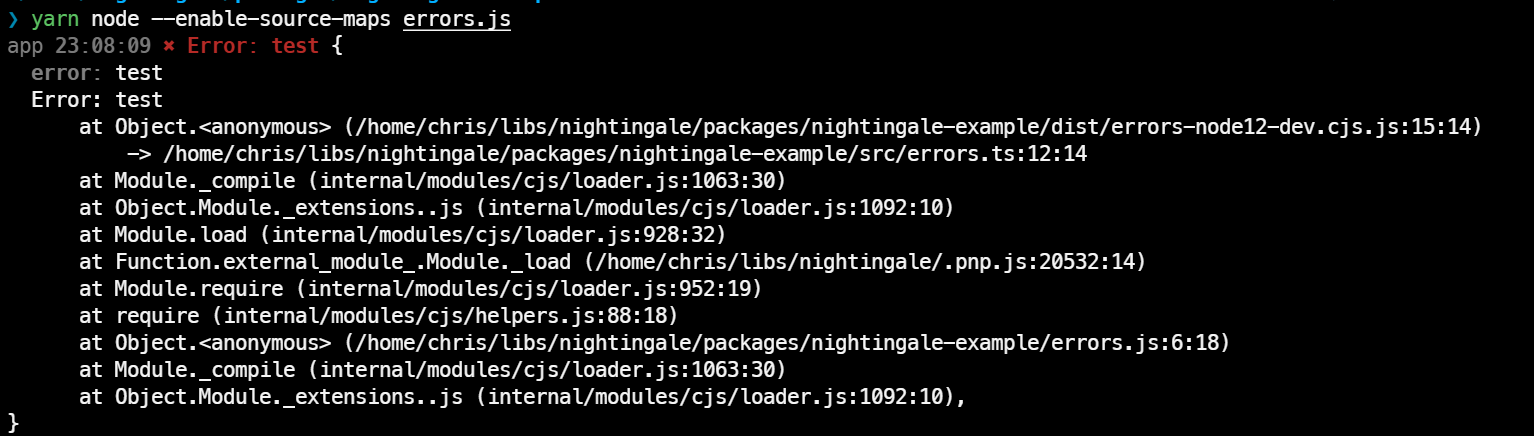
Use source maps to display error stack trace
Since node 12.12.0, you can use --enable-source-maps while running node.
BrowserConsoleHandler
Usage
import { configure, levels } from "nightingale";
import { ConsoleHandler } from "nightingale-browser-console";

configure([{ handlers: [new ConsoleHandler(Level.INFO)] }]);
Theme
If you have a dark console theme, you can set this config in your localStorage :
localStorage.NIGHTINGALE_THEME = "dark";You can also force this option:
import { ConsoleHandler } from "nightingale-browser-console";

configure([{ handlers: [new ConsoleHandler(Level.INFO, { theme: "dark" })] }]);
Debug with localStorage
localStorage.debug = "*"; // debug everything
localStorage.debug = "app"; // debug for logger with key 'app'
localStorage.debug = "app,nightingale"; // debug for logger with key 'app' and 'nightingale'
localStorage.debug = "/^app/"; //debug for logger with key starting with 'app'
localStorage.debug = "/^(app|nightingale$)/"; // debug for logger with key starting with 'app' and key 'nightingale'
localStorage.debug = "*,-app"; // debug everything except app
localStorage.debug = "*,-app:*"; // debug everything except app and all its children
Debug with query, in the url
?DEBUG='*'; // debug everything
?DEBUG=app // debug for logger with key 'app'
?DEBUG=app,nightingale // debug for logger with key 'app' and 'nightingale'
?DEBUG=/^app/  // debug for logger with key starting with 'app'
?DEBUG=/^(app|nightingale$)/  // debug for logger with key starting with 'app' and key 'nightingale'
?DEBUG=*,-app // debug everything except app
?DEBUG=*,-app:* // debug everything except app and all its children
Use source maps to display error stack trace
In production:
Send your log to an external tool like sentry. Sentry allows you to send the source maps after building (if you use webpack, you can use hidden-source-map to generate .map files, send them to sentry, and remove them so they are not accessible).
In development:
- Configure your build tool to generate sourcemaps. For webpack: use proper
devtoolconfiguration. For best stack trace, usesource-mapbut it's the slowest option. - Make sure your project uses source-map-support or similar tool. If not, you can install and simply import
source-map-support/register.
StringHandler
Useful for testing purposes
import { configure, levels, StringHandler } from "nightingale";
import { BrowserConsoleHandler } from "nightingale-browser-console";

const stringHandler = new StringHandler(Level.INFO);

configure([
  {
    key: "app",
    handlers: [stringHandler],
  },
]);

console.log(stringHandler.string);
More handlers
You can find handlers on npm
Formatter
How the record is formatted, with its colors.
Included formatters
Raw
import { RawFormatter } from "nightingale";

RawFormatter.format(record);
Markdown
import { MarkdownFormatter } from "nightingale";

MarkdownFormatter.format(record);
JSON
import { JSONFormatter } from "nightingale";

JSONFormatter.format(record);
More formatters
You can find formatters on npm
Output
Where the log is sent: console, file, ...
Included handlers
consoleOutput
Output using console.log/error or process.stdout/stderr
More outputs
You can find outputs on npm
Processor
Add extra data in the record
Extends Logger
import { Logger } from "nightingale";

class MyCustomLogger extends Logger {
  myCustomMethod(message) {
    return this.info(`custom message: ${message}`);
  }
}

const logger = new MyCustomLogger("app");
Global processors
import { configure } from "nightingale";
import errorProcessor from "./myErrorProcessor";

configure([{ processors: [errorProcessor] }]);
Global handlers
import { addGlobalHandler, levels } from "nightingale";
import { SentryHandler } from "nightingale-sentry";

configure([{ handlers: [new SentryHandler(Level.ERROR)] }]);
Children
You can create children.
import { Logger } from "nightingale";
const loggerApp = new Logger("app");
const loggerMyService = loggerApp.child("myService");
// loggerMyService key is `app.myService`
Context
You can use context to add data to each log.
import { Logger } from "nightingale";
const loggerMyService = new Logger("app.myService");

export function someAction(arg1) {
  const logger = loggerMyService.context({ arg1 });
  logger.info("starting");
  // do stuff
  logger.info("done");
}
Customize format styles
import { formatStyles } from "nightingale";

formatStyles.bigint = ["green", "bold"]; // instead of default ["yellow", "bold"]
formatStyles.number = ["green"]; // instead of default ["yellow"]