





GigaTables ReactJS plug-in 
GigaTables supports the following capabilities:
-- ajax data processing/editing (CRUD),
-- classic pagination or infinite scroll,
-- column sorting,
-- live cell edit,
-- common search (through all columns),
-- discrete (per column) search,
-- ajax files upload,
-- shft/ctrl rows selection,
-- fixed header,
-- trigger functions,
-- dynamic column content functions,
-- 10 popular languages,
-- data load for period interval,
-- hot keys,
-- plugins
-- material-ui theme
and more...
- Installation
- Demo
- Installation based on browser script implementation
- Getting Started
- An example of using GigaTables with Editor tool
- Pagination or Infinite scroll
- Ajax or local data
- Ajax autoload period
- Hot keys
- Plugins
- Themes
- Headers
- Aggregate Footer
- Data export
- Table options
- Editor options
- FAQ
Installation
- npm i gigatables-react
After installation has been completed, add import to your main.js like this:
import { Reactables, Header } from 'gigatables-react'see how to create table with JSX below.
Demo
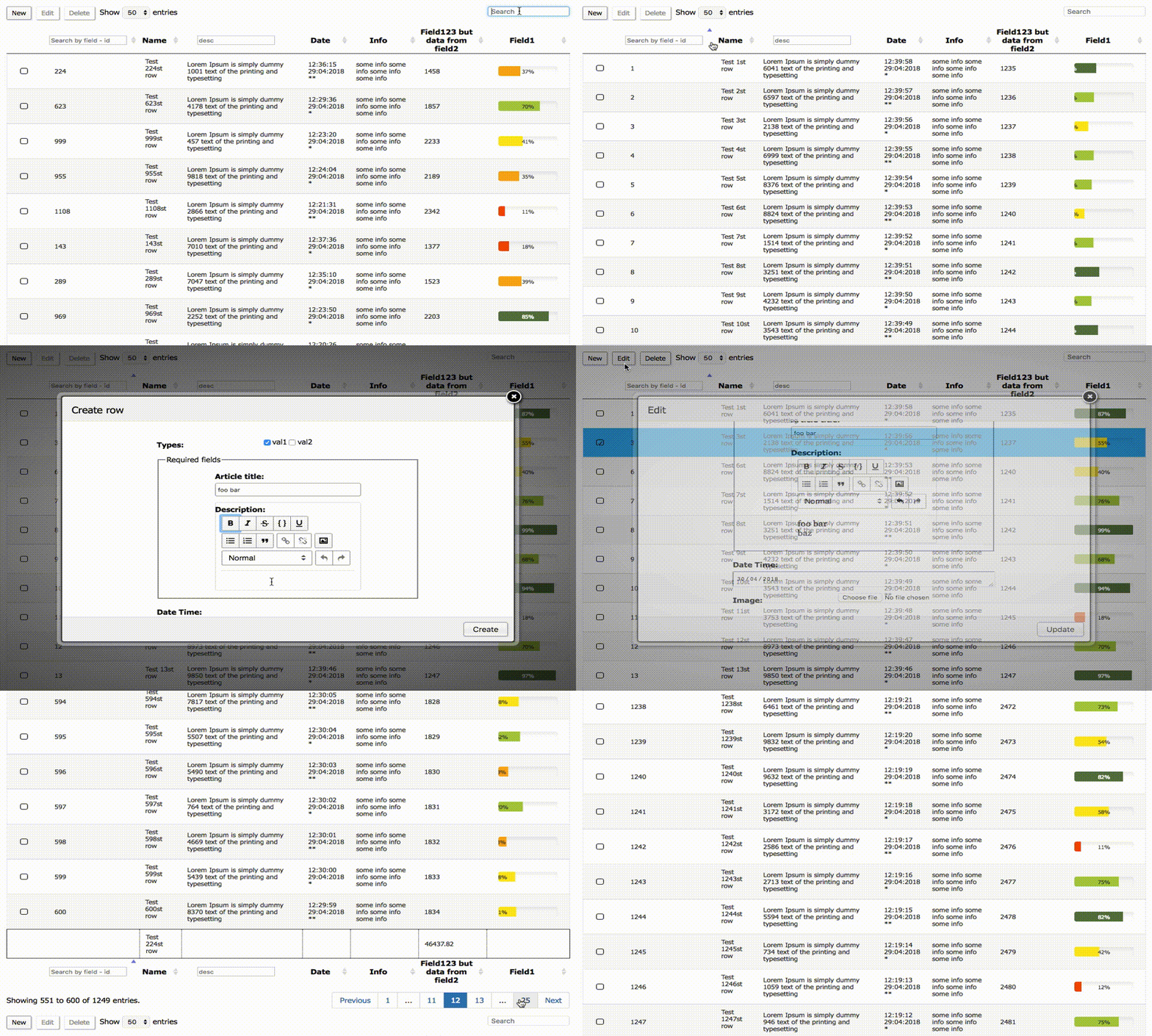
Installation based on browser script implementation (which U can download from build/ dir)
    <script src="build/index.js"></script>
    // or
    <script src="wherever/whatever.js"></script>
Getting Started
To initialize plug-in and to bind GigaTables with table structure - set settings prop with options and table structure in JSX format.
The <Reactables> tag, it's Headers and all the stuff like pagination, per page selector will be constructed on the fly.
Minimal configuration
Add js below to main.js file:
import React from 'react'
import ReactDOM from 'react-dom'
import {Reactables, Header} from 'gigatables-react'

let settings = {
    struct: {// all in
        search: ['top', 'bottom'],
        rowsSelector: ['asc', 'top', 'bottom'],
        pagination: ['bottom']
    },
    ajax: 'http://example.com/your/tabledata',
    // or u can set local json data
    // data: localData,
    columns: [
        {data: "id"},
        {data: "desc"},
        {data: "title"},
        {data: "date"},
        {data: "info"},
        {data:"field1"},
        {data:"field2"},
        {data:"field3", visible: false}
    ]
};

ReactDOM.render(
    <Reactables settings={settings}>
        <Header data="id">ID</Header>
        <Header data="title">Name</Header>
        <Header data="desc">Description</Header>
        <Header data="date">Date</Header>
        <Header data="info">Info</Header>
        <Header data="field2">Field123 but data from field2</Header>
        <Header data="field1">Field1</Header>
        <Header data="field3">Field3 invisible</Header>
        <Header>Field3 invisible</Header>
    </Reactables>,
    document.getElementById('app'));
If u run GT from scratch - don't forget to install dependencies, such as:
  "dependencies": {
    "react": "^16.3.1",
    "react-dom": "^16.3.1",
    "classnames": "^2.2.5",
    "css-loader": "^0.26.1",
    "expect": "^1.20.2",
    "file-loader": "^0.10.0",
    "hoek": "^5.0.3",
    "lodash": "4.17.4",
    "prop-types": "^15.6.0",
    "react": "^16.1.1",
    "react-dom": "^16.1.1",
    "resolve-url": "^0.2.1",
    "style-loader": "^0.13.1",
    "superagent": "^3.5.2",
    "url-loader": "^0.5.7",
    // for plugins
    "react-minimal-pie-chart": "^3.0.2",
    "react-rte": "^0.15.0",
    "react-trend": "^1.2.4",
    // dev deps
    "babel": "^6.23.0",
    "babel-cli": "^6.26.0",
    "babel-loader": "^7.1.4",
    "babel-preset-react": "^6.24.1",
    "webpack": "^4.5.0",
    "webpack-cli": "^2.0.14",
    "webpack-dev-server": "^3.1.3"
  },
Also add index.html file to the root and put the following content in it:
<!DOCTYPE html>
<html lang="en">
<head>
    <meta charset="UTF-8">
    <title>Title</title>
</head>
<body>
    <div id = "app"></div>
    <script src = "index.js"></script>
</body>
</html>
Be sure to create a webpack.config.js file and copy content from the same file in this repo.
Get to the project directory and run npm start.
That's it, you are up and running.
Advanced configuration with opts and editor
let settings = {
 struct: {
   search: ['top', 'bottom'],
   rowsSelector: ['asc', 'top', 'bottom'],
   pagination: ['bottom'],
   fixedHeader: true, // default false
   editableCells: true, // default false
 },
 lang: 'en', // english default
 perPageRows: [25, 50, 100, 200, 500],
 defaultPerPage: 50,
 ajax: 'https://example.com/your/tabledata',
 requestType: 'GET',
 columns: [
   {// include all defaults
     data: "id",
     sortable: true, // true by defualt
     visible: true, // true by defualt
     searchable: true, // true by defualt
     discreteSearch: true, // false by default
     discreteSearchValue: function (title) {
       return 'Search in field ' + title;
     }
   },
   {
     data: "title",
     cISearch: true // default false
   },
   {
     data: "desc",
     sortable: false,
     discreteSearch: true,
     discreteCISearch: true // default false
   },
   {
     data: "date",
     searchable: false
   },
   {
     data: "info"
   },
   {data:"field1"},
   {data:"field2"},
   {data:"field3", visible: false}
 ],
 columnOpts: [
   {
     render: function (data, row, type) {
       return '<div><form method="post" class="accForm" action=""><input type="hidden" name="action" value="forms" /><input type="hidden" name="id" value="' + row.id + '" /><div>' + data + '</div></form></div>';
     },
     target: 2
   },
   {
     render: function (data, row, type) {
       return '<div><form method="post" class="accForm" action=""><input type="hidden" name="action" value="forms" /><input type="hidden" name="id" value="' + row.id + '" /><div>' + data + '</div></form></div>';
     },
     target: 3
   }
 ],
 tableOpts: {
   buttons: [
     {extended: "editor_create", editor: editor, triggerAfter: (function () {
         console.log('after create');
       }), triggerBefore: (function () {
         console.log('before create');
       })},
     {extended: "editor_edit", editor: editor},
     {extended: "editor_remove", editor: editor, triggerAfter: (function () {
         console.log('after del');
       })}
   ],
   buttonsPosition: ['top', 'bottom'],
   theme: 'std'
 }
};
The table is defined like in example below:
ReactDOM.render(
  <Reactables editor={editor} settings={settings}>
    <Header data="id">ID</Header>
    <Header data="title">Name</Header>
    <Header data="desc">Description</Header>
    <Header data="date">Date</Header>
    <Header data="info">Info</Header>
    <Header data="field2">Field123 but data from field2</Header>
    <Header data="field1">Field1</Header>
    <Header data="field3">Field3 invisible</Header>
    <Header>Field3 invisible</Header>
  </Reactables>,
  document.getElementById('app'))
data attribute is needed to glue columns to json data steadily.
JSON structure to return from provided url in "ajax" GigaTables option:
{
    "rows": [
        {
            "GT_RowId": 2, // optional
            "id": 2, // if there is no GT_RowId - try to fetch "id"
            "title": "Test 2st row",
            "desc": "<input type=\"text\" name=\"ttl\" value=\"Test 2nd row Test 2nd row Test 2nd row
 Test 2st row Test 2st row\" \/> ",
            "date": "20:40:37 17:06:2015",
            "info": "some info some info some info some info"
        },
        {
            "GT_RowId": 1,
            "id": 1,
            "title": "Test 1st row",
            "desc": "<input type=\"text\" name=\"ttl\" value=\"Test 1st row Test 1st row Test 1st row
 Test 1st row Test 1st row\" \/> ",
            "date": "20:40:38 17:06:2015",
            "info": "some info some info some info some info"
        }, ...
An example of using GigaTables with Editor tool
First of all You should define an object Editor like this:
let editor = {
ajax: 'http://example.com/editor.php',
// it is possible to set discrete urls, http methods for any type of request
// ajax: {
// create: {
// url: 'http://gigatables.loc/editor.php',
// type: 'POST',
// headers: {
// 'X-Api-Key': '8013b37216a07f50027139d89ee9f822e3784049'
// }
// },
// edit: {
// url: 'http://gigatables.loc/editor.php',
// type: 'PUT',
// headers: {
// 'X-Api-Key': '8013b37216a07f50027139d89ee9f822e3784049',
// 'X-Header-Key': 'foo-bar'
// }
// },
// delete: {
// url: 'http://gigatables.loc/editor.php',
// type: 'DELETE',
// headers: {
// 'X-Api-Key': '8013b37216a07f50027139d89ee9f822e3784049',
// 'X-Header-Key': 'foo-bar-baz'
// }
// }
// },
ajaxFiles: 'http://example.com/uploadFiles.php',
struct: {
buttons: ['top', 'bottom'] // buttons
},
fields: [
{
label: 'ID',
name: 'id',
type: 'hidden'
},
{
label: 'Progress',
name: 'field1',
type: 'range',
attrs: {
min: 0,
max: 100,
defaultValue: 55
}
},
{
label: 'Article title:',
name: 'title',
type: 'text', // default, other: password, file, select, multiselect etc
fieldsetOpen: true,
legend: 'Required fields',
attrs: {
pattern: '^[A-Za-z0-9_]+
and then pass variable (in this case - editor) to GigaTables main options in tableOpts section like this:
tableOpts: {
buttons: [
{extended: "editor_create", editor: editor},
{extended: "editor_edit", editor: editor},
{extended: "editor_remove", editor: editor}
],
buttonsPosition: ['top', 'bottom'],
theme: 'std'
}
That's it then You will be able to CRUD any record You want.
Pagination or Infinite scroll
It is sometimes convenient to use an infinite scroll rather then classic pagination, ex.: sort and see only part of data, watching an updated list etc.
To initialize an infinite scroll - set infiniteScroll: true property in struct object.
struct: {
search: ['top', 'bottom'],
rowsSelector: ['desc', 'top', 'bottom'],
pagination: ['bottom'],
infiniteScroll: true
},
even if You leave pagination option there - infinite scroll will take precedence.
Ajax or local data
While it is clear that GT was primarily developed with data processing via ajax, u can use either ajax or local data.
To let GT accept local data the only thing u need to do is to set settings.data property to any json object that will be
satisfy defined structure.
It can be variable, object itself or json from local file (loaded by require on nodejs for example).
The difference between data and ajax processing is that:
- local data is always prioritized over ajax data, so if they both set - only the local data will be loaded
- with local data u can't mutate rows/cols with editor create/edit/delete options
Ajax autoload period
If You need an autoload period set for online live-loaded grid data, just add 2 properties to settings object:
ajaxAutoloadData: true, // default false
ajaxAutoloadPeriod: 8, // sec
the ajaxAutoloadPeriod must be set in seconds and the interval should be placed between 5 and 300 seconds,
if U wish to switch the mode to classic loader without touching settings structure - set the ajaxAutoloadData: false.
Hot keys
To efficiently manage table behavior You can use the following hot keys:
Ctrl+Arrow Up - selects rows above the selected
Ctrl+Arrow Down - selects rows below the selected
Ctrl+A - selects all rows in a current table view
Ctrl+Arrow Right - next page
Ctrl+Arrow Left - prev page
PS In some OS like Macintosh can be default conflicting hot keys, ex.: Cmd+Arrow Left get back in browsers
Plugins
Plugins can be helpful to build convenient features around form elements and table rows/columns.
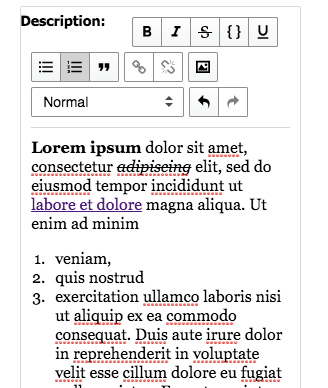
For instance - to edit text with HTML tags (aka WYSIWYG) and then save it in DB you can set the rte (Rich Text Editor):
{
...
type: 'textarea',
plugins: 'rte',
...
}
Progress bar plugin (table):

{
data: 'field1',
plugins: 'progressbar',
pluginProps: {
height: 20
}
}
this will build 5 colored (left-to-right) progress bar for every row in the column, with percent number.
Protected from null and negative numbers as well as more then 100.
PieChart plugin (table):

{
data: 'consumers',
plugins: 'pie',
pluginProps: {
ratio: 2,
startAngle: 3,
rounded: true,
animate: true,
radius: 33,
}
}
Trend plugin (table):

{
data: 'consumers_trend',
plugins: 'trend',
pluginProps: {
autoDraw: true,
autoDrawDuration: 2000,
autoDrawEasing: 'ease-in',
strokeWidth: 15,
padding: 18
}
}
and the data, as in progress bar plugin, comes in via children prop intuitively,
thus the only thing you need is to pass them through json:
{
"rows": [
{
...
"statistics": 89, // for progress bar
...
"consumers": [ // for pie chart
{
"value": 32,
"color": "#E38627"
},
{
"value": 19,
"color": "#C13C37"
},
{
"value": 68,
"color": "#6A2135"
}
],
...
"consumers_trend": [0, 10, 5, 22, 3.6, 11]
}
]
}
React select plug-in (editor):
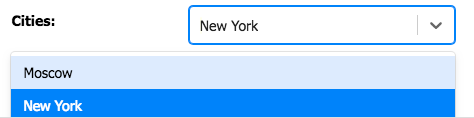
Pretty popular plug-in for ReactJS with simple settings
{
label: 'Cities:',
name: 'cities',
type: 'select',
plugins: 'react-select',
pluginProps: {
options: [
{value: 'msc', label: 'Moscow'},
{value: 'nyc', label: 'New York'},
{value: 'london', label: 'London'}
],
}
}
Plugins integration in GT is flexible in terms of versatility with which providers/vendors may supply props, e.g.
some plugin have prop structure like:
strokeWidth: 123,
strokeOpacity: 0.75,
strokeLinejoin: true
then developers team may change it to e.g:
stroke: {
width: 123,
opacity: 0.75,
linejoin: true
}
you can just place a new structure to pluginProps, update the plugin and proceed using new features.
Themes
GT supports the most popular ReactJS theme - material-ui, thus you can easelly switch between standard and material-ui themes
by setting:
tableOpts: {
...
theme: 'material-ui' // 'std' is the default theme
...
}
there are buttons, inputs, selects, redio, checkboxes, textareas and other form/table elements for material-ui theme.
As an option you can always set additional attributes to any component as with std form elements e.g.:
attrs: {
className: 'titleField',
placeholder: 'Place holder'
}
Headers
In some work-flows u may need to send several useful headers, ex. with secret key for api,
additional info for back-end to recognize anything etc
In GT u can place those either in settings or editor this way:
in settings:
headers: {
'X-Api-Key': '8013b37216a07f50027139d89ee9f822e3784049',
'X-Header-Key': 'foo-bar'
},
in editor:
...
edit: {
url: 'http://example.com/editor.php',
type: 'PUT',
headers: {
'X-Api-Key': '8013b37216a07f50027139d89ee9f822e3784049',
'X-Header-Key': 'foo-bar'
}
},
...
Aggregate Footer
To set an aggregate footer, to be able to collect statistical data with different functions/methods
use the following property in struct object:
struct: {
...
aggregateFooter: true
...
}
then you can declare whatever function needed to be processed for particular columns like this:
{
data: "title",
...
footer: 'frequency',
...
},
to get most frequently used sentences/words,
{
data: "price",
...
footer: "avg",
...
},
to count an average value of all numbers in column,
{
data: "amount",
...
footer: "sum",
...
},
there are also minLength - maxLength footer settings to get a string lengths.
Data export
Sometimes users need to export data in different formats, the most popular is csv, so here we go:
- define
download object with csv property in settings->struct
download: {
csv: true,
},
- define button object in
settings->tableOpts->buttons like this:
{
extended: "editor_csv",
editor: editor,
},
You'll see an extra button CSV Export on the left, right before standard buttons for CRUD.
Table options
Property
Available values
Default value(s)
Description
struct.search(array) top/bottom
['top']
Where to display the common search field (searches all rows)
struct.rowsSelector(array) top/bottom, asc/desc
['top', 'asc']
Where to display rows selector field with order setting
struct.pagination(array) top/bottom
['bottom']
Where to display pagination block
struct.fixedHeader(bool)
false
Whether to fix table header or not
struct.editableCells(bool)
false
Whether to edit cells by clicking on it and send changed content pressing Enter
struct.aggregateFooter(bool)
false
Whether to count frequency/sum/avg/minLength/maxLength and put them in footer (see column settings below)
struct.download.csv(bool)
false
Whether to display button with CSV Export
struct.width(string) 'Npx'
width of columns
width of a table
lang(string) 'en/gr/ru/fr/es/ch/hi/ar/pt/ja'
'en'
Language that will be shown on all elements
perPageRows(array) of integers
[25, 50, 100, 200, 500]
How many rows to show per page
defaultPerPage(integer) N according to perPageRows
50
How many rows to show per page by default
ajaxAutoloadDatatrue/false
false
Whether to load data automatically from the server (back-end)
ajaxAutoloadPeriodinteger
every 5 seconds (maximum 300 seconds)
Language that will be shown on all elements
headers(object) of key/value pairs of headers
no extra headers
Extra headers to send to the server (back-end) via ajax request
ajaxstring/Promise
none
Url to send the ajax request to
data(object)
none
Local data either as an object or loaded content from require
requestType(string) one of HTTP methods GET/POST etc
'GET'
HTTP method to be used to send an ajax request for table data
columns(array) an array of object
none
Array of objects which describes columns behaveour
columns object prop data(string) column id
none
Unique string to set a column id e.g.: title/description
columns object prop sortable(bool)
true
Whether to sort column or not
columns object prop visible(bool)
true
Whether to show column or not
columns object prop searchable(bool)
true
Whether to search this column (in common search) or not
columns object prop discreteSearch(bool)
true
Whether to search in this particular column or not
columns object prop discreteCISearch(bool)
true
Case Insensitive search in this particular column
columns object prop discreteSearchValue(function/closure)
title of column
Title that will be displayed in search field
columns object prop plugins(string)
none
A plugin to use for rendering specific data in column
columns object prop pluginProps(object)
none
A plugin special properties to use for rendering
columns object prop footer(string) avg/sum/frequency/minLength/maxLength
none
If aggregateFooter is set to true, then values will be processed according to this setting
columnOpts.render(function/closure)
none
How to render column data
columnOpts.target(string)
none
To which column should render method be applied (see columns object prop data they should be the same)
tableOpts object prop buttons(array)
none
An array of object buttons
tableOpts object prop buttonsPosition(array)
['top', 'bottom']
An array of object buttons
tableOpts object prop theme(string) material-ui/std
'std'
Theme that will be set on all elements
Editor options
Property
Available values
Default value(s)
Description
ajax(string/object)
none
Url/objects to send CRUD ops
ajax.create(object)
none
An object of props url/type/headers for create operation
ajax.edit(object)
none
An object of props url/type/headers for edit operation
ajax.delete(object)
none
An object of props url/type/headers for delete operation
ajaxFiles(string)
none
Where to send file uploads
fields(array) of objects
none
An array of object form fields
fields object prop type(string)
none
One of HTML5 form element e.x.: input/select/email/textarea etc
fields object prop name(string)
none
Name of field that will be sent to back-end
fields object prop label(string)
none
Form field label
fields object prop attrs(object)
none
An object of field props e.g.: size/min/max/placeholder etc
fields object prop defaultValue(any)
none
Default value for a field
fields object prop plugins(string)
none
A custom plugin to use for a field
fields object prop pluginProps(object)
none
A set of plugin props
FAQ
Can I use file types in GT editor to upload files through AJAX on server?
Sure, it can be done by this additional option in editor:
ajaxFiles: 'https://example.com/upload/files',
which is pointing on script on the server where it should upload the file(s).
And to add the actual field which will send the file to the server script:
{
label: "Image:",
name: "image",
type: 'file'
}
Ensure that the field is in fields: [ option. U can even specify:
attrs: [
{'multiple': ''}
]
to upload as many files as U need.
What types of fields can be used in editor?
You can use any HTML5 types, but responsibility for cross-browser support is on Your side.
Can I choose more then one row?
It is possible to even select not only the bunch of rows, but several bunches and some between them, by manipulating with:
Ctrl+Left click (one row anywhere) and Shift+Left click (several rows). Also U can use hot-keys to select above/below Ctrl+Arrow Up/Ctrl+Arrow Down
and Ctrl+A will select them all for current table-view.
Is it possible to search for a particular column in GT?
Specify any column U wanted to search by setting these options in columns parts eg.:
columns: [
{// include all defaults
data: "id",
discreteSearch: true,
discreteSearchValue: function(title) {
return 'Search on the field - ' + title;
}
}
Is there languages support?
You can pick one of 10 languages: English, German, Russian, French, Spanish, Chinese, Hindi, Portuguese, Arabic and Japanese - en, gr, ru, fr, es, ch, hi, ar, pt and ja respectively.
Does GT have any event-triggered functions, ex.: to run something before/after pop-up?
GigaTables plug-in has 2 types of triggers triggerBefore and triggerAfter which can be applied to any action button - Create, Edit or Delete.
Can I set case insensitive search to either common and/or discrete search?
Yes. For common search You should choose for which particular column it is needed and place cISearch: true option there,
for discrete search use discreteCISearch: true.
Does GT have an ability to fix header while scrolling?
Just add:
fixedHeader: true
to struct section of settings variable as in example above.
Is there a way to edit cells in real-time?
editableCells option will transform table to per-cell edit bases:
editableCells: true
Thus, You can click on any cell - edit the content and press Enter to send the AJAX request to the specified url.
Is it possible to edit multiple rows?
Sure, but you should understand the fact, that if you edit a field - it will be changed for all selected rows,
those fields that were left unchanged will be sent in their current state.
How can I set css styling to form fields?
Simply by specifying:
attrs: [
{'className': 'myClass1 myClass2'}
]
in the field settings, don't forget to import the styles file with global cascades like this:
import './main.css'
you can see an example in main.js file.
For those who like fieldset legend form structure GT offers:
{
...
fieldsetOpen: true,
legend: 'Required fields',
...
}
to open fieldset tag and set legend, to close previous fieldset in any further object use syntax like this:
{
...
fieldsetClose: true,
...
},
I need to set the default value for a field, how can I achieve that?
Sure, just add the defaultValue property to the particular fields object. It works for all types of fields input, select, html5 inputs etc.
How would GT behave if there will be > 1 000 000 rows data?
GT will perform good, but you should consider to turn off all the extra settings,
for instance with aggregate footer set - the data will be counted through those 1M rows.
Sure it will aggregate values only once and then get the results from state,
but the 1st page load will be longer than usual.
Contribution gratitude
@tanz-sullamora (without this guy project would not be completed at all)
@AndreiEnache (solved problem with Exceptions)
@GreenbBro (helped with robust functionality and ES6 code-style)
@wangfrombupt (found critical bugs + translation issues)
Used by

,
className: 'titleField'
}
},
{
label: 'Description:',
name: 'desc',
type: 'textarea',
plugins: 'rte',
attrs: {
className: 'descriptionField'
},
fieldsetClose: true
},
{
label: 'Date Time:',
name: 'date',
type: 'date'
},
{
label: 'Image:',
name: 'image',
type: 'file'
},
{// an example of using select - automatically selected if matches with data in table column
label: 'Types:',
name: 'types[]',
values: [// if select,checkbox,radio etc types - need this pre-set structure of values
{'key1': 'val1'},
{'key2': 'val2'}
],
type: 'select' // select,checkbox,radio
}
]
}and then pass variable (in this case - editor) to GigaTables main options in tableOpts section like this:
__CODE_BLOCK_9__That's it then You will be able to CRUD any record You want.
Pagination or Infinite scroll
It is sometimes convenient to use an infinite scroll rather then classic pagination, ex.: sort and see only part of data, watching an updated list etc. To initialize an infinite scroll - set __INLINE_CODE_7__ property in __INLINE_CODE_8__ object.
__CODE_BLOCK_10__even if You leave __INLINE_CODE_9__ option there - infinite scroll will take precedence.
Ajax or local data
While it is clear that GT was primarily developed with data processing via ajax, u can use either ajax or local data. To let GT accept local data the only thing u need to do is to set __INLINE_CODE_10__ property to any json object that will be satisfy defined structure.
It can be variable, object itself or json from local file (loaded by require on nodejs for example).
The difference between data and ajax processing is that:
- local data is always prioritized over ajax data, so if they both set - only the local data will be loaded
- with local data u can't mutate rows/cols with editor create/edit/delete options
Ajax autoload period
If You need an autoload period set for online live-loaded grid data, just add 2 properties to settings object:
__CODE_BLOCK_11__the __INLINE_CODE_11__ must be set in seconds and the interval should be placed between 5 and 300 seconds, if U wish to switch the mode to classic loader without touching settings structure - set the __INLINE_CODE_12__.
Hot keys
To efficiently manage table behavior You can use the following hot keys:
Ctrl+Arrow Up - selects rows above the selected
Ctrl+Arrow Down - selects rows below the selected
Ctrl+A - selects all rows in a current table view
Ctrl+Arrow Right - next page
Ctrl+Arrow Left - prev page
PS In some OS like Macintosh can be default conflicting hot keys, ex.: Cmd+Arrow Left get back in browsers
Plugins
Plugins can be helpful to build convenient features around form elements and table rows/columns.
For instance - to edit text with HTML tags (aka WYSIWYG) and then save it in DB you can set the __INLINE_CODE_13__ (Rich Text Editor):
Progress bar plugin (table):
this will build 5 colored (left-to-right) progress bar for every row in the column, with percent number. Protected from __INLINE_CODE_14__ and __INLINE_CODE_15__ numbers as well as __INLINE_CODE_16__.
PieChart plugin (table):
Trend plugin (table):
and the data, as in progress bar plugin, comes in via __INLINE_CODE_17__ prop intuitively, thus the only thing you need is to pass them through json:
__CODE_BLOCK_16__React select plug-in (editor):
Pretty popular plug-in for ReactJS with simple settings
__CODE_BLOCK_17__Plugins integration in GT is flexible in terms of versatility with which providers/vendors may supply props, e.g. some plugin have prop structure like:
__CODE_BLOCK_18__then developers team may change it to e.g:
__CODE_BLOCK_19__you can just place a new structure to __INLINE_CODE_18__, update the plugin and proceed using new features.
Themes
GT supports the most popular ReactJS theme - material-ui, thus you can easelly switch between standard and material-ui themes by setting:
__CODE_BLOCK_20__there are buttons, inputs, selects, redio, checkboxes, textareas and other form/table elements for material-ui theme.
As an option you can always set additional attributes to any component as with std form elements e.g.:
__CODE_BLOCK_21__Headers
In some work-flows u may need to send several useful headers, ex. with secret key for api, additional info for back-end to recognize anything etc In GT u can place those either in settings or editor this way: in settings:
__CODE_BLOCK_22__in editor:
__CODE_BLOCK_23__Aggregate Footer
To set an aggregate footer, to be able to collect statistical data with different functions/methods use the following property in __INLINE_CODE_19__ object:
__CODE_BLOCK_24__then you can declare whatever function needed to be processed for particular columns like this:
__CODE_BLOCK_25__to get most frequently used sentences/words,
__CODE_BLOCK_26__to count an average value of all numbers in column,
__CODE_BLOCK_27__there are also __INLINE_CODE_20__ - __INLINE_CODE_21__ footer settings to get a string lengths.
Data export
Sometimes users need to export data in different formats, the most popular is csv, so here we go:
- define __INLINE_CODE_22__ object with __INLINE_CODE_23__ property in __INLINE_CODE_24__
- define button object in __INLINE_CODE_25__ like this:
You'll see an extra button __INLINE_CODE_26__ on the left, right before standard buttons for CRUD.
Table options
| Property | Available values | Default value(s) | Description |
|---|---|---|---|
| __INLINE_CODE_27__ | (array) top/bottom | ['top'] | Where to display the common search field (searches all rows) |
| __INLINE_CODE_28__ | (array) top/bottom, asc/desc | ['top', 'asc'] | Where to display rows selector field with order setting |
| __INLINE_CODE_29__ | (array) top/bottom | ['bottom'] | Where to display pagination block |
| __INLINE_CODE_30__ | (bool) | false | Whether to fix table header or not |
| __INLINE_CODE_31__ | (bool) | false | Whether to edit cells by clicking on it and send changed content pressing Enter |
| __INLINE_CODE_32__ | (bool) | false | Whether to count frequency/sum/avg/minLength/maxLength and put them in footer (see __INLINE_CODE_33__ settings below) |
| __INLINE_CODE_34__ | (bool) | false | Whether to display button with CSV Export |
| __INLINE_CODE_35__ | (string) 'Npx' | width of columns | width of a table |
| __INLINE_CODE_36__ | (string) 'en/gr/ru/fr/es/ch/hi/ar/pt/ja' | 'en' | Language that will be shown on all elements |
| __INLINE_CODE_37__ | (array) of integers | [25, 50, 100, 200, 500] | How many rows to show per page |
| __INLINE_CODE_38__ | (integer) N according to __INLINE_CODE_39__ | 50 | How many rows to show per page by default |
| __INLINE_CODE_40__ | true/false | false | Whether to load data automatically from the server (back-end) |
| __INLINE_CODE_41__ | integer | every 5 seconds (maximum 300 seconds) | Language that will be shown on all elements |
| __INLINE_CODE_42__ | (object) of key/value pairs of headers | no extra headers | Extra headers to send to the server (back-end) via ajax request |
| __INLINE_CODE_43__ | string/Promise | none | Url to send the ajax request to |
| __INLINE_CODE_44__ | (object) | none | Local data either as an object or loaded content from require |
| __INLINE_CODE_45__ | (string) one of HTTP methods GET/POST etc | 'GET' | HTTP method to be used to send an ajax request for table data |
| __INLINE_CODE_46__ | (array) an array of object | none | Array of objects which describes columns behaveour |
| __INLINE_CODE_47__ object prop __INLINE_CODE_48__ | (string) column id | none | Unique string to set a column id e.g.: title/description |
| __INLINE_CODE_49__ object prop __INLINE_CODE_50__ | (bool) | true | Whether to sort column or not |
| __INLINE_CODE_51__ object prop __INLINE_CODE_52__ | (bool) | true | Whether to show column or not |
| __INLINE_CODE_53__ object prop __INLINE_CODE_54__ | (bool) | true | Whether to search this column (in common search) or not |
| __INLINE_CODE_55__ object prop __INLINE_CODE_56__ | (bool) | true | Whether to search in this particular column or not |
| __INLINE_CODE_57__ object prop __INLINE_CODE_58__ | (bool) | true | Case Insensitive search in this particular column |
| __INLINE_CODE_59__ object prop __INLINE_CODE_60__ | (function/closure) | title of column | Title that will be displayed in search field |
| __INLINE_CODE_61__ object prop __INLINE_CODE_62__ | (string) | none | A plugin to use for rendering specific data in column |
| __INLINE_CODE_63__ object prop __INLINE_CODE_64__ | (object) | none | A plugin special properties to use for rendering |
| __INLINE_CODE_65__ object prop __INLINE_CODE_66__ | (string) avg/sum/frequency/minLength/maxLength | none | If __INLINE_CODE_67__ is set to true, then values will be processed according to this setting |
| __INLINE_CODE_68__ | (function/closure) | none | How to render column data |
| __INLINE_CODE_69__ | (string) | none | To which column should render method be applied (see __INLINE_CODE_70__ object prop __INLINE_CODE_71__ they should be the same) |
| __INLINE_CODE_72__ object prop __INLINE_CODE_73__ | (array) | none | An array of object buttons |
| __INLINE_CODE_74__ object prop __INLINE_CODE_75__ | (array) | ['top', 'bottom'] | An array of object buttons |
| __INLINE_CODE_76__ object prop __INLINE_CODE_77__ | (string) material-ui/std | 'std' | Theme that will be set on all elements |
Editor options
| Property | Available values | Default value(s) | Description |
|---|---|---|---|
| __INLINE_CODE_78__ | (string/object) | none | Url/objects to send CRUD ops |
| __INLINE_CODE_79__ | (object) | none | An object of props url/type/headers for create operation |
| __INLINE_CODE_80__ | (object) | none | An object of props url/type/headers for edit operation |
| __INLINE_CODE_81__ | (object) | none | An object of props url/type/headers for delete operation |
| __INLINE_CODE_82__ | (string) | none | Where to send file uploads |
| __INLINE_CODE_83__ | (array) of objects | none | An array of object form fields |
| __INLINE_CODE_84__ object prop __INLINE_CODE_85__ | (string) | none | One of HTML5 form element e.x.: input/select/email/textarea etc |
| __INLINE_CODE_86__ object prop __INLINE_CODE_87__ | (string) | none | Name of field that will be sent to back-end |
| __INLINE_CODE_88__ object prop __INLINE_CODE_89__ | (string) | none | Form field label |
| __INLINE_CODE_90__ object prop __INLINE_CODE_91__ | (object) | none | An object of field props e.g.: size/min/max/placeholder etc |
| __INLINE_CODE_92__ object prop __INLINE_CODE_93__ | (any) | none | Default value for a field |
| __INLINE_CODE_94__ object prop __INLINE_CODE_95__ | (string) | none | A custom plugin to use for a field |
| __INLINE_CODE_96__ object prop __INLINE_CODE_97__ | (object) | none | A set of plugin props |
FAQ
Can I use file types in GT editor to upload files through AJAX on server?
Sure, it can be done by this additional option in editor:
__CODE_BLOCK_30__which is pointing on script on the server where it should upload the file(s).
And to add the actual field which will send the file to the server script:
__CODE_BLOCK_31__Ensure that the field is in fields: [ option. U can even specify:
__CODE_BLOCK_32__to upload as many files as U need.
What types of fields can be used in editor?
You can use any HTML5 types, but responsibility for cross-browser support is on Your side.
Can I choose more then one row?
It is possible to even select not only the bunch of rows, but several bunches and some between them, by manipulating with: Ctrl+Left click (one row anywhere) and Shift+Left click (several rows). Also U can use hot-keys to select above/below Ctrl+Arrow Up/Ctrl+Arrow Down and Ctrl+A will select them all for current table-view.
Is it possible to search for a particular column in GT?
Specify any column U wanted to search by setting these options in columns parts eg.:
__CODE_BLOCK_33__Is there languages support?
You can pick one of 10 languages: English, German, Russian, French, Spanish, Chinese, Hindi, Portuguese, Arabic and Japanese - en, gr, ru, fr, es, ch, hi, ar, pt and ja respectively.
Does GT have any event-triggered functions, ex.: to run something before/after pop-up?
GigaTables plug-in has 2 types of triggers triggerBefore and triggerAfter which can be applied to any action button - Create, Edit or Delete.
Can I set case insensitive search to either common and/or discrete search?
Yes. For common search You should choose for which particular column it is needed and place __INLINE_CODE_98__ option there, for discrete search use __INLINE_CODE_99__.
Does GT have an ability to fix header while scrolling?
Just add:
__CODE_BLOCK_34__to __INLINE_CODE_100__ section of __INLINE_CODE_101__ variable as in example above.
Is there a way to edit cells in real-time?
__INLINE_CODE_102__ option will transform table to per-cell edit bases:
__CODE_BLOCK_35__Thus, You can click on any cell - edit the content and press Enter to send the AJAX request to the specified url.
Is it possible to edit multiple rows?
Sure, but you should understand the fact, that if you edit a field - it will be changed for all selected rows, those fields that were left unchanged will be sent in their current state.
How can I set css styling to form fields?
Simply by specifying:
__CODE_BLOCK_36__in the field settings, don't forget to __INLINE_CODE_103__ the styles file with global cascades like this:
__CODE_BLOCK_37__you can see an example in __INLINE_CODE_104__ file.
For those who like __INLINE_CODE_105__ form structure GT offers:
__CODE_BLOCK_38__to open fieldset tag and set legend, to close previous fieldset in any further object use syntax like this:
__CODE_BLOCK_39__I need to set the default value for a field, how can I achieve that? Sure, just add the __INLINE_CODE_106__ property to the particular fields object. It works for all types of fields input, select, html5 inputs etc.
How would GT behave if there will be > 1 000 000 rows data?
GT will perform good, but you should consider to turn off all the extra settings, for instance with aggregate footer set - the data will be counted through those 1M rows. Sure it will aggregate values only once and then get the results from state, but the 1st page load will be longer than usual.
Contribution gratitude
@tanz-sullamora (without this guy project would not be completed at all)
@AndreiEnache (solved problem with Exceptions)
@GreenbBro (helped with robust functionality and ES6 code-style)
@wangfrombupt (found critical bugs + translation issues)
Used by