
enigma-cli
Everything you need to work with a coding agent, in one command. enigma
installs a shared set of engineering policy skills into the agents you
actually use (Claude Code, OpenAI Codex, opencode) and sets up portable git
security hooks that block secrets, .env files, and dependency dirs from being
committed.
Install
Recommended - run the install script (clears the npm cache, installs the latest
version, then runs enigma install interactively so you choose what to set up -
handy where npm postinstall scripts are disabled):
# macOS / Linux
curl -fsSL https://raw.githubusercontent.com/FJRG2007/enigma/main/scripts/install.sh | sh

# Windows (PowerShell)
irm https://raw.githubusercontent.com/FJRG2007/enigma/main/scripts/install.ps1 | iex
Or install the enigma command globally, then run the interactive hub:
npm install -g enigma-cli@latest   # provides the `enigma` command
enigma                             # interactive hub: pick what to set up
Or one-shot, no global install, no prompts - deploy the skills to every supported agent at user level:
npx enigma-cli@latest install --all --yesThat first install is the only one you ever need to run by hand: afterwards,
launching a tool through enigma (e.g. enigma claude) auto-syncs the deployed
skills and memory with the installed package version (see
Auto-sync).
Requirements
Minimum: Node.js >= 18 (with npm), Git
and at least one coding agent. Recommended: add Claude Code,
the GitHub CLI, Bun and Warp.
Details - what each one is for
Minimum
 |
>= 18, ships with npm - installs and runs the enigma CLI |
 |
powers the security hooks and the commit guard |
 |
at least one of Claude Code, OpenAI Codex or opencode - the skills need a home |
Recommended
Everything in Minimum, plus:
 |
the agent enigma is most battle-tested with |
 |
gh commits go through the same hooks, and enigma issue opens prefilled reports |
 |
only needed to build or contribute from source |
 |
a modern terminal where the hub TUI shines |
Commands
enigma                 Interactive menu: choose features to set up
enigma install         Install/update agent skills
enigma security        Set up git security hooks in the current repo
enigma guard [--all]   Run the commit guard (staged files, or all tracked)
enigma config [k v]    Show or set runtime toggles (e.g. config commit-emoji off)
enigma <tool> [acct]   Launch claude | codex | opencode with an account
                       (resolution: explicit > active profile > tool active);
                       auto-syncs deployed skills first
enigma account ...     Manage per-tool accounts (list/add/use/login/remove)
enigma profile ...     Group one account per tool (list/add/use/set/unset/remove)
enigma skills ...      List skills and manage discards (list/discard/restore)
enigma compress [file] Compress JSON/logs/text to fewer tokens (reversible via CCR);
                       --retrieve <hash> restores, --stats shows total savings,
                       --clear wipes all dashboard data (stats/history/cache)
enigma mcp             Run the context-compression MCP server over stdio
enigma dashboard|dash  Open the local dashboard (manage enigma; see savings) in your browser (http://enigma,
                       or http://localhost:24282 if :80/hosts is unavailable)
enigma seal            Maintenance: (re)compute skill content hashes
enigma check           Integrity gate: verify skills are well-formed and sealed
enigma help | version
Agent skills
Skills are authored once and deployed to every selected agent (no per-agent
duplication). enigma install auto-detects which agents are installed (CLI on
PATH or a config dir like ~/.claude, ~/.codex, ~/.config/opencode) and
preselects them; --all targets every supported agent.
| Agent | Scope | Skills | Memory file |
|---|---|---|---|
| Claude Code | global | ~/.claude/skills/ |
~/.claude/CLAUDE.md |
| OpenAI Codex | global | ~/.agents/skills/ |
~/.codex/AGENTS.md |
| opencode | global | ~/.config/opencode/skills/ |
~/.config/opencode/AGENTS.md |
(--local installs into the current project instead.)
Don't want one of the skills? Discard it from the hub's install panel (the
SKILLS section lists every skill; unchecking one discards it) or with
enigma skills discard <name>: it is removed from every agent and skipped by
future installs, updates and auto-syncs until you restore it with
enigma skills restore <name>.
Slash commands
enigma install also deploys reusable slash commands to every selected agent (a
full install only - --skills-only / --memory-only skip them). Each command is
authored once and copied verbatim to the agent's command directory, where the file
name becomes the command.
| Agent | Scope | Command directory |
|---|---|---|
| Claude Code | global | ~/.claude/commands/ |
| opencode | global | ~/.config/opencode/command/ |
| OpenAI Codex | global | ~/.codex/prompts/ |
(--local installs into the project's .claude/commands/ and .opencode/command/.
Codex has no project-local prompt directory, so it only receives commands at global
scope.)
Commands are enigma-managed: if a same-named command already exists and is not enigma's, it is replaced so enigma's command always wins the name. A command you have not changed is left untouched; auto-sync keeps it current on every launch.
/improve
Two modes in one command. Implement mode edits a focused area directly;
Advisor mode is strictly read-only and writes self-contained implementation plans into
plans/ for another (cheaper) agent to execute.
The mode is resolved from the arguments: an advisor keyword (audit, quick,
deep, branch, next, plan, review-plan, execute, reconcile) selects
Advisor mode; otherwise an area token selects Implement mode. A bare security
or performance runs Implement mode (edits code) for backward compatibility - to
audit those read-only instead, prefix an advisor keyword (audit security,
quick perf). With no argument (or an unknown one) it prints both usages and stops.
Implement mode (/improve <area>):
| Invocation | What it does |
|---|---|
/improve ui or /improve frontend |
Visual design, components, accessibility, responsiveness (same workflow) |
/improve security |
Secrets, authz, input validation, OWASP, dependency audit |
/improve performance |
Profile hot paths, queries/indexes, caching, bundle/render |
/improve seo |
Metadata, semantic HTML, structured data, crawlability, Core Web Vitals |
/improve refactor or /improve refactorize |
Dedup and consistency: consolidate duplicate code/components and divergent implementations of one concept into a single source of truth, apply ciphera-style and minimal-code, remove dead code - without changing behavior |
It detects the project stack first, reuses existing code, applies the smallest change, follows any matching policy skill, and verifies with the project's build/lint/test before reporting.
Advisor mode (read-only; writes only to plans/):
| Invocation | What it does |
|---|---|
/improve audit |
Full audit -> prioritized findings table -> plans you select |
/improve quick / /improve deep |
Effort level for the audit (hotspots only / whole repo) |
/improve audit <focus> |
Focused audit (e.g. security, perf, tests, bugs) |
/improve branch |
Audit only what the current branch changes |
/improve next |
Grounded feature/direction suggestions (also features, roadmap) |
/improve plan <description> |
Skip the audit, spec one thing as a single plan |
/improve review-plan <file> |
Critique and tighten an existing plan |
/improve execute <plan> |
Dispatch a cheaper executor in an isolated worktree, review its diff |
/improve reconcile |
Refresh the backlog: verify DONE, unblock, retire dead findings |
... --issues |
Also publish each written plan as a GitHub issue via gh |
Advisor mode never modifies source code, never mutates the working tree, and never reproduces secret values. Each plan is self-contained, stamps the commit it was written against, and carries machine-checkable done criteria and STOP conditions so a weaker executor can run it without this session's context.
Auto-sync on launch
After the first enigma install, you never need to run it again: whenever you
launch a tool through enigma (enigma claude, enigma account run work), enigma
first compares the deployed skills/memory against the installed package version
and silently refreshes anything that changed (new skills, updated versions,
removed skills, memory-file edits). On by default; opt out with:
enigma config auto-sync offAuto-sync is deliberately conservative:
- It only touches agents/scopes that already have a deployment - it never
performs a first install (that stays your explicit
enigma install). - Skills you modified locally are never overwritten (same rule as
--keep-modified). - The memory file (
CLAUDE.md/AGENTS.md) is only rewritten when it is byte-identical to what enigma last wrote (tracked in~/.enigma/state.json) - a file you authored or edited is never touched. - A sync failure never blocks the launch; the tool starts anyway.
Auto-lint on edit
Opt-in. When on, enigma autonomously installs @enigmax/linter into a
managed dir (~/.enigma/linter, in the background) and wires a post-write hook into
each agent, so every file an agent writes is linted the moment the edit finishes:
enigma config auto-lint on    # installs the linter and wires the hooks
enigma config auto-lint off   # removes the hooks
The hook is designed for minimum token cost: it auto-fixes the safe formatting rules (whitespace, blank lines, final newline) in place, and surfaces only the unfixable findings (hardcoded secrets, URL imports, style issues that need judgement) back to the agent. A clean file produces no output at all - zero added tokens.
- Claude Code: a
PostToolUsehook insettings.json(matcherEdit|Write|MultiEdit|NotebookEdit). Unfixable findings come back via the hook's stderr, which Claude feeds to the model. - opencode: an auto-loaded plugin in
~/.config/opencode/plugins/whosetool.execute.afterruns the same check and appends the findings to the tool output the model sees.
Both invoke one shared runner (~/.enigma/hooks/lint-hook.mjs) that resolves the
managed linter and no-ops cleanly until the background install lands (self-healing).
The wiring is mirrored into managed account config dirs on sync, like the other
managed settings. Default: off (it changes agent behavior and installs a
package, so it stays an explicit choice).
Git security hooks
enigma security drops a portable, dependency-free commit guard into any repo:
it copies guard.mjs into the repo's .githooks/, writes a cross-platform
pre-commit shim and a toggle config, and points core.hooksPath at it. Commit
.githooks/ so the team inherits it. Because it runs on git commit, it also
covers commits made through the GitHub CLI (gh).
On every commit the guard, OS-agnostically:
- Blocks committed secrets (API keys, tokens, private keys).
- Blocks
.env/.env.local(allows*.example/*.sample/*.template). - Blocks dependency/cache dirs (
node_modules,__pycache__, virtualenvs). - Warns on generated dirs (
dist,build,.next,coverage), log/OS-junk files, and files over 5 MB.
Each protection is individually toggleable (saved to .githooks/enigma-guard.json).
Bypass once with git commit --no-verify.
Multiple accounts and profiles
Work across separate workflows with different accounts per tool - for example
your company Claude Code account and your personal one - keeping each
fully isolated and switching between them without ever logging out. Each account
has its own credentials, session, and history, so client work never mixes with
personal projects. Supported tools: Claude Code (CLAUDE_CONFIG_DIR),
OpenAI Codex (CODEX_HOME) and OpenCode (a private XDG_DATA_HOME /
XDG_CONFIG_HOME pair per managed account; its default account keeps your real
environment untouched).
This is for legitimate, professional account separation (one account per employer/context, as many organizations require). It is not a way to evade usage limits or Anthropic's terms - each account still authenticates as itself and is subject to its own limits. Use the account that each piece of work belongs to.
Claude Code reads its credentials and session from the directory in
CLAUDE_CONFIG_DIR (default ~/.claude), so each profile just needs its own
directory. Rather than hand-editing per-shell aliases, enigma launches Claude
for you with that variable set - the same command on macOS, Linux and Windows.
enigma account add work --login   # create 'work' and run /login to authenticate
enigma account add personal       # create 'personal' (log in later)
enigma account add acme -t codex  # create a Codex account
enigma account list               # show all accounts (active one marked *)
enigma claude work                # run Claude Code as 'work'
enigma codex acme                 # run Codex as 'acme'
enigma account use personal       # make 'personal' the active account
enigma claude                     # run the resolved account (profile > active)
enigma claude work -- --version   # forward args after -- to the tool
enigma account rename work corp   # rename an account (its config dir moves)
enigma account remove work        # delete an account and its config dir
Your existing ~/.claude / ~/.codex / opencode setup is always available as
each tool's built-in default account (never deleted). New accounts live under
~/.enigma/<tool>/<name>/. Bare claude / codex / opencode commands keep
using your real environment as before.
Managed accounts inherit your enigma setup automatically: because the tool reads
everything from the account's config dir, enigma deploys the skills and memory
file into it (seeded on account add and on launch) and mirrors the
enigma-managed native settings from your default account on every launch -
Claude's permission bypass, attribution overrides and statusline, Codex's
approval_policy/sandbox_mode, opencode's "*": "allow" permission. Turning
a knob off on the default account propagates too; per-account manual edits to
those specific knobs are overwritten on the next launch, while every other
account setting (theme, custom statusline, extra permissions) is left untouched.
Profiles (one account per tool)
A profile pins one account per tool under a single name - e.g. profile work =
Claude Code work + Codex acme. While a profile is active, enigma <tool>
launches that profile's account for the tool (explicit account arguments still
win; unmapped tools fall back to their own active account):
enigma profile add work                 # create the profile
enigma profile set work claude work     # pin claude account 'work'
enigma profile set work codex acme      # pin codex account 'acme'
enigma profile use work                 # activate (enigma claude/codex now use it)
enigma profile list                     # profiles + mappings (* = active)
enigma profile rename work corp         # rename a profile (mappings stay)
enigma profile use none                 # deactivate
From the hub TUI (enigma), the Accounts panel lists every tool's accounts -
with the signed-in identity (email for Claude/Codex, connected providers for
OpenCode) - and lets you add (a), set active (enter), connect/log in
(c), rename (r), or remove (d). Adding first asks which tool with a
searchable selector (type to filter, like opencode's model picker), then the
account name, then offers to connect right away. The Profiles panel manages
profiles end-to-end: enter switches the active one ((none) deactivates), a
creates one, e edits its mappings (searchable tool selector, then a searchable
account selector including (unpin)), r renames it, and d removes it
(accounts are kept).
GitHub CLI telemetry (default off)
If the GitHub CLI (gh) is installed, enigma install disables its usage
telemetry (gh config set telemetry disabled). This is pure privacy upside -
telemetry is usage analytics only (command, flags, OS/version, device ids) and
no gh feature depends on it - and it also avoids a known Windows bug where the
detached gh send-telemetry subprocess spawns tzutil.exe without hiding its
window, flashing a terminal on gh invocations
(cli/cli#13354). Re-enable any time:
enigma config gh-telemetry on     # restore gh's default
enigma config gh-telemetry off    # disable again
Claude feedback survey (default off)
When Claude Code is a target, enigma install disables the periodic "How is
Claude doing?" session-quality survey by setting
env.CLAUDE_CODE_DISABLE_FEEDBACK_SURVEY to "1" in Claude's settings.json.
It is a recurring prompt with no functional value, so it is off by default.
Re-enable any time:
enigma config claude-survey on        # restore Claude's survey
enigma config claude-survey off       # disable again
enigma config claude-survey off -g    # global (~/.claude/settings.json)
Commit emojis
By default the policy skills make commit subjects carry a leading type emoji
(one per subject, e.g. for feat/fix); code, prose, and PR text stay
emoji-free. The convention and its type-to-emoji map live in the git-policy
skill. Opt out per repo or globally:
enigma config commit-emoji off       # disable (writes .enigma.json)
enigma config commit-emoji on        # re-enable
enigma config commit-emoji off -g    # global (~/.enigma.json)
Precedence: built-in default (on) -> ~/.enigma.json -> repo .enigma.json.
Parallel sub-agents
The memory file always tells agents to break long or complex tasks into smaller subtasks and complete them incrementally. The parallel part - delegating independent subtasks to sub-agents that run at the same time to finish faster - is opt-in, because spawning sub-agents multiplies token cost:
enigma config parallel-subagents on        # add the parallel section to the memory file
enigma config parallel-subagents off       # remove it (default)
enigma config parallel-subagents on -g      # global (~/.enigma.json)
This toggle edits the deployed agent memory file (adds or removes the section), so restart Claude Code / Codex / OpenCode after changing it for the new session to pick it up. Subtask decomposition itself is always on and is never removed.
Token-efficient output
Optionally compress the agent's chat prose to cut output tokens while keeping full technical accuracy. Chosen at install or via config; off by default:
enigma config output-style lite     # professional terse (drop filler, keep grammar)
enigma config output-style full     # shorter, drops articles and uses fragments
enigma config output-style ultra    # telegraphic, maximum compression
enigma config output-style off      # back to full prose (default)
enigma install --output-style lite # set it during installon/off also work (on = full). Like the toggle above it edits the memory
file, so restart your agent after changing it. Code, comments, commits, and
PRs stay normal, the agent reverts to full prose for security warnings and other
safety-critical replies, and the level is switchable mid-session by asking
("be more terse", "ultra", "normal mode").
Claude Code's status bar shows an [ENIGMA] badge at all times; while the mode is
active it appends the level ([ENIGMA:FULL], [ENIGMA:LITE], [ENIGMA:ULTRA]).
enigma wires this into settings.json during enigma install, only when you have
no status line configured (it never replaces your own). If you upgraded the package,
re-run enigma install once to wire it.
Minimal code (anti-overengineering)
The companion to token-efficient output: that compresses how the agent talks,
this governs how it builds. It pushes the agent toward the laziest solution
that works - YAGNI, the standard library and native platform features before
custom code, one line before fifty. On by default at full:
enigma config minimal-code lite     # build what's asked, name the lazier alternative
enigma config minimal-code full     # YAGNI ladder enforced, shortest working diff (default)
enigma config minimal-code ultra    # YAGNI extremist, deletion before addition
enigma config minimal-code off      # opt out, no extra pressure
enigma install --minimal-code lite # set a different level during installon/off also work (on = full). Like token-efficient output it edits the
memory file, so restart your agent after changing it. Security, input
validation at trust boundaries, data-loss error handling, and accessibility are
never simplified away. The full discipline lives in the
anti-overengineering-policy skill, and the level is switchable mid-session by
asking ("be more lazy", "full", "stop minimal-code").
For the on-demand passes, the anti-overengineering-review skill reviews a diff,
audits the whole repo, or harvests the enigma: shortcut markers into a debt
ledger - ask to "review for over-engineering", "audit the codebase for bloat",
"what can we delete", or "list the deferred shortcuts". It emits a tagged list of
cuts (stdlib/native/yagni/delete/shrink) with a net: -N lines score
and applies nothing; correctness and security stay with the normal review.
Side-by-side "with vs without enigma" comparisons live in
docs/examples/.
Context compression (opt-in)
A native, dependency-free engine that shrinks large content before it reaches the model - same information, far fewer tokens. It detects the content type and routes it:
- JSON arrays of records are compressed statistically: a representative, schema-preserving sample is kept (head + stride samples + tail), and error rows, numeric anomalies and structural outliers are always preserved - unique entities with no signal are left intact so real data is never silently dropped.
- Logs collapse by template (volatile timestamps/numbers/hashes are masked; runs of similar lines fold into one + a count), keeping error/warning lines.
- Plain text is truncated head+tail. Code, diffs and markdown pass through untouched (no safe lossy transform without a parser).
Compression is reversible (CCR - Compress-Cache-Retrieve): when rows or spans
are dropped, the full original is cached under ~/.enigma/ccr and the output
carries a <<enigma:ccr:HASH ...>> marker. Pass the hash back to get the original.
cat tool-output.json | enigma compress     # compressed to stdout, savings to stderr
enigma compress big.log                     # compress a file
enigma compress --retrieve <hash>           # restore a cached original
enigma compress --stats                     # cumulative token savings
enigma compress --clear                     # wipe all dashboard data (stats/history/cache)
Dashboard (manage enigma + see savings)
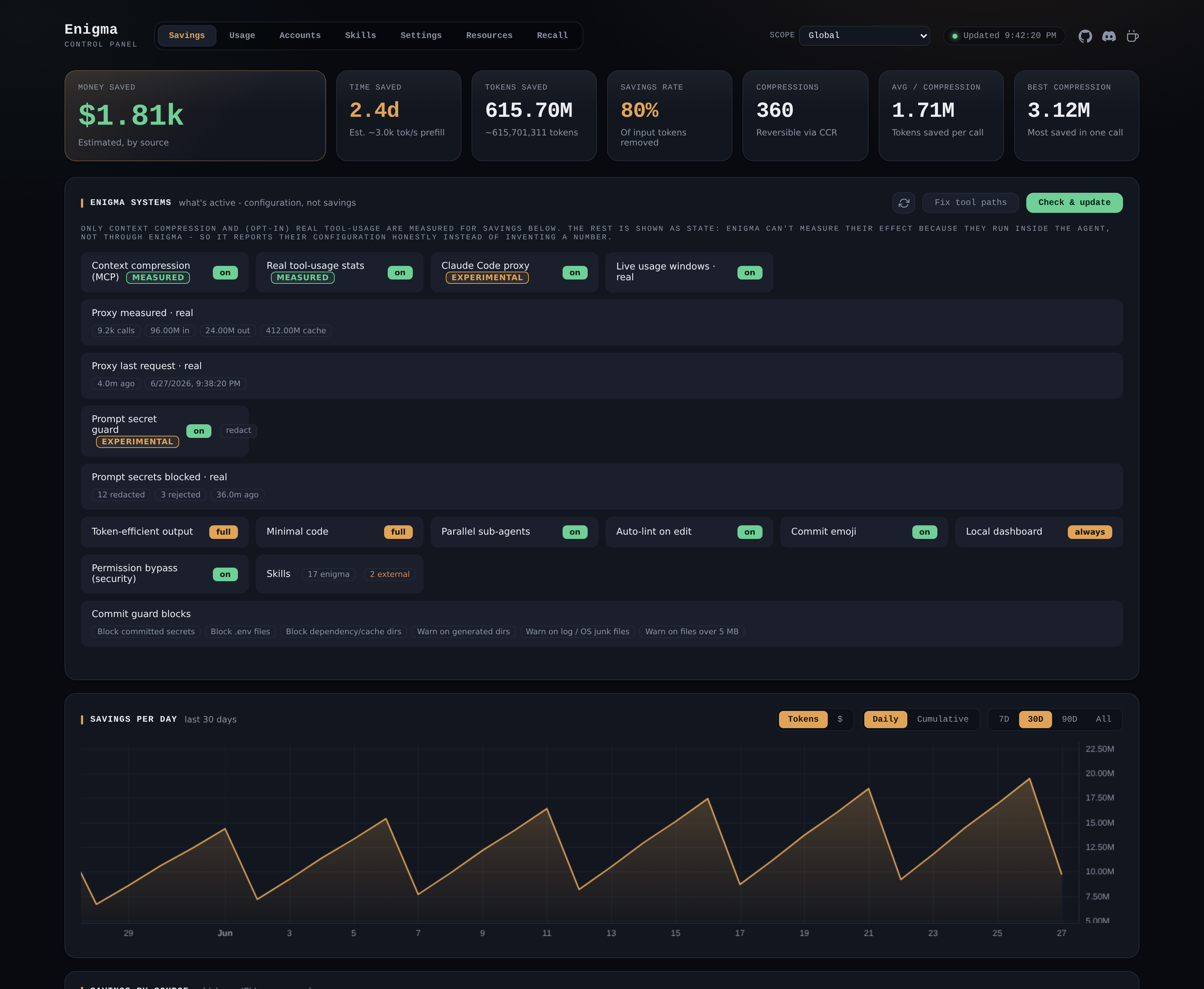
The dashboard (savings view shown; auto-generated from the current UI, mock data).
enigma dashboard (alias dash) serves a local, loopback-only browser dashboard to
manage all of enigma - switch accounts and profiles, enable or edit skills per app,
change any setting, and free up your machine (kill a port, shut down WSL, quit Docker).
It also surfaces real Claude usage and the compression savings enigma can measure: totals,
estimated money saved, a per-day graph (tokens/$ and daily/cumulative), breakdowns by
the app that requested each compression and by content type, a savings history, a
recent-compressions table and reversible-cache (CCR) stats. It runs only while open;
enigma config dashboard always keeps a lightweight background daemon, and
enigma compress --clear resets the savings data.
The dashboard is fully modular - if you don't want it (e.g. on a server), you never need
it, and you can add or remove it at any time. Its browser UI (the page plus a ~196 KB chart
library) is not bundled in enigma-cli: it ships as a separate package,
@enigmax/dashboard, that enigma fetches
on demand the first time you open or enable the dashboard, into ~/.enigma/dashboard. enigma
keeps it current on enigma update, so it is enigma's dependency to maintain, not yours. If
you never use the dashboard, that bundle is never downloaded. enigma config dashboard off
is a complete teardown: it stops any background daemon and removes the enigma hosts-file
entry, so nothing is left behind. Re-enable it whenever you like with on-demand or always.
The Savings page also shows an Enigma Systems overview (which systems are active and how
they're configured - only Context Compression and the opt-in usage/proxy stats are measured;
the rest is shown as state, never invented savings), a Check & update button (refreshes
skills and the dashboard UI in place; a CLI bump still needs enigma update in a terminal),
and the Skills subpage to view/edit/enable/disable/remove skills and check for updates.
Proxy (experimental, opt-in, Claude Code only)
enigma config proxy on makes enigma claude route Claude Code through a local loopback
proxy that forwards every request verbatim to Anthropic and streams the response straight
back, reading only the token usage to record real measurements (no estimates). It is
off by default and deliberately conservative: a faithful pass-through (no content or
cache rewriting), it never stores auth headers or message content, binds 127.0.0.1 only,
and falls back to a direct launch if it can't start. It applies only to launches via
enigma claude (it injects ANTHROPIC_BASE_URL for that process only) and only to Claude
Code. Leave it off until you've confirmed it works for your setup.
Secret protection (commit guard + prompt guard)
enigma's commit guard already blocks committed secrets, .env files and dependency dirs.
You can now tailor it granularly - and not just for git:
Granular file rules. On top of the built-in protections, add your own blocked paths (extra globs to refuse, e.g.
secrets/*.json), excluded paths (an allowlist the guard never flags, e.g.tests/fixtures/**), and custom secret patterns (extra regexes). Edit them visually in the dashboard Enigma Settings panel or the terminal UI (enigma config), or from the CLI:enigma config guard-block-paths add "secrets/*.json",enigma config guard-allow-paths add "tests/fixtures/**",enigma config guard-secret-patterns add "mycorp_[a-z0-9]{32}"(and... remove <entry>, or the key alone to list). Defaults are unchanged; these only refine them. They live in~/.enigma-guard.jsonand a repo can override per-.githooks/enigma-guard.json.Prompt secret guard (opt-in, off by default, Claude Code only). Turn on
enigma config prompt-secret-guard onandenigma clauderoutes through the local proxy, scanning each outgoing chat message for credentials before they reach the model. On a hit it either redacts the secret (default - replaces it with[REDACTED: ...]so the key never leaves your machine but the turn still works) or rejects the whole request (enigma config prompt-secret-mode reject- nothing reaches Claude). It uses the same patterns as the commit guard plus your custom ones. The dashboard's Enigma Systems panel shows the guard's state and how many prompts it has actually redacted/rejected.
You can also configure enigma from the dashboard itself: the Enigma Settings panel
exposes the same options as the terminal UI (enigma config), editable in the browser.
Writes apply immediately at global scope; memory-affecting toggles prompt for an agent
restart. The settings write endpoint is loopback-only and origin-guarded (cross-site and
DNS-rebinding requests are refused), and the server never binds anything but 127.0.0.1.
The money figure is an estimate: enigma isn't a proxy, so it can't see the model -
it prices saved tokens per source with sensible defaults. Override the rate with
enigma config token-price <usd-per-1M-input-tokens> (0 restores the defaults).
The time figure is likewise an estimate: it converts saved input tokens into saved
prefill time at a default model speed. Override it with enigma config token-speed <tokens-per-second> (0 restores the default rate).
Claude usage (opt-in)
enigma config usage-stats on unlocks a full Usage view - in the dashboard (its own
tab) and the terminal UI (a "Claude usage" entry) - that reads your own Claude Code
session transcripts (~/.claude/projects/.../*.jsonl) and reports:
- Estimated cost in USD from a per-model price table (Opus/Sonnet/Haiku, incl. cache read/write rates), plus measured input/output/cache tokens.
- Breakdowns by model, by project, by account (every Claude login - default and
managed accounts, not just
~/.claude), and a recent sessions table. - A provider coverage line: only Claude Code keeps a readable local usage store, so Codex and OpenCode are shown as unavailable (no local token store) rather than faked. The session/weekly windows are Claude-specific (they come from Anthropic's rate-limit headers).
- A current 5-hour block computed locally from transcript timestamps: tokens + cost used in the open window, the burn rate (tokens/min) and a projected end-of-window total. (No Anthropic API is called - this is reconstructed from your local logs.)
- The same usage windows Claude Code shows as gauges: Current session, Weekly -
All models, and Weekly - Sonnet only, each with its reset time and % used.
- Live (recommended): with the proxy on (
enigma config proxy on) and launching viaenigma claude, enigma reads Anthropic's realanthropic-ratelimit-unified-*response headers from your traffic and shows the exact %/reset Claude's own UI shows - no plan limit needed. Cards backed by this are marked live. (This is how usage trackers get the numbers; enigma gets them for free from traffic you already make, with no extra API call or token handling.) - Fallback: before the proxy has seen a request, the card shows tokens used, or a %
against a plan limit you set on the card or with
enigma config plan-weekly-limit <tokens>/plan-session-limit/plan-weekly-sonnet-limit(weekly reset viaenigma config plan-weekly-reset "mon 11:00"). enigma never fabricates a percentage.
- Live (recommended): with the proxy on (
It is read-only and loopback-only; nothing is sent anywhere. Off by default because it reads your session logs, which are broader than enigma's own compression data.
Honesty note: cost is an estimate (Anthropic does not record per-message cost in the transcript; real spend is billed by Anthropic). Token counts and prompt-cache reads are measured facts. enigma deliberately does not attribute savings to skills or to token-efficient output - a transcript has no counterfactual baseline, so any such figure would be invented. Only Claude Code is read today; Codex/OpenCode use absent or undocumented local session stores and are not guessed.
Manage accounts & profiles from the dashboard
The dashboard Accounts tab does everything the terminal UI does: switch the active
account, add / rename / remove managed accounts, and create profiles that pin one account
per tool. Logging an account in still happens in a terminal (the browser cannot host a
tool's interactive login), so the panel shows the exact command to run, e.g.
enigma claude work.
Export / import your config
The Settings tab has Export config and Import config. Export downloads a
single JSON bundle - your .enigma.json, the commit-guard config, and your account/profile
structure (names + tool->account mappings). It is secret-free: no auth tokens or
credentials are ever included, so the file is safe to move between machines or commit.
Importing recreates the structure (seeding fresh account dirs); you then log each account
in per machine. Both use the browser's native file dialogs, so you always choose where to
save or which file to import.
As an MCP server
enigma mcp runs a stdio MCP server exposing three tools - enigma_compress,
enigma_retrieve, enigma_stats - so an agent can compress large tool outputs
itself and retrieve originals on demand. Enable deployment and it is registered in
each managed agent's own config (Claude Code mcpServers, Codex
[mcp_servers.enigma], opencode mcp), preserving your other servers:
enigma config compress on     # register the MCP server on install/sync
enigma config compress off    # remove it again
Off by default - adding an MCP server to your agents is an explicit choice. Everything runs locally; no data leaves your machine.