
DevSurface
Local developer dashboard for Node.js repositories.
Quick Start · Commands · Dashboard · Report an issue





DevSurface is a zero-config CLI and local browser dashboard for understanding, configuring, and running unfamiliar repositories. It detects Node.js package scripts, Python, Go, and Java project commands, environment files, occupied ports, Docker Compose services, frameworks, live command logs, repo health checks, and multi-workspace projects.
No global install, account, cloud service, or config file is required.
npx devsurfaceWith Bun:
bunx devsurface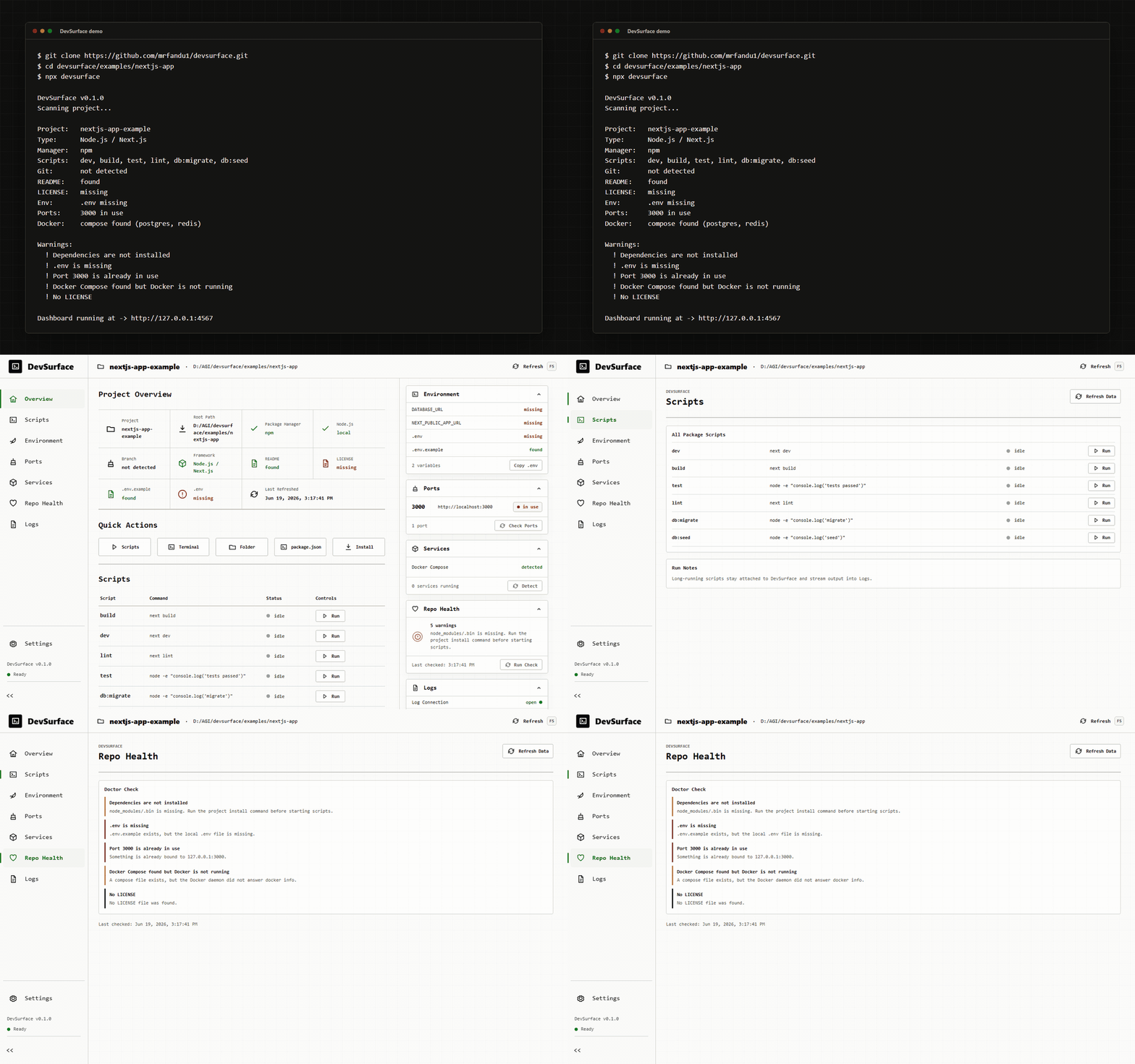
Why DevSurface
Most repositories explain setup with a few commands, but real onboarding usually means checking env files, ports, Docker, package managers, scripts, and stale README instructions. DevSurface puts that project surface in one local browser view so a new contributor can see what is missing before guessing in the terminal.
DevSurface is local-first:
- Local runs bind to
127.0.0.1. - Docker and k3s runs bind inside the container and are meant to be exposed with
local port mappings or
kubectl port-forward. - No accounts, cloud sync, telemetry, or analytics.
.envvalues are never displayed.- Commands are shown before they run.
Use Cases
DevSurface is useful when you need to:
- Onboard contributors to an unfamiliar Node.js repository.
- Explore available npm, pnpm, Yarn, or Bun scripts.
- Check missing environment variables before starting a project.
- Detect local port conflicts.
- View and control Docker Compose services.
- Run development commands from a browser dashboard.
- Check repository onboarding health in GitHub Actions.
- Manage multiple local project workspaces.
Supported Frameworks and Tools
DevSurface detects projects using:
- Next.js
- Vite
- Express
- Fastify
- NestJS
- Remix
- Prisma
- Python: FastAPI/Uvicorn, Flask, Django
- Go modules
- Java: Maven and Gradle
- Docker Compose
- npm, pnpm, Yarn, and Bun
How It Compares
| Tool | What it does | Where DevSurface is different |
|---|---|---|
| runme.dev | Runs commands embedded in annotated README markdown. | Requires maintainers to annotate commands. DevSurface scans the repo without README annotations. |
| VS Code Tasks | Runs tasks from .vscode/tasks.json. |
VS Code only and manually configured. DevSurface runs from npx and opens in any browser. |
| Makefile / Taskfile | Provides terminal task runners. | Terminal only. DevSurface adds UI, auto-detection, ports, env checks, logs, and health warnings. |
| npm-run-all | Runs multiple npm scripts from the terminal. | Script orchestration only. DevSurface shows the whole local project surface. |
package.json scripts |
Standard Node.js script entry points. | No UI, env checks, port checks, service detection, or repo health context. |
DevSurface is not trying to replace these tools. It sits above them as a local control panel for contributors who need to understand how a project is meant to run.
Quick Start
Run DevSurface from the root of any Node.js project:
cd my-node-project
npx devsurface
Or, if you use Bun:
cd my-node-project
bunx devsurface
The dashboard opens at:
http://127.0.0.1:4567If a browser does not open automatically, copy the printed dashboard URL from the terminal.
Commands
Run DevSurface without installing it globally:
| Runtime | Command |
|---|---|
| npm | npx devsurface |
| Bun | bunx devsurface |
| Command | Description |
|---|---|
devsurface |
Scan the current project, start the dashboard, and open the browser. |
devsurface scan |
Print detected project information to the terminal. |
devsurface doctor |
Print setup and repo health warnings. |
devsurface init |
Create a starter devsurface.config.json. |
devsurface run <script> |
Run a package script and stream output. |
devsurface serve |
Start the multi-workspace hub server. |
devsurface workspace add [path] |
Register a project directory with the local hub. |
devsurface workspace list |
List registered hub workspaces. |
devsurface workspace remove <id> |
Remove a workspace from the hub registry. |
Multi-Workspace Hub
DevSurface now runs as a local hub. One server can serve several project directories, each with isolated process state, Docker controls, logs, and scanner results.
Start or attach from any project:
npx devsurfaceRun a persistent hub:
npx devsurface serve --no-openRegister workspaces manually:
npx devsurface workspace add /path/to/project-a
npx devsurface workspace add /path/to/project-b
npx devsurface workspace list
Container and k3s deployments are included for local-cluster use:
Dockerfiledocker-compose.hub.ymldeploy/k3s/
Container deployments bind inside the container. Keep host port mappings local,
for example 127.0.0.1:4567:4567, or use kubectl port-forward for k3s.
GitHub Action
DevSurface can check repository onboarding health on every pull request without installing dependencies or running project scripts.
name: DevSurface

on:
  pull_request:
  push:
    branches: [main]

permissions:
  contents: read
  pull-requests: write

jobs:
  health:
    runs-on: ubuntu-latest
    steps:
      - uses: actions/checkout@v4
      - uses: mrfandu1/devsurface@v0
        with:
          fail-on: error
The action always emits workflow annotations and a Markdown job summary. On pull
requests it also creates or updates one DevSurface comment when the workflow token
has pull-requests: write. Fork pull requests normally receive a read-only token;
in that case the action keeps the annotations and summary and skips the comment.
Inputs:
| Input | Default | Description |
|---|---|---|
path |
. |
Repository-relative directory to check. |
fail-on |
error |
Fail on error, warning, or never fail with never. |
comment |
true |
Create or update a pull request comment when permissions allow. |
github-token |
token | Token used only for pull request comments. |
The repository checks are intentionally static. They do not install dependencies,
run package scripts, inspect local ports, require a real .env, or contact Docker.
What It Detects
| Area | Detection |
|---|---|
| Project | package.json, project name, README, LICENSE |
| Package manager | npm, pnpm, yarn, bun from lock files |
| Scripts | package.json scripts |
| Environment | .env, .env.example, missing and empty keys without values |
| Ports | Configured, inferred, and occupied ports using Node's net module |
| Docker | Compose files, daemon status, service state, controls, and logs |
| Git | Repository presence and current branch |
| Framework | Next.js, Vite, Express, Fastify, NestJS, Remix, Prisma |
Dashboard
The dashboard includes:
- Project Overview: project name, framework, package manager, branch, env, README, and license status.
- Quick Actions: compact direct actions for scripts, terminal, project folder,
package.json, and dependency install. - Scripts: every package script, plus grouped configured commands when present.
- Environment:
.envand.env.examplestatus, key presence, and copy-from-example. - Ports: detected ports with availability and conflict warnings.
- Services: Docker Compose daemon state, per-service status, start/stop controls, and the latest 200 log lines for each service.
- Logs: expandable per-command logs with timestamps, streams, and exit state.
- Repo Health: doctor warnings for common setup issues.
Quick Actions intentionally stay compact. Long script lists belong in the Scripts page, where they have room to breathe.
Optional Config
DevSurface works without configuration. Maintainers can add devsurface.config.json
when a project needs richer commands, groups, ports, env paths, or docs links.
{
  "name": "My App",
  "description": "Full-stack SaaS starter",
  "commands": {
    "install": "pnpm install",
    "dev": "pnpm run dev",
    "build": "pnpm run build",
    "test": "pnpm test",
    "lint": "pnpm run lint"
  },
  "groups": {
    "Setup": ["install"],
    "Development": ["dev"],
    "Quality": ["test", "lint"],
    "Build": ["build"]
  },
  "ports": [3000, 5432, 6379],
  "env": {
    "example": ".env.example",
    "local": ".env"
  },
  "services": {
    "docker": true
  },
  "docs": "https://docs.example.dev"
}
Configured commands appear on the Scripts page. If groups is present, DevSurface
uses those group names. Commands not listed in a group still appear under
Configured Commands. The docs URL appears as a Project docs link.
Badge
Maintainers can add this badge to a project README after checking that DevSurface works for the repo:
[](https://github.com/mrfandu1/devsurface)Safety
DevSurface is designed for local development.
- Local dashboard servers bind to loopback hosts.
- Container deployments use
DEVSURFACE_CONTAINER=true. - Workspace registration can be limited with
DEVSURFACE_WORKSPACE_ROOTS. In container or shared-host deployments, set this to restrict which directories the hub will accept; on a single-user laptop it is optional and DevSurface starts with no extra config. .envvalues are never returned by scanners, API routes, CLI output, or UI panels.- Dashboard command runs show the exact command string first.
- Docker service start and stop actions show the exact Compose command before running.
- Destructive-looking configured commands, such as
rm -rf,docker volume rm, database drops, andgit clean -fd, are visibly marked before execution. This list is a helpful warning, not a sandbox: it flags common footguns for confirmation but does not attempt to detect every dangerous command. Treat package scripts as code that runs as you. - Child processes started by DevSurface are cleaned up when the dashboard exits.
FAQ
What is DevSurface?
DevSurface is a local developer dashboard for understanding, configuring, and running Node.js repositories.
Can DevSurface run npm scripts from a browser?
Yes. DevSurface detects package.json scripts and lets you run them while viewing
live logs and exit status.
Does DevSurface display .env values?
No. DevSurface checks whether environment keys exist, but never displays their values.
Does DevSurface require configuration?
No. It works automatically, with an optional devsurface.config.json file for richer
commands, groups, ports, env paths, and docs links.
Does DevSurface support Docker Compose?
Yes. It detects Compose services and provides service status, controls, and recent logs.
Examples
This repository includes two sample projects:
cd examples/node-basic
node ../../dist/cli/index.js

cd examples/nextjs-app
node ../../dist/cli/index.js
The Next.js example is used for the README demo: it has six scripts, .env.example,
Docker Compose, and a port conflict scenario.
Development
npm install
npm run build
npm test
Useful commands:
| Command | Description |
|---|---|
npm run dev |
Run the local DevSurface CLI from source. |
npm run build:web |
Build the React dashboard with Vite. |
npm run build:cli |
Build the CLI with tsup. |
npm run typecheck |
Run TypeScript without emitting files. |
npm run lint |
Run ESLint. |
npm run format:check |
Check Prettier formatting. |
Before opening a pull request, run:
npm run format:check
npm run typecheck
npm run lint
npm test
npm run build
Contributing
Contributions of every kind are welcome: code, documentation, bug reports, examples, and reviews. Start with CONTRIBUTING.md for the development workflow.
License
DevSurface is released under the MIT License. See LICENSE for the full text. Copyright (c) 2026 DevSurface contributors.
Contact and community
- GitHub Issues: report bugs and request features through GitHub Issues.
- Security: report vulnerabilities through SECURITY.md.