
copilot-reverse
Use the GitHub Copilot subscription you already pay for as a local Claude Code / Codex backend. No new API keys. No per-token bills. One terminal app.
  ┌─────────────┐        ┌───────────────────┐        ┌─────────────┐
  │ Claude Code │ ─────▶ │  copilot-reverse  │ ─────▶ │   Copilot   │
  │   / Codex   │  local │  (your machine)   │  proxy │  (your sub) │
  └─────────────┘        └───────────────────┘        └─────────────┘
Disclaimer: The GitHub Copilot integration uses community-documented, unofficial endpoints, for use with your own Copilot subscription only. It may break if GitHub changes these endpoints.
60-second start
npx copilot-reverse- It asks you to log in to GitHub (device code — paste a code in your browser). One time only.
- The terminal app launches. You'll see a prompt and a status bar.
- In the app, type:
Pick a model (e.g. claude-opus-4.8 (1M)), choose global, done./setup-claude - Open a new terminal and run
claude. It's now talking to Copilot through copilot-reverse.
That's it. Codex users: run /setup-codex instead.
Here's the app itself — a prompt, a live status bar, and slash-command autocomplete:
 ✳ copilot-reverse                                                       worker: ready

 Type a message to chat with the assistant, or /help for commands.
╭─────────────────────────────────────────────────────────────────────────────────────╮
│ › /setup                                                                              │
╰─────────────────────────────────────────────────────────────────────────────────────╯
  ❯ /setup-claude   print Claude Code config
    /setup-codex    print Codex/OpenAI config
    /setup-status   show configured endpoints
    ↑↓ navigate · tab complete · enter run
 model claude-opus-4.8  ·  daemon ready  ·  claude u:✓ p:○  codex u:✓ p:○  ·  /help
What can I do in the app?
Just talk to it — it understands plain English and will do the work for you:
"list models" → shows every model + its context window "set up claude" → asks scope (global/project) + model, then configures Claude Code "is the worker healthy?" → runs a health check "why did my last request fail?" → shows the error (incl. cut-short stream runaways)
Prefer commands? Type / to see them all. The essentials:
| Command | What it does |
|---|---|
/setup-claude · /setup-codex |
Point Claude Code / Codex at copilot-reverse |
/model |
Switch the chat model (1M-context models marked) |
/status · /doctor |
Is everything healthy? (/status shows each client's scope + model) |
/logs · /metrics |
What ran, what failed, and why |
/dashboard |
Open a live web dashboard in your browser |
/report |
File a pre-filled bug report (diagnostics only — no prompts) |
/reset-claude · /reset-codex |
Undo setup, restore original config |
/login · /logout |
Sign in to GitHub (device-code) · sign out (remove token) |
/help · /quit |
List commands · exit |
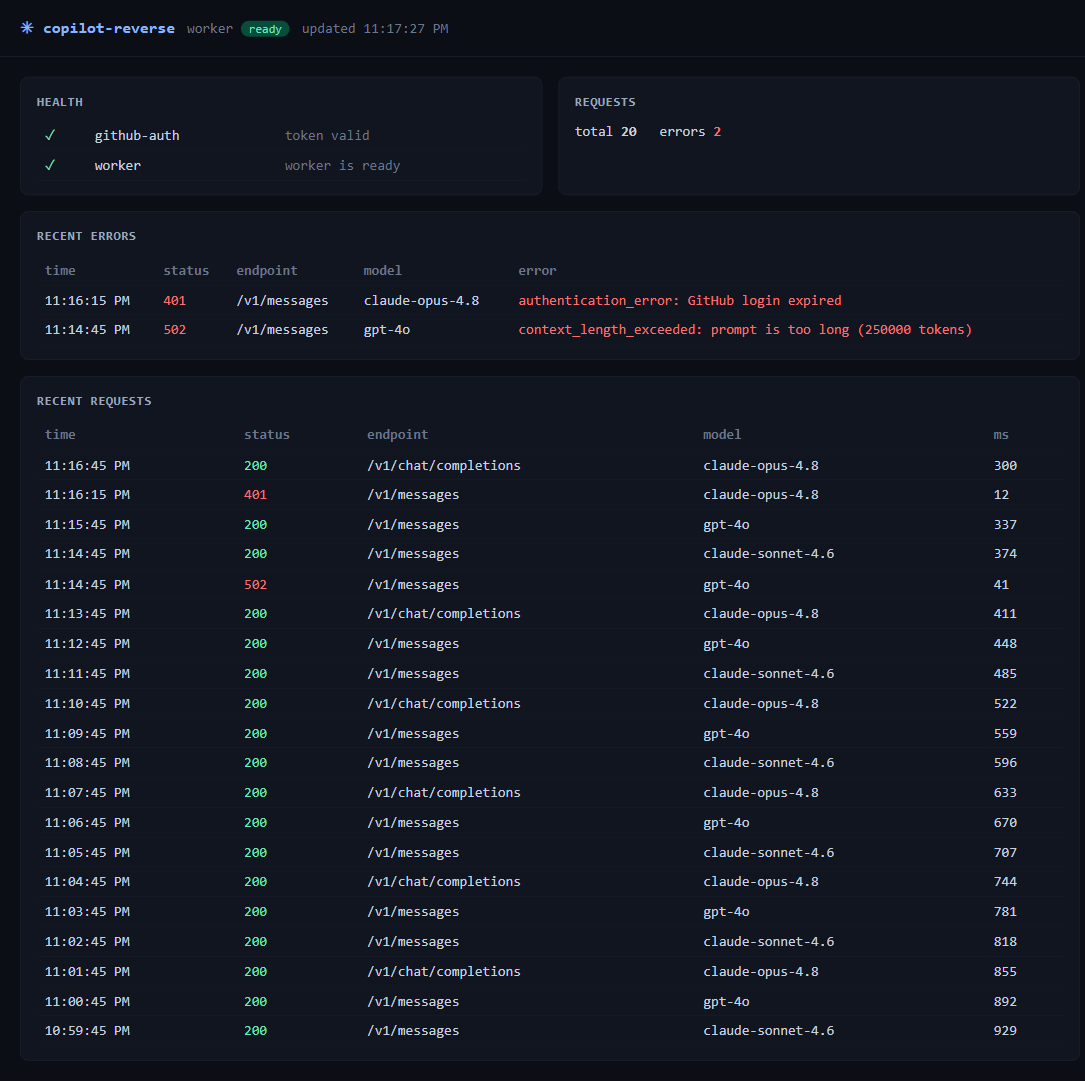
The live dashboard
/dashboard opens a self-refreshing web view of everything happening through the proxy — worker
health, request volume, and (most useful) recent errors with their real messages:
Connect your own tools
Already have something that speaks OpenAI or Anthropic? Point it here:
- OpenAI-compatible:
http://127.0.0.1:7891/openai - Anthropic-compatible:
http://127.0.0.1:7891/anthropic
Any API key value works locally (it's your machine). Example:
export ANTHROPIC_BASE_URL=http://127.0.0.1:7891/anthropic
export ANTHROPIC_API_KEY=local
claude
The status bar, decoded
The bottom line of the app tells you everything at a glance:
model claude-opus-4.8 · daemon ready · claude u:✓ p:○ codex u:○ p:○ · /help- worker / daemon — green
readymeans the proxy is up and self-healing. - claude u:✓ p:○ — Claude Code is configured at the user (global) level, not in this project. Read live from your real config files.
Troubleshooting
"context 100%" or /compact fails in Claude Code
Re-run /setup-claude and pick a 1M model (e.g. claude-opus-4.8 (1M)). copilot-reverse writes
the right context-window hint so the client stops assuming a small window. Then restart Claude Code.
"GitHub login expired" Your Copilot session lapsed. You don't need to restart anything — when a chat fails, copilot-reverse detects it and tells you right there:
assistant error: 401 authentication_error: GitHub login expired
  ↳ your GitHub login looks expired — run /login to sign in again
Just type /login, complete the device-code prompt, and you're back — the worker reloads the new
token automatically. (Switching accounts? /logout first, then /login.)
A request failed and I don't know why
Type /logs (or ask "why did that fail?"). Every failure is captured with its real upstream
message. Still stuck? /report opens a pre-filled GitHub issue with diagnostics — never your
prompt content.
Want to undo everything
/reset-claude and /reset-codex remove exactly the keys copilot-reverse added and leave the rest
of your config untouched.
Good to know
- Your data stays local. The app proxies between your editor and Copilot on
127.0.0.1. Your GitHub token lives only in~/.copilot-reverse/creds.jsonon your own disk. - It heals itself. If the proxy crashes, the supervisor restarts it with backoff and records why.
- It never freezes. If a model degenerates (loops on one token, never stops), the proxy cuts the
stream cleanly as
max_tokensand tags it —/reportthen files a prefilled issue so it's easy to flag. - Tunable.
~/.copilot-reverseconfig covers ports, restart backoff, and the GitHub-token heartbeat interval; defaults are sensible, override only if needed. - Unofficial endpoints. This uses community-documented Copilot endpoints with your own subscription. It may break if GitHub changes them — that's the trade-off for not needing extra keys.
Architecture
Three processes, one terminal app:
- TUI (Ink) — the
copilot-reverseprocess: REPL + slash commands + a claude-agent-sdk assistant (which dogfoods copilot-reverse's own Anthropic endpoint). - Supervisor (:7890) — control API + SQLite + self-healing worker supervision.
- Worker (:7891) — OpenAI
/openai/chat/completions+ Anthropic/anthropic/v1/messages→ Copilot, with tool-use translation both ways. Each protocol also serves a…/modelsdiscovery endpoint.
Development
Requires Node >=20.
npm install && npm test && npm run buildEnd-to-end tests
The e2e/ folder holds cross-module end-to-end scenarios (real worker + supervisor +
TUI wiring, fake Copilot provider). The case catalog is e2e/cases.md and the
latest run is e2e/RESULTS.md.
Every code change must keep the full e2e suite green. npm test runs it (the suite is
included in the default vitest run); npm run test:e2e runs only the e2e cases. After a change,
re-run and update e2e/RESULTS.md.
Test notes
- TUI input tests (
tests/tui/app.test.tsx): the test waits ~30 ms afterrender()before writing tostdin. This is not flakiness padding — Ink'suseInputsubscribes to stdin asynchronously after mount, so writes issued in the same tick asrender()are dropped. The delay lets the subscription attach; assertions are otherwise unchanged.
Questions or bugs? Use /report from inside the app, or open an issue on
GitHub. Happy hacking.