
CDP Tunnel

Chrome DevTools Protocol Bridge
A Chrome extension that exposes your browser as a CDP endpoint,
supporting multiple Playwright/Puppeteer clients to connect simultaneously.


Architecture
┌─────────────────────────────────────────────────────────────────┐
│                        Proxy Server                             │
│                     (localhost:9221)                            │
│                                                                 │
│   /plugin  ←─── Chrome Extension (WebSocket)                    │
│   HTTP     ←─── Playwright/Puppeteer Clients                    │
└─────────────────────────────────────────────────────────────────┘
         ↑              ↑              ↑
         │              │              │
    Client 1       Client 2       Client 3
   (clientId_1)    (clientId_2)    (clientId_3)
Features
- Multi-client Support - Multiple Playwright/Puppeteer clients can connect simultaneously
- Message Isolation - Pages created by each client are owned by that client
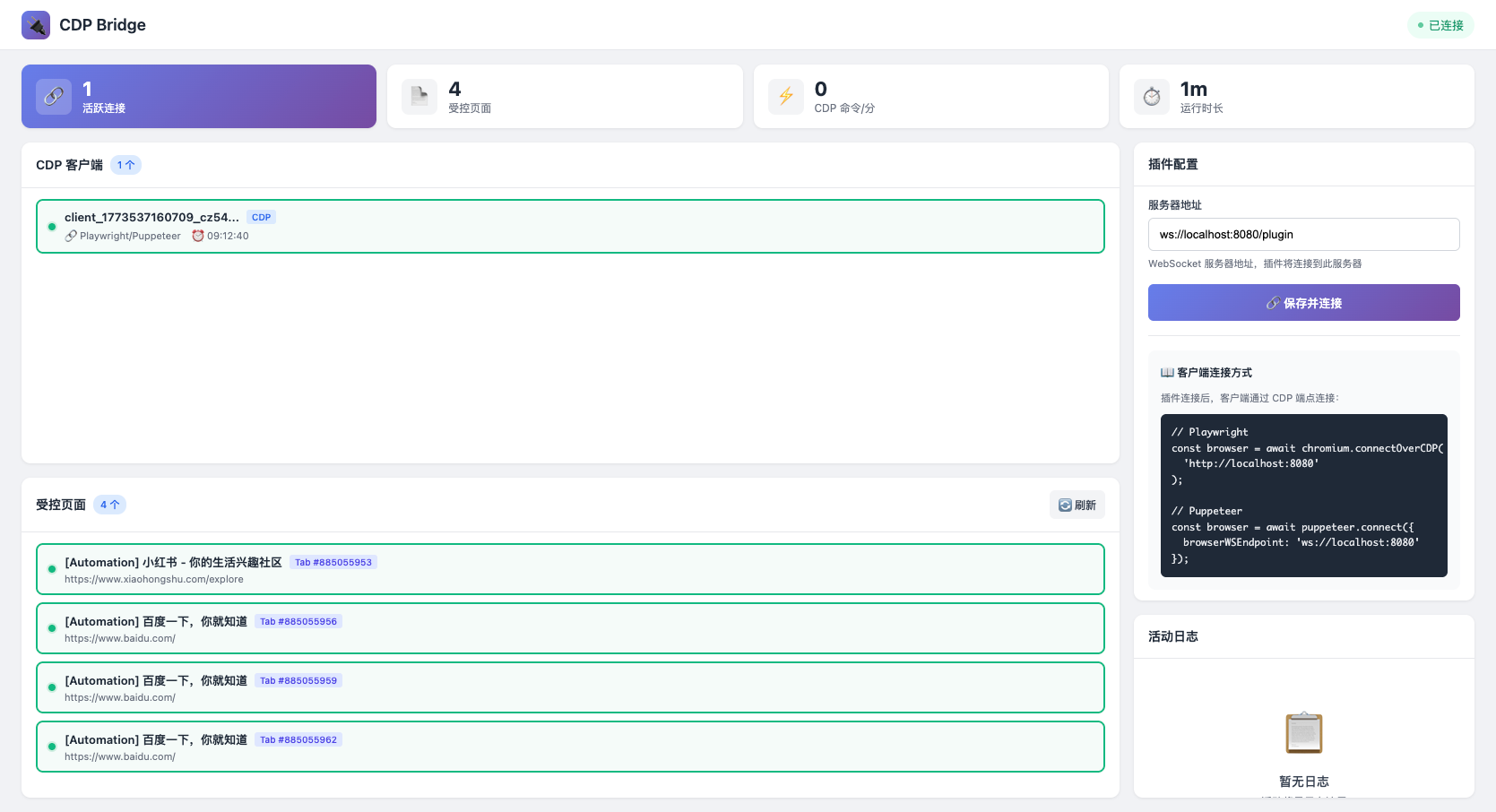
- Configuration Page - Visualize connection status, client list, and controlled pages
- Auto Reconnect - Extension automatically reconnects to the server
Screenshot
Quick Start
Option 1: Install Extension Only (No npm needed)
Download and install the Chrome extension directly:
- Download
cdp-tunnel-extension.zipfrom the latest release - Unzip it
- Open
chrome://extensions/in Chrome - Enable Developer mode (top right)
- Click Load unpacked → select the unzipped folder
- Start the proxy server separately (see Option 2 or 3 below)
Option 2: Install via npm (Recommended)
# One command to set up everything
npx cdp-tunnel setup

# Or install globally
npm install -g cdp-tunnel
cdp-tunnel setup        # Start server + auto-load extension into Chrome
cdp-tunnel status       # Check status
cdp-tunnel diagnose     # Diagnose connection issues
Option 3: Manual Installation
1. Start the Proxy Server
npx cdp-tunnel start
# or manually:
npx cdp-tunnel start -p 9221
2. Install Chrome Extension
- Open
chrome://extensions/ - Enable "Developer mode"
- Click "Load unpacked"
- Select the
extension-newdirectory
3. Connect the Extension
Click the extension icon, then click 打开完整配置 to open the configuration page. Add a connection: fill in Name (e.g., "local"), WebSocket URL (default ws://localhost:9221/plugin), and Mode (create/takeover). The CDP address will be displayed (e.g., http://localhost:9221 for create mode, http://localhost:9222 for takeover mode). Copy it and use it in Playwright: chromium.connectOverCDP('http://localhost:9221').
3. Client Connection
// Playwright
const { chromium } = require('playwright');

const browser = await chromium.connectOverCDP('http://localhost:9221');
const context = browser.contexts()[0];
const page = await context.newPage();
await page.goto('https://example.com');

// Puppeteer
const puppeteer = require('puppeteer');

const browser = await puppeteer.connect({
  browserWSEndpoint: 'ws://localhost:9221'
});
const page = await browser.newPage();
await page.goto('https://example.com');
4. Using with agent-browser
agent-browser is a browser automation CLI that can connect to CDP Tunnel:
# Install agent-browser
npm install -g agent-browser

# Connect to CDP Tunnel
agent-browser --cdp http://localhost:9221 open https://example.com

# Take a snapshot
agent-browser --cdp http://localhost:9221 snapshot -i

# Interact with elements
agent-browser --cdp http://localhost:9221 click @e1
agent-browser --cdp http://localhost:9221 fill @e2 "hello"

# Take screenshot
agent-browser --cdp http://localhost:9221 screenshot output.png
This allows you to control the browser through CDP Tunnel using simple CLI commands.
Multi-client Usage
All clients connect to the same endpoint http://localhost:9221. The server automatically assigns a unique clientId to each connection.
// Multiple clients can connect simultaneously
const browser1 = await chromium.connectOverCDP('http://localhost:9221');
const browser2 = await chromium.connectOverCDP('http://localhost:9221');
const browser3 = await chromium.connectOverCDP('http://localhost:9221');

// Pages created by each client are independent
const page1 = await browser1.contexts()[0].newPage();
const page2 = await browser2.contexts()[0].newPage();
const page3 = await browser3.contexts()[0].newPage();
Configuration Page
Click the extension icon to open the configuration page, where you can view:
- CDP Client List - Shows connected Playwright/Puppeteer clients
- Controlled Pages List - Shows controlled pages with click-to-navigate support
- Activity Log - Connection status change records
Project Structure
cdp-tunnel/
├── server/
│   └── proxy-server.js      # Proxy server
├── extension-new/
│   ├── background.js        # Extension Service Worker
│   ├── config-page-preview.html  # Configuration page
│   ├── config-page.js       # Configuration page script
│   ├── core/
│   │   ├── state.js         # State management
│   │   └── websocket.js     # WebSocket connection management
│   └── features/
│       ├── cdp-router.js    # CDP message routing
│       └── screencast.js    # Screenshot functionality
└── tests/
    ├── playwright-single.js      # Single client test
    ├── playwright-multi.js       # Multi-client test
    └── playwright-interactive.js # Interactive test
Testing
# Single client test
node tests/playwright-single.js

# Multi-client test
node tests/playwright-multi.js

# Interactive test
node tests/playwright-interactive.js
Notes
- Port Availability - Ensure port 9221 is not in use
- Extension Permissions - The extension requires
debugger,tabs, and other permissions - Browser Limitation - Only one extension can control a browser via debugger at a time
License
This project is licensed under the Apache License 2.0 with Attribution Requirement.
See LICENSE for details.
If you use this project in your work, please include attribution:
- Project: CDP Tunnel
- Author: dyyz1993
- Source: https://github.com/dyyz1993/cdp-tunnel