
Case anything


# npm
npm i case-anything

# deno
deno add jsr:@mesqueeb/case-anything

# jsr (use any of npx, yarn dlx, pnpm dlx, or bunx)
npx jsr add @mesqueeb/case-anything
14 case changing functions: camelCase, kebab-case, PascalCase and more...
A simple integration with nano package size. (SMALL footprint!)
Motivation
I created this package because most other packages that do simple case changing are so big...
|
Some features I focused on: |
Case anything is used in... |
Usage
case-anything supports tree-shaking and is side-effect free!
// just import the functions you need like so:
import { camelCase, kebabCase } from 'case-anything'
case-anything has different behaviour if the string you pass has spaces or not.
- Without spaces it will split and format on every "part" it can detect
- With spaces it will split and format on every "word" based on those spaces
Strings without spaces
| Name | Input example | Output example |
|---|---|---|
| camelCase | camelCase('$catDog') |
catDog |
| PascalCase UpperCamelCase |
pascalCase('$catDog')upperCamelCase('$catDog') |
CatDog |
| kebab-case | kebabCase('$catDog') |
cat-dog |
| snake_case | snakeCase('$catDog') |
cat_dog |
| CONSTANT_CASE | constantCase('$catDog') |
CAT_DOG |
| Train-Case | trainCase('$catDog') |
Cat-Dog |
| Ada_Case | adaCase('$catDog') |
Cat_Dog |
| COBOL-CASE | cobolCase('$catDog') |
CAT-DOG |
| Dot.notation | dotNotation('$catDog') |
cat.Dog |
| Path/case | pathCase('$catDog') |
$cat/Dog |
| Space case | spaceCase('$catDog') |
$cat Dog |
| Capital Case | capitalCase('$catDog') |
$Cat Dog |
| lower case | lowerCase('$catDog') |
$cat dog |
| UPPER CASE | upperCase('$catDog') |
$CAT DOG |
Special Characters
You can see that most functions by default remove special characters, and some functions keep special characters.
| functions that remove special characters* | functions that keep special characters* |
|---|---|
|
|
|
*You can control wether or not to keep or remove special characters like so:
// default:
camelCase('$catDog') === 'catDog'
// force keeping special characters:
camelCase('$catDog', { keepSpecialCharacters: true }) === '$catDog'

// default:
pathCase('$catDog') === '$cat/Dog'
// force removing special characters:
pathCase('$catDog', { keepSpecialCharacters: false }) === 'cat/Dog'
Case Changing
These cases do not change the casing of the words:
- dotNotation
- pathCase
- spaceCase
// default:
dotNotation('$catDog') === 'cat.Dog'
// force lower case:
dotNotation('$catDog').toLowerCase() === 'cat.dog'
Strings with spaces
As soon as there is a space in the target string, it will regard the input as a sentence and only split each part at the spaces.
| Name | Input example | Output example |
|---|---|---|
| camelCase | camelCase("I'm O.K.!") |
imOk |
| PascalCase UpperCamelCase |
pascalCase("I'm O.K.!")upperCamelCase("I'm O.K.!") |
ImOk |
| kebab-case | kebabCase("I'm O.K.!") |
im-ok |
| snake_case | snakeCase("I'm O.K.!") |
im_ok |
| CONSTANT_CASE | constantCase("I'm O.K.!") |
IM_OK |
| Train-Case | trainCase("I'm O.K.!") |
Im-Ok |
| Ada_Case | adaCase("I'm O.K.!") |
Im_Ok |
| COBOL-CASE | cobolCase("I'm O.K.!") |
IM-OK |
| Dot.notation | dotNotation("I'm O.K.!") |
Im.OK |
| Path/case | pathCase("I'm O.K.!") |
I'm/O.K.! |
| Space case | spaceCase("I'm O.K.!") |
I'm O.K.! |
| Capital Case | capitalCase("I'm O.K.!") |
I'm O.k.! |
| lower case | lowerCase("I'm O.K.!") |
i'm o.k.! |
| UPPER CASE | upperCase("I'm O.K.!") |
I'M O.K.! |
Also note, that multiple sequential spaces are treated as one space.
Keep only certain special characters
Instead of removing all special characters, you can opt to keep some special characters.
In the example below we see:
- input:
$cat-dog - desired output:
$CatDog
pascalCase('$cat-dog', { keepSpecialCharacters: false })
// CatDog → not what we want
pascalCase('$cat-dog', { keepSpecialCharacters: true })
// $Cat-Dog → not what we want
pascalCase('$cat-dog', { keep: ['
Convert special characters into alphabet
I have extended regular alphabet with the most common Latin-1 Supplement special characters.
The coolest thing about this library is that it will "convert" special characters into regular alphabet for the cases used as variable names!
// CONVERTS special characters:
camelCase('Çâfé Ågård') === 'cafeAgard'
pascalCase('Çâfé Ågård') === 'CafeAgard'
kebabCase('Çâfé Ågård') === 'cafe-agard'
snakeCase('Çâfé Ågård') === 'cafe_agard'
constantCase('Çâfé Ågård') === 'CAFE_AGARD'
trainCase('Çâfé Ågård') === 'Cafe-Agard'
adaCase('Çâfé Ågård') === 'Cafe_Agard'
cobolCase('Çâfé Ågård') === 'CAFE-AGARD'
dotNotation('Çâfé Ågård') === 'Cafe.Agard'
// DOES NOT convert special characters:
spaceCase('Çâfé Ågård') === 'Çâfé Ågård'
pathCase('Çâfé Ågård') === 'Çâfé/Ågård'
lowerCase('Çâfé Ågård') === 'çâfé ågård'
upperCase('Çâfé Ågård') === 'ÇÂFÉ ÅGÅRD'
capitalCase('Çâfé Ågård') === 'Çâfé Ågård'
JSDocs
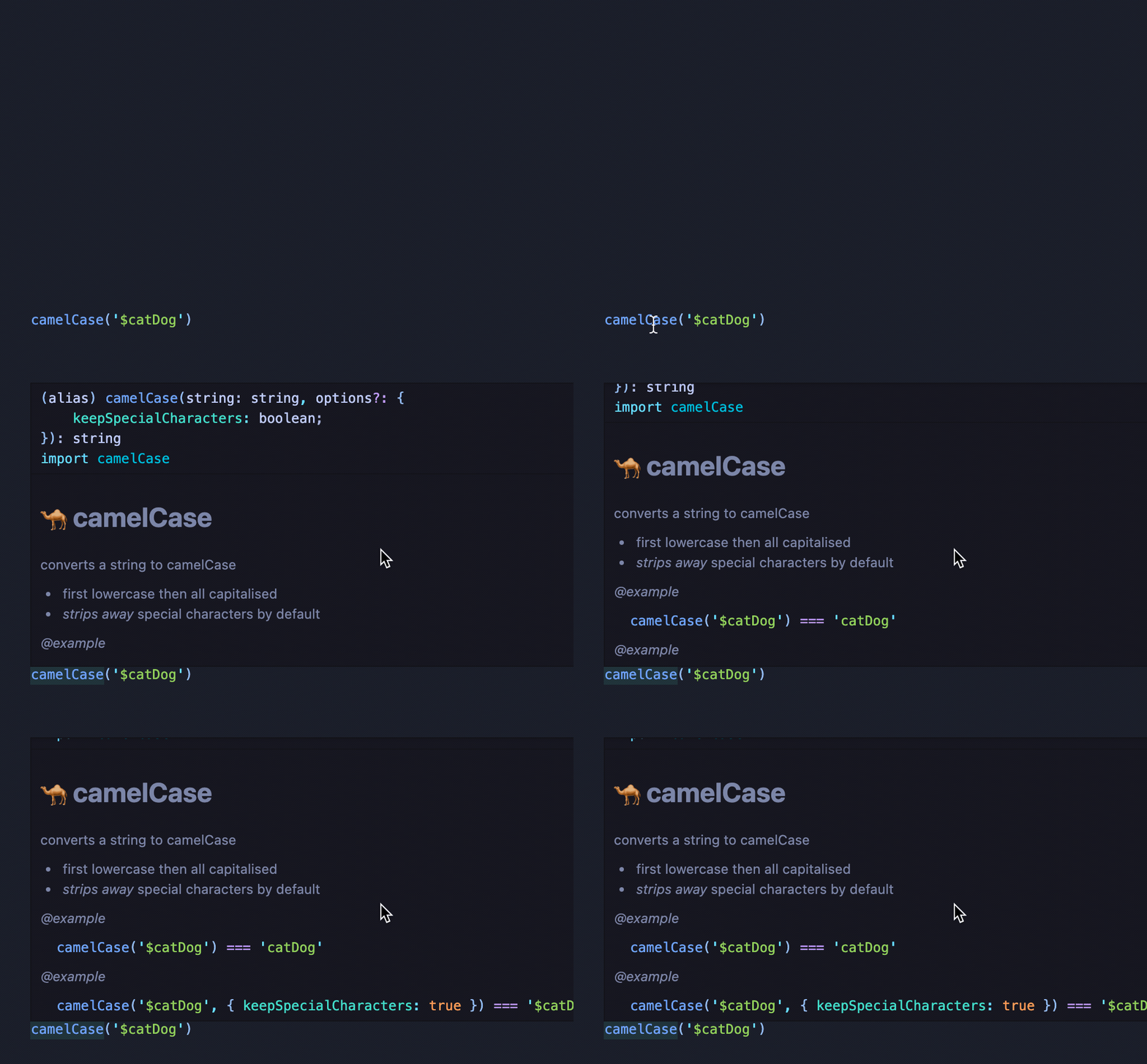
I have made sure there is great documentation available on hover!
Keyboard shortcuts
With Better Touch Tool you can set up keyboard shortcuts to convert selected text with JavaScript. This repo provides an easy to install preset that has shortcuts for pascal, kebab and camel case! (thanks to @AndrewKoch) It even supports multi-cursors in VSCode!
Here is an example triggering keyboard shortcuts to convert the selected text to PascalCase; kebab-case; camelCase:
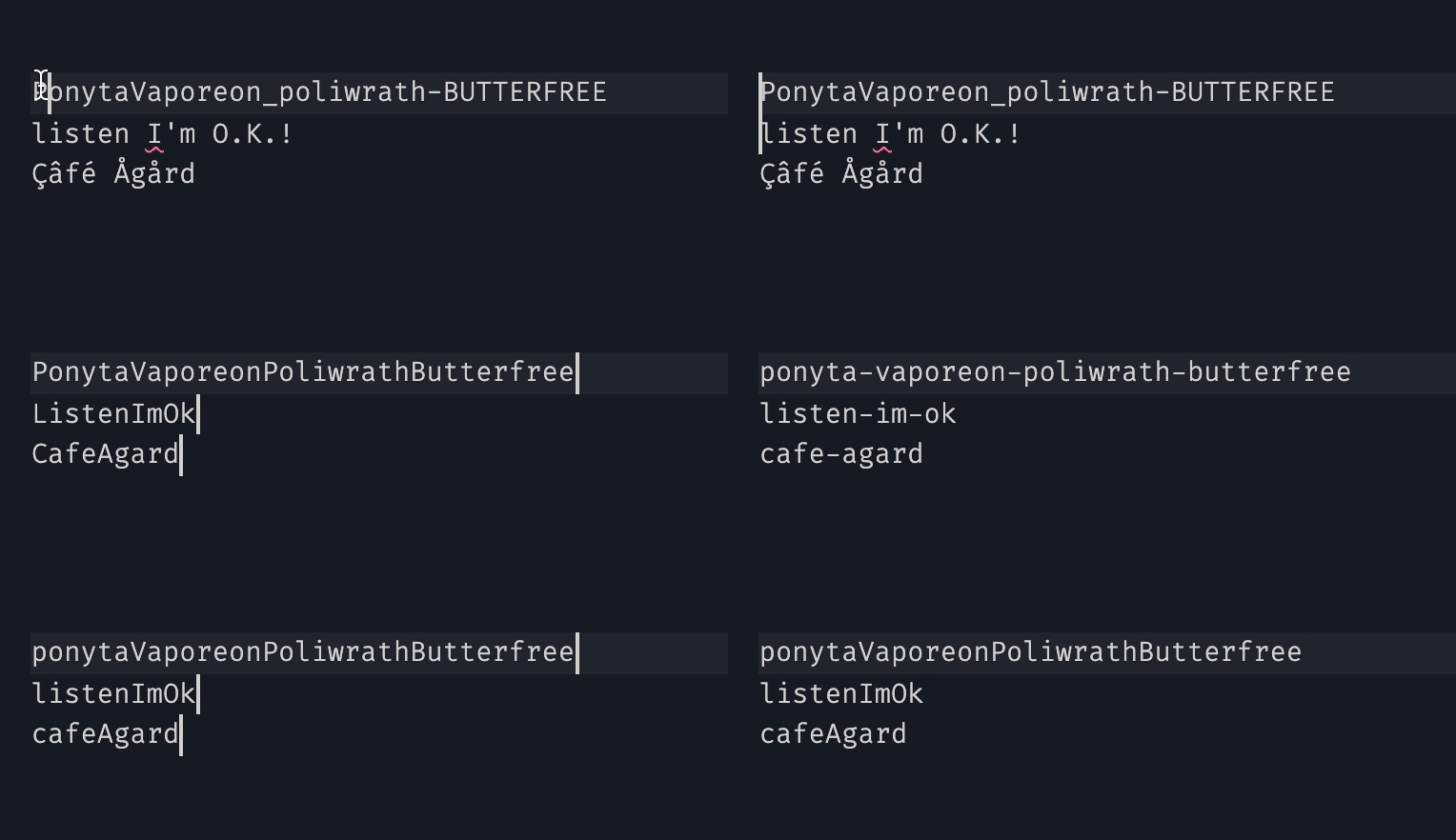
You can download the BTT preset from the source code: case-anything.bttpreset.
Package size
We'll compare this package with blakeembrey/change-case, a very famous package on npm.
case-anything
change-case
camelCase
1.1K (572)
27.2K (6K)
pascalCase
1.1K (561)
27.4K (6.1K)
kebabCase
1.1K (541)
26.8K (5.9K)
snakeCase
1.1K (540)
26.8K (5.9K)
constantCase
1.1K (540)
27.2K (6K)
pathCase
1K (530)
26.8K (5.9K)
Source code
What keeps my package small, is that literally just uses a regex to separate "words".
// the source code is similar to:
export function splitOnSpecialChars(string: string): any[] {
return string.match(/^[a-z]+|[A-Z][a-z]+|[a-z]+|[0-9]+|[A-Z]+(?![a-z])/g)
}
The actual regex used is a little bit more comprehensive and can be found here.
Meet the family (more tiny utils with TS support)
] })
// $CatDog → desired outputConvert special characters into alphabet
I have extended regular alphabet with the most common Latin-1 Supplement special characters.
The coolest thing about this library is that it will "convert" special characters into regular alphabet for the cases used as variable names!
__CODE_BLOCK_5__JSDocs
I have made sure there is great documentation available on hover!
Keyboard shortcuts
With Better Touch Tool you can set up keyboard shortcuts to convert selected text with JavaScript. This repo provides an easy to install preset that has shortcuts for pascal, kebab and camel case! (thanks to @AndrewKoch) It even supports multi-cursors in VSCode!
Here is an example triggering keyboard shortcuts to convert the selected text to PascalCase; kebab-case; camelCase:
You can download the BTT preset from the source code: case-anything.bttpreset.
Package size
We'll compare this package with blakeembrey/change-case, a very famous package on npm.
| case-anything | change-case | |
|---|---|---|
| camelCase | 1.1K (572) | 27.2K (6K) |
| pascalCase | 1.1K (561) | 27.4K (6.1K) |
| kebabCase | 1.1K (541) | 26.8K (5.9K) |
| snakeCase | 1.1K (540) | 26.8K (5.9K) |
| constantCase | 1.1K (540) | 27.2K (6K) |
| pathCase | 1K (530) | 26.8K (5.9K) |
Source code
What keeps my package small, is that literally just uses a regex to separate "words".
__CODE_BLOCK_6__The actual regex used is a little bit more comprehensive and can be found here.