
Binance Smart Money & OI Monitor




English · 简体中文
A Bennie Strategy project · npm package
binance-smart-money-oi-monitor· contact: X/Twitter @0xBenniee · Telegram @OxBennie
Production-grade scraper for Binance Smart Signal (the "Smart Money" tab on
binance.com Futures) — pulls the full 17-field whale overview that the public
fapi API does not expose, with a 7-layer defense against 418 / 429 / 403
rate-limit bans.
This repo ships two halves of one workflow plus three ways to consume the data:
| Tool | Stack | What it does |
|---|---|---|
Smart Money tracker (root src/) |
TypeScript | Snapshots the 17-field whale overview + top-trader + OI to SQLite, serves an Express dashboard |
altmonitor (altmonitor/) |
Python | Full-market 1-minute price-move (±3%) + OI anomaly monitor with a Telegram bot |
altmonitor tells you WHEN a symbol moves (real-time Telegram price/OI/volume alert); the Smart Money tracker / MCP / panel tells you WHO is positioned and whether whales are in profit — pipe the alerted symbol straight into get_full_picture / render_panel.
Consume the Smart Money data three ways — as a Node library, over the HTTP JSON API, or through the bundled MCP server that exposes it as tools to any terminal AI (Claude Code, Codex, Gemini CLI, Cursor, …).
This is the URL that binance.com/zh-CN/smart-money/signal/<symbol> calls
behind the scenes:
https://www.binance.com/bapi/futures/v1/public/future/smart-money/signal/overview?symbol=BTCUSDTNo API key required. No proxy required (works directly from most VPS regions).
But Binance enforces an undocumented per-IP weight budget, and a single careless
burst can cost you a 4-hour Retry-After. This repo solves that.
What you get vs. public fapi
| Field | Public fapi/data |
This repo |
|---|---|---|
longShortRatio |
via topLongShortPositionRatio |
|
| Top 20% account/position long-short ratios | (bonus: also pulled) | |
| Taker buy/sell ratio | (bonus: also pulled) | |
| Total Open Interest (USD) + 5m/15m/1h/4h velocity | (bonus: also pulled) | |
longWhalesAvgEntryPrice / shortWhalesAvgEntryPrice |
||
longProfitTraders / shortProfitTraders (in-profit count) |
||
longProfitWhales / shortProfitWhales |
||
| Smart Money's share of total market OI (derived) |
The bold rows are what makes Smart Signal useful — they tell you not just
which side has more positions, but which side is actually making money right
now, and at what average entry. Public fapi can't tell you any of that.
Example interpretation
Symbol            Long Profit%   Short Profit%   Whale Avg L/S    Verdict
1000RATSUSDT      5%             92%             0.034 / 0.042    🔴 shorts winning big (price has dropped)
1000LUNCUSDT      71%            41%             0.085 / 0.092    🟢 longs winning big (price has run)
When Short Whale Avg Entry > Long Whale Avg Entry by >5%, it usually means
shorts entered too late and are about to get squeezed.
Architecture
                    ┌──────────────────────────────────────────────────────┐
                    │                   library core                        │
                    │  getSmartMoneyOverview / getTopTraderSnapshot /       │
                    │  getOpenInterest — live Binance (bapi + fapi/data),   │
                    │  7-layer rate-limit guard                             │
                    └───────────────┬───────────────────────┬───────────────┘
                                    │                        │
        ┌───────────────────────────┘                        └────────────────────────┐
        │  TRACK A — cron → db → dashboard                    │  TRACK B — live, no DB   │
        ▼                                                     ▼  (hits Binance live,     │
┌─────────────────┐  cron 60m                                    no cron / no sqlite)    │
│ smart-money-tick│──┐                                       ┌──────────────────────────┐
└─────────────────┘  │                                       │  • Node import           │
┌─────────────────┐  │ writes snapshots                      │      import { … }        │
│ top-trader-tick │──┤                                       │  • MCP server            │
└─────────────────┘  │                                       │      (stdio, 7 tools)    │
┌─────────────────┐  │                                       │  • panel HTML            │
│ oi-tick         │──┘                                       │      (render_panel)      │
└─────────────────┘  │                                       └──────────────────────────┘
                     ▼
┌─────────────────────────────────────────────┐
│           sqlite (data/snapshots.db)         │
│   ob_smart_money_snapshots (21 columns)      │
│   ob_top_trader_snapshots  (12 columns)      │
│   ob_oi_snapshots                            │
└────────────────────┬─────────────────────────┘
                     │ read-only
                     ▼
            ┌───────────────────┐
            │ Express dashboard │   http://your-host:3001/
            │ + JSON API        │
└───────────────────┘- Track A (
cron → sqlite → Express): scheduled ticks persist snapshots to one sqlite file (two/three tables, 30-day retention), served by one server-side-rendered Express dashboard + JSON API (no JS framework). - Track B (live, no DB): the same library core is consumed directly —
as a Node import, over the MCP server (stdio, 7 tools), or via the
panel HTML (
render_panel). Each call hits Binance live and needs no cron and no database. - Shared core: both tracks call
getSmartMoneyOverview/getTopTraderSnapshot/getOpenInterest, so the same 7-layer rate-limit guard protects every path.
7 layers of 418/429 protection
The Smart Signal endpoint lives on Binance's web bapi gateway, which is more
aggressive than fapi. A single uncoordinated burst can earn a 3.85-hour
Retry-After (verified empirically). All seven layers below are wired up
by default:
- Real
Retry-Afterparsing — uses the exact seconds Binance returns, not a guess.parseInt(response.headers['retry-after']). - Weight budget tracker — reads
X-MBX-USED-WEIGHT-1Mfrom every fapi response; when utilization > 70%, the next call sleeps to the next minute window before firing. - Pre-flight ping — every cron entry pings
/fapi/v1/pingonce before the batch; on 418/403 it aborts immediately, no further requests fired. - Jittered spacing — smart-money batches use 12s ± 3s, top-trader uses 1s ± 200ms. Avoids forming a predictable cadence that WAFs flag.
- Exponential backoff — consecutive soft hits within 1 hour escalate the cooldown 5min → 15min → 60min.
- Process-wide circuit breaker —
isBinanceApiBlocked()short-circuits all downstream calls in the same process;getSmartMoneyOverview()andgetTopTraderSnapshot()return cached or null without firing. - Memory cache — 10min for smart-money, 5min for top-trader. Repeated calls to the same symbol within the window don't hit Binance at all.
There is no retry-on-failure path that ignores Retry-After. That is
intentional. The single fastest way to escalate a 5-minute soft block into a
multi-hour hard block is to retry-loop a 418 — don't.
Quick start
git clone https://github.com/0xBennie/binance-smart-money-oi-monitor.git
cd binance-smart-money-oi-monitor
npm install

# 1. One-shot pull (writes to data/snapshots.db)
npx tsx src/scripts/smart-money-tick.ts

# 2. Start the dashboard (reads from the same db)
PORT=3001 npx tsx src/scripts/smart-money-dashboard.ts
# → http://localhost:3001/

# 3. Optional: also pull top-trader supplement (Taker ratio + 5min LSR)
npx tsx src/scripts/top-trader-tick.ts
Env vars
| Var | Default | What |
|---|---|---|
SMART_MONEY_POOL_MAX |
0 |
Cap of symbols. 0 = all USDT-PERPETUAL (~500). Set to e.g. 100 to limit |
SMART_MONEY_SHARD_INDEX |
0 |
0-based shard index when sharding (see below) |
SMART_MONEY_SHARD_TOTAL |
1 |
Total shards. 1 = no sharding |
TOP_TRADER_POOL_MAX / _SHARD_INDEX / _SHARD_TOTAL |
same | Same semantics for top-trader cron |
OI_POOL_MAX / _SHARD_INDEX / _SHARD_TOTAL |
same | Same for open-interest cron |
SMART_MONEY_DASHBOARD_PORT / PORT |
3001 |
Dashboard listen port |
As a library
import {
  getSmartMoneyOverview,
  getTopTraderSnapshot,
  getOpenInterest,
  smartMoneyNotionalUsd,
  smartMoneyShareOfOI,
} from 'binance-smart-money-oi-monitor';

const sym = 'BTCUSDT';
const [sm, tt, oi] = await Promise.all([
  getSmartMoneyOverview(sym),         // 17 whale fields
  getTopTraderSnapshot(sym, '5m'),    // top-account/position LSR + Taker BSR
  getOpenInterest(sym),               // total market OI + 5m/15m/1h/4h velocity
]);

if (sm && oi) {
  console.log(`${sm.longWhales} long whales @ avg ${sm.longWhalesAvgEntryPrice}`);
  console.log(`${sm.longProfitTraders}/${sm.longTraders} longs in profit`);
  console.log(`Total OI: $${(oi.oiNowUsd / 1e6).toFixed(2)}M, 4h chg ${oi.oiChg4h == null ? 'n/a' : oi.oiChg4h.toFixed(2) + '%'}`);

  // Smart Money USD notional, derived from qty × avg-entry (NOT from the
  // undocumented `totalPositions` field whose unit is inconsistent).
  const smUsd = smartMoneyNotionalUsd(sm);
  const share = smartMoneyShareOfOI(sm, oi.oiNowUsd);
  console.log(`Smart Money notional: $${(smUsd / 1e6).toFixed(2)}M`);
  console.log(`Smart Money share of total OI: ${share == null ? 'n/a' : (share * 100).toFixed(1) + '%'}`);
}
Why a helper? Binance's undocumented
totalPositionsfield has inconsistent units across symbols (sometimes base-coin units, sometimes USD).smartMoneyNotionalUsd(sm)computes it deterministically fromlongTradersQty × longTradersAvgEntryPrice + shortTradersQty × shortTradersAvgEntryPrice— both fields have known units (base-coin × USD = USD). Don't dividetotalPositionsby anything; use the helper.
The library re-exports all rate-limit helpers
(isBinanceApiBlocked, preflightBinanceFapi, waitForBinanceWeightHeadroom)
so you can integrate the same circuit breaker into your other Binance calls
and share one weight budget across modules.
Install straight from GitHub:
npm install github:0xBennie/binance-smart-money-oi-monitorHTTP JSON API
The dashboard process doubles as a read-only JSON API over whatever is in the
sqlite db — any HTTP client (including an AI agent that can fetch) can pull it:
npm run dashboard # PORT=3001 by default| Route | Returns |
|---|---|
GET /api/snapshots |
Latest snapshot per symbol (smart-money joined with OI), enriched with profit % and SM-share-of-OI |
GET /api/symbol/:symbol/history?days=30 |
One symbol's snapshot history |
GET /health |
{ ok: true, port } liveness probe |
GET / |
Human-facing HTML dashboard (sortable table) |
GET /symbol/:symbol |
Single-symbol 30-day HTML view |
curl -s localhost:3001/api/snapshots | jq '.[0]'The API serves what the cron has written to
data/snapshots.db. Run the tracker (npm run smart-money:tick) at least once first, or the responses are empty.
MCP server (use from any terminal AI)
The bundled MCP server exposes the live Smart Money / Top Trader / OI library (with the built-in rate-limit protection) as Model Context Protocol tools — no cron or local database needed. It works with any MCP-compatible client: Claude Code, Claude Desktop, Codex CLI, Gemini CLI, Cursor, Windsurf, Cline, Zed, Continue, …
Register it with one line — no clone, no build. Point
your AI client at npx -y binance-smart-money-oi-monitor:
Updating:
npxcaches the package — to move to the latest version, re-add it (claude mcp remove binance-smart-money && claude mcp add …) or runnpx clear-npx-cache, then restart your client.
{
  "mcpServers": {
    "binance-smart-money": {
      "command": "npx",
      "args": ["-y", "binance-smart-money-oi-monitor"]
    }
  }
}
Or add it to Claude Code from the shell:
claude mcp add binance-smart-money -- npx -y binance-smart-money-oi-monitornpx downloads the package, runs the binance-smart-money-oi-monitor bin (the MCP
server), and your AI gets the seven tools below. The server is pure stdio JSON-RPC
and pulls in no native modules (no better-sqlite3/express at runtime).
Running from a clone instead (no npm publish needed)
{
  "mcpServers": {
    "binance-smart-money": {
      "command": "npx",
      "args": ["tsx", "src/scripts/mcp-server.ts"],
      "cwd": "/absolute/path/to/binance-smart-money-oi-monitor"
    }
  }
}
or just npm run mcp to launch the stdio server in the foreground.
Tools exposed:
| Tool | Args | Returns |
|---|---|---|
get_smart_money |
symbol |
Per-side (long/short) smart-money + whale positions (USD), avg entry prices, in-profit counts — bapi-only |
get_top_trader |
symbol, period? |
Top-trader (top 20% margin) LSR + Taker buy/sell ratio |
get_open_interest |
symbol |
Total OI (USD + coins) + 5m/15m/1h/4h velocity |
get_full_picture |
symbol, period? |
Per-side smart-money + whale positions, top-trader flow, OI + SM's share of OI — the one-shot "what's the positioning on X" call |
get_funding |
symbol, notionalUsd? |
Funding rate → annualized % + the USD you pay/receive per settlement / day / year on a position (default $10k); detects the real 8h/4h/1h interval |
render_panel |
symbol, includeHtml? |
Shareable dark-HTML Smart Money card (Smart Signal look) — returns { summary, html }; pass includeHtml:false for summary-only |
render_push |
symbol |
Telegram 巨鲸总览 card as a parse_mode:HTML message body — the compact card to send straight to a chat (vs render_panel's full standalone page) |
Example get_full_picture ETH result:
{
  "symbol": "ETHUSDT",
  "smartMoney": { "longShortRatio": 0.288, "shortProfitPct": 72, "notionalUsd": 1860314867 },
  "topTrader": { "topPositionLsr": 1.50, "takerBuySellRatio": 1.16 },
  "openInterest": { "oiNowUsd": 3610164191, "oiChg4h": 0.55 },
  "smartMoneyShareOfOI": 0.515
}
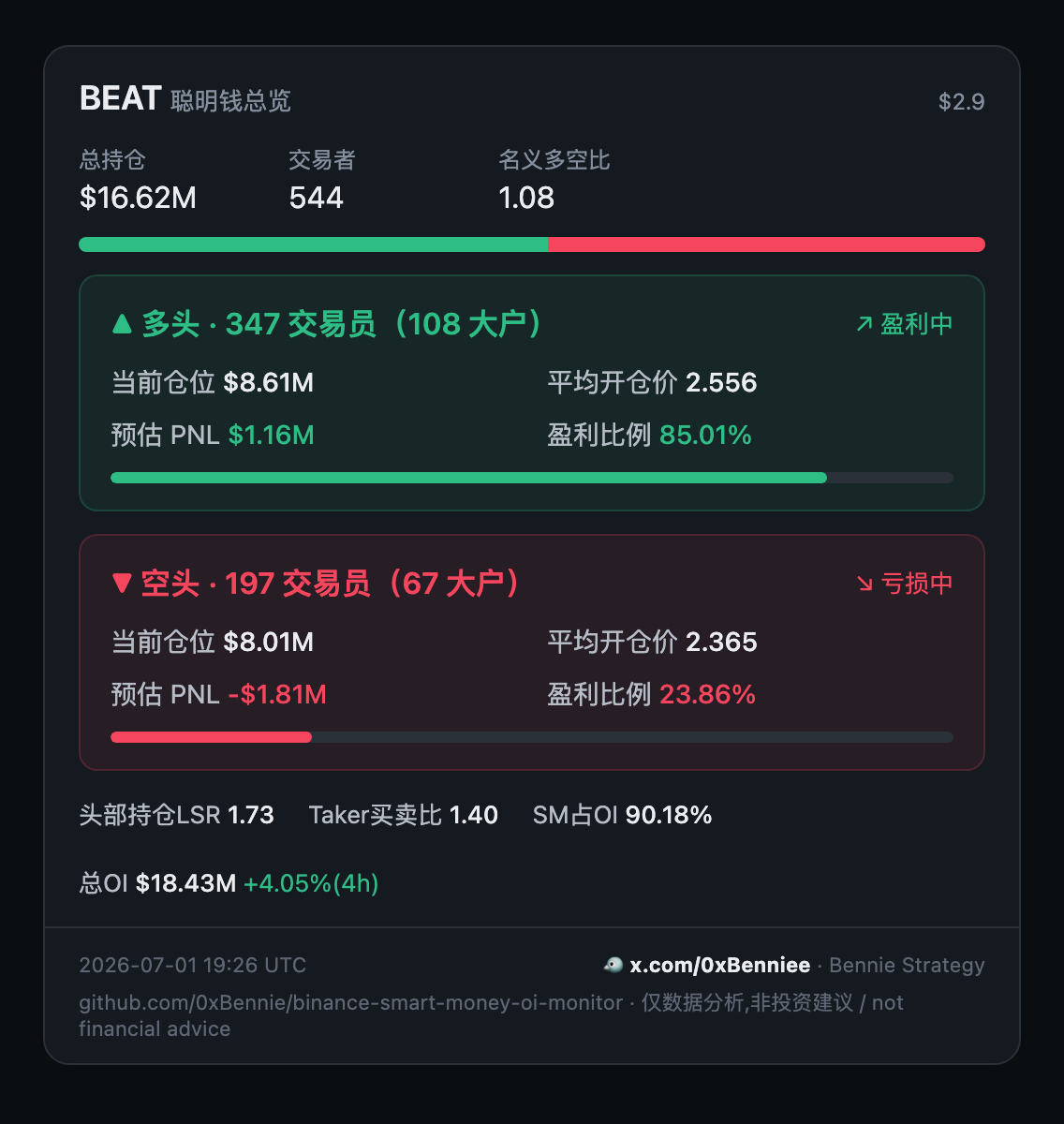
Generate a shareable panel
Turn any symbol's whale positioning into a self-contained dark HTML card (the binance.com Smart Signal look) — screenshot it for a post, or embed the string.
npm run panel BEAT # writes beatusdt-panel.html; open it & screenshotThree ways, same card:
import { buildPanel, renderPanelHtml } from 'binance-smart-money-oi-monitor';
const html = renderPanelHtml((await buildPanel('BEAT'))!);   // as a library
The third way is the MCP tool render_panel (see the tools table above), so
your AI can generate a panel on demand. However you build it, the card is
dependency-free (no external assets), so it renders anywhere and screenshots
cleanly.
Pool sizing & cron cadence
Default behavior is all USDT-PERPETUAL symbols (~500 contracts as of 2026). Pick a deployment mode that matches your tolerance for data freshness:
| Mode | Symbols | smart-money cron | top-trader cron | OI cron | Sharding |
|---|---|---|---|---|---|
| Light | 100 cap | 7 * * * * (1×/h) |
*/30 * * * * |
15,45 * * * * |
None |
| Standard | 200 cap | 7 * * * * (1×/h) |
*/30 * * * * |
15,45 * * * * |
None |
| Full, 2h refresh | ~500 all | 0 */2 * * * (1×/2h) |
*/30 * * * * |
15,45 * * * * |
None |
| Full, 1h refresh | ~500 all | 7,37 * * * * (2×/h, each does half) |
*/30 * * * * |
15,45 * * * * |
2 shards |
Read "1h refresh" as every symbol gets a fresh snapshot within 1h, achieved
by two cron entries at :07 and :37 each pulling half (shard 0/2 and 1/2).
The math: smart-money runs at 12s ± 3s spacing (web bapi is rate-sensitive). 500 symbols ≈ 100 min, so it cannot finish inside an hour without sharding. Top-trader and OI both use fapi/data at 1s spacing — 500 symbols ≈ 8 min, fits anywhere.
Sharding
Symbols are split deterministically by index % SHARD_TOTAL == SHARD_INDEX,
so each shard always pulls the same set (good for cache locality, and means
shards don't collide on the same symbol within a window).
Data Retention
The sqlite tables (ob_smart_money_snapshots, ob_top_trader_snapshots,
ob_oi_snapshots) are pruned to 30 days by the storage.cleanup() call
that runs at the end of every smart-money-tick execution. If you need
longer history, increase RETENTION_DAYS in src/storage.ts and rebuild,
or back the table up before the daily cron runs.
Disk usage estimate at default cadence (500 symbols, hourly smart-money + 30min top-trader + 30min OI): roughly 30–80 MB / month with WAL enabled.
Production deployment (pm2)
A. Standard — cap at 200, hourly
// ecosystem.config.js
module.exports = {
  apps: [
    {
      name: 'smart-money-tick',
      script: 'node_modules/.bin/tsx',
      args: 'src/scripts/smart-money-tick.ts',
      cron_restart: '7 * * * *',        // :07 every hour
      autorestart: false,
      env: { SMART_MONEY_POOL_MAX: '200' },
    },
    {
      name: 'top-trader-tick',
      script: 'node_modules/.bin/tsx',
      args: 'src/scripts/top-trader-tick.ts 5m',
      cron_restart: '*/30 * * * *',
      autorestart: false,
    },
    {
      name: 'oi-tick',
      script: 'node_modules/.bin/tsx',
      args: 'src/scripts/oi-tick.ts',
      cron_restart: '15,45 * * * *',    // offset from top-trader
      autorestart: false,
    },
    {
      name: 'smart-money-dashboard',
      script: 'node_modules/.bin/tsx',
      args: 'src/scripts/smart-money-dashboard.ts',
      autorestart: true,
      env: { PORT: '3001' },
    },
  ],
};
B. Full coverage with 1h refresh — 2-way sharding
Two pm2 entries, each pulls half the symbols at staggered times:
module.exports = {
  apps: [
    {
      name: 'smart-money-tick-a',
      script: 'node_modules/.bin/tsx',
      args: 'src/scripts/smart-money-tick.ts',
      cron_restart: '7 * * * *',        // :07
      autorestart: false,
      env: { SMART_MONEY_SHARD_INDEX: '0', SMART_MONEY_SHARD_TOTAL: '2' },
    },
    {
      name: 'smart-money-tick-b',
      script: 'node_modules/.bin/tsx',
      args: 'src/scripts/smart-money-tick.ts',
      cron_restart: '37 * * * *',       // :37 — 30 min offset from A
      autorestart: false,
      env: { SMART_MONEY_SHARD_INDEX: '1', SMART_MONEY_SHARD_TOTAL: '2' },
    },
    // ... top-trader-tick and dashboard same as Mode A
  ],
};
C. Full coverage, slower refresh — 2-hour cron, no sharding
Cheapest option if hourly freshness isn't required:
{
  name: 'smart-money-tick',
  args: 'src/scripts/smart-money-tick.ts',
  cron_restart: '0 */2 * * *',          // every 2 hours
  autorestart: false,
  // no env vars needed — defaults to all symbols
}
Why staggering matters
The circuit breaker lives in per-process module state. Two cron processes
running simultaneously cannot share isBinanceApiBlocked() state directly,
but each one ping-tests via preflightBinanceFapi() before issuing any
data requests — so if process A just got a 418, process B's preflight will
catch it and abort cleanly. Stagger the times anyway to give the IP weight
window time to drain between bursts.
Companion: altmonitor (price / OI / volume anomaly monitor)
The altmonitor bot lives in the GitHub repo (not the npm package).
altmonitor/ is a self-contained Python tool (the Python half
of this repo) that watches every USDT-perpetual contract and fires
Telegram alerts in three flavors:
- Price move — ±3% within a single 1-minute candle, annotated with the same-minute OI direction (price × OI quadrant), amplitude, and long/short ratio.
- OI surge — open interest jumps past a threshold over a 1-minute or 5-minute window.
- Volume burst (爆量) — a closed 1m candle's quote volume spikes to ≥ N× its own trailing median.
- Single WebSocket subscription to the full-market
@kline_1mstream (price + volume) - Background
fapi/v1/openInterestsweep every 60 s, kept in a timestamped ring buffer for 1m/5m deltas - Telegram commands (
/set_pump,/set_oi,/set_vol,/watch,/history,/stats, …) to retune live without a restart; config persists tostate.json - Optional SQLite alert history (all three alert types) for
/historyand/statsreview - Free public endpoints only — no API key, no quota burn
Fastest start — interactive wizard (validates your bot token, auto-discovers your
chat_id, writes .env, then offers to run locally / in Docker / deploy to your server):
cd altmonitor && pip install -r requirements.txt && python setup.pyDeploy to your own VPS in one command (tries SSH key then password, installs Docker,
syncs code + .env, runs, and pings you on Telegram when live):
python altmonitor/deploy.py # or pick "deploy to my server" at the end of setup.pyOr a one-command Docker deploy from the repo root:
cp altmonitor/.env.example altmonitor/.env   # fill TG_BOT_TOKEN + TG_CHAT_ID
docker compose up -d                          # build + run, auto-restart
Or run it directly:
cd altmonitor
python3 -m venv .venv && source .venv/bin/activate
pip install -r requirements.txt
cp .env.example .env          # fill TG_BOT_TOKEN + TG_CHAT_ID
python monitor.py
Full configuration, Telegram command reference, the Docker compose file, and the
systemd unit are in altmonitor/README.md.
What's not in this repo
- No trading. This is data only.
- No proxy. If your IP gets a hard 403 (CloudFront WAF), the only fix is to wait it out or change IP. The whole point of the protection layers is to never get there.
- No on-chain data, no order book, no aggregated trades. For that, see the projects in Credits.
Author & contact
Built and maintained by Bennie Strategy.
- X / Twitter: @0xBenniee (zero-x, double-e)
- Telegram: @OxBennie (capital O)
Both handles are correct — not typos. Questions, ideas, or want a feature? Reach out on either — issues and PRs welcome too.
Credits
- andychien555/binance-smart-money-tracker
— original reverse-engineering of the
bapi/futures/v1/public/future/smart-money/signal/overviewendpoint. Their version is built on Cloudflare Workers + R2 with a static SPA frontend; this repo is the Node + sqlite + express version with stronger rate-limit protection. Different architecture, same source insight. - y18929284608-byte/BNSmartMoneyMonitor and 6551Team/opentrade — parallel implementations that confirmed the endpoint contract.
License
MIT — see LICENSE.