
Amicus
A multi-model LLM Council for Claude — with a parallel AI window underneath.
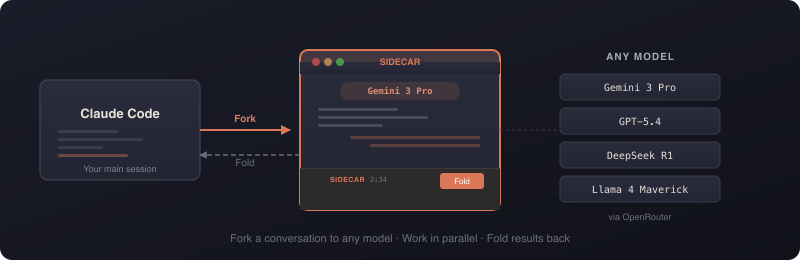
Hand Claude a plan, a design, a diff, an architecture decision, a manuscript — anything — and say council review this: Amicus routes it through several models from different families, has them anonymously cross-review each other, and a non-Claude chair synthesizes a verdict you turn into accept/deny edits. Or skip the ceremony and fork a single conversation to Gemini, GPT, DeepSeek, or any other model — it works in parallel with full context, and you fold the result back when you're ready. Claude orchestrates throughout; you stay in your editor.


Supported clients: Claude Code CLI and Claude Cowork are fully tested and supported. Claude Code web and Claude Desktop are experimental.
Table of Contents
- What is Amicus
- Quick start
- The Council
- The parallel window
- Commands
- Models
- MCP integration
- Configuration
- JSON output
- Windows
- Troubleshooting
- Documentation
- Contributing
- Built on OpenCode
- Attribution & License
What is Amicus
One install delivers four things that work together:
- The
second-opinionLLM Council skill. Structured multi-model review: independent reviews → anonymized peer cross-review → a non-Claude chair verdict → tiered accept/deny decisions. This is the hero. - The
sidecarchat skill. Ad-hoc fork/work/fold — spin up one other model in a real window (or headless), work alongside it, fold the summary back. - The
amicusCLI (with anamalias) and an MCP server. The engine underneath both skills: launches sessions, shares context, runs parallel waves, and exposes the same surface to Claude as MCP tools. - A self-updating model catalog. Aliases and validation resolve against a live catalog fetched from provider APIs (cached locally), so model names stay current without a hard-coded table.
Claude is the orchestrator. The council and chat skills run on top of the engine; you talk to Claude, and Claude drives Amicus.
Quick start
Install:
npm install -g amicusThe postinstall step auto-configures everything — no manual registration:
- Registers the MCP server in Claude Code and in Claude Desktop / Cowork, so the Amicus tools appear natively.
- Installs both skills into
~/.claude/skills/—second-opinion(the council) andsidecar(the chat skill).
Prerequisites & what it costs you
Before your first run:
- Node.js ≥ 18 —
node --versionto check. - An active Claude Code or Cowork session — Amicus is orchestrated by Claude; it is not a standalone chatbot.
- At least one paid model API key — OpenRouter (covers the most models) or a direct Google / OpenAI / Anthropic / DeepSeek key. Add one with
amicus setuporamicus key <provider> <key>.
What a run costs. A sidecar is a single model call. A full council is typically ~5–8 paid model calls (e.g. 3 reviewers across 2 fan-out waves + 1 chair). Amicus shows an estimate before each council and enforces a built-in budget gate that refuses ultra-expensive models (o3-pro class) unless you opt in with --no-cost-gate. You pay your providers directly for the tokens; Amicus itself is free and open-source.
Configure:
amicus setupThis opens a graphical wizard:
| Step | What it does |
|---|---|
| 1. API Keys | Enter keys for OpenRouter, Google, OpenAI, Anthropic, and/or DeepSeek. Each is validated live against the provider's API. Written to ~/.config/amicus/.env with 0600 permissions. |
| 2. Default Model | Pick your go-to model from a searchable live picker (backed by the catalog). Used whenever you omit --model. |
| 3. Model Routing | Decide which provider serves each model — e.g. route Gemini through a direct Google key and everything else through OpenRouter. |
| 4. Review | Confirm the configuration before saving. |
Headless environments: if Electron can't open a window, the wizard falls back to a readline-based setup in the terminal.
Your first council — no flags to learn. In Claude Code or Cowork, give Claude a document and say:
council review this
Claude prepares the material, recommends a bench of models, discloses the run shape and cost, and orchestrates the rest. You make the accept/deny calls at the end. (The second-opinion skill installed in the previous step is what teaches Claude to recognize this — if nothing happens, confirm it landed in ~/.claude/skills/second-opinion/.)
Your first sidecar. The sidecar is the lower-level path — you can invoke it by phrase through Claude too, but the CLI gives you the flags directly:
amicus start --model gemini --prompt "Fact-check the auth approach Claude just proposed"A window opens alongside your editor with Gemini ready, pre-loaded with your conversation. Work with it, then Fold the summary back.
Install from GitHub
The npm package is the primary path. To install straight from the repo instead (the postinstall runs identically — same MCP registration, same two skills):
npm install -g github:BourbonDog/amicusContributor setup
Cloning to develop Amicus? See CONTRIBUTING.md for the dev setup, git-hook wiring, and test commands.
The Council
Why multi-model. Any single model — including the one running your session — has consistent blind spots. Route the same material through models from different families and the disagreements surface: missed issues, overstated confidence, claims one model alone would have waved through. The council is the structured version of that idea.
The flow, in five beats:
- Independent reviews. Each council model reviews the artifact on its own (one parallel wave), producing a structured findings list — claim, severity (
blocker | major | minor | nit), location, rationale. - Anonymized cross-review. Claude relabels every review (Review A, B, C…) and sends the identical bundle to every model. Each model ranks the reviews and adjudicates every finding (
agree | dispute | neutral) — unknowingly judging its own, so self-bias washes out. This yields a street-cred ranking and sorts findings into Confirmed / Contested / Singleton tiers. - Chair verdict. A designated non-Claude chair receives the de-anonymized picture — all reviews, rankings, and adjudications — and synthesizes an independent verdict. Claude presents it verbatim; Claude does not synthesize.
- Tiered decisions. Confirmed findings get one bulk accept/deny; Contested and Singleton findings are decided one at a time (accept / deny / modify).
- Outputs applied. Accepted findings are written into a reviewed copy of the source; the full run is captured in the run folder.
What a run produces (in output/<stem>-council/):
review-<model>.md× N — each model's independent review.crossreview-matrix.md— the adjudication grid plus the de-anonymized street-cred table.verdict.md— the chair's synthesis.report.md— synthesis + the full decision log + a per-call run-stats table.- For an editable source, the accepted edits land in
<stem>-reviewed.<ext>next to the original.
Claude in the council (default off): you can add Claude's own fresh review to the bundle so the bench ranks and adjudicates it — Claude is judged but never votes or chairs, so the verdict stays independent.
Cost is disclosed up front. Before any model launches, you see the run shape — for example:
This run uses 3 council models across 2 fanout waves + 1 chair call (~7 model runs).
Then the council waits for your confirmation.
The skill lives at skills/second-opinion/SKILL.md; the design spec behind it is skills/second-opinion/COUNCIL-DESIGN.md.
Free council (zero-cost). Want the cross-examination without the model spend? amicus setup offers a Free OpenRouter council mode — readline wizard option 2, and the Electron Models step. It detects the free :free models live from the catalog, lets you multi-pick (Enter takes a vendor-diverse default), and saves them as councils.free — a first-class councils config primitive seeded under collision-safe free-* aliases. Your config.default is left untouched, and all you need is an OPENROUTER_API_KEY.
Run it anywhere a council runs:
amicus fanout --council free --prompt "Review this design"The amicus_fanout MCP tool takes the same council parameter, and the second-opinion skill reads councils.free automatically. A member that gets delisted is dropped with a warning — the council still runs as long as ≥2 survive. Free models are rate-limited and quality-variable, and some return 404 unless you enable data-sharing at openrouter.ai/settings/privacy.
The parallel window
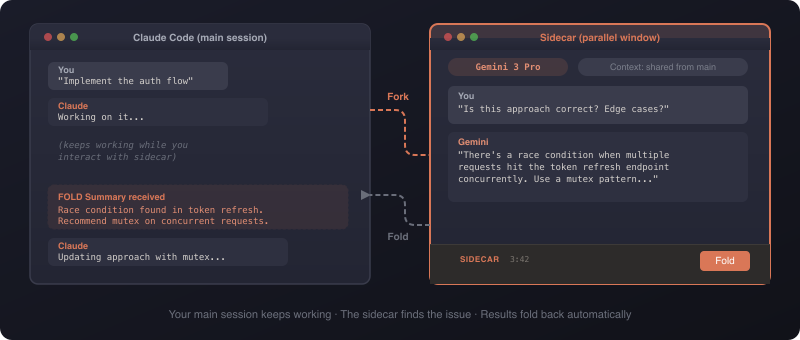
When you don't need a full council — just one other model's take — fork a conversation. Amicus extracts your current Claude Code context, opens a session pre-loaded with it, you work alongside it, and you fold a structured summary back into Claude's context when you're done.
Interactive (default): a real window opens next to your editor. Switch models mid-conversation with the model switcher, then click the FOLD button (or press Cmd+Shift+F) to generate the summary. Customize the shortcut with --fold-shortcut.
Headless (--no-ui): the agent works autonomously and emits the fold summary when it finishes — ideal for bulk work like test generation or documentation. Pair with --json for a machine-readable run document.
Context sharing. Your conversation history is passed automatically. Tune it:
--context-turns <N>— max conversation turns to include (default 50).--context-since <duration>— time window (e.g.2h); overrides turns.--context-max-tokens <N>— cap the context size (default 80000).--no-context— skip parent history entirely.
MCP inheritance. Amicus discovers the MCP servers your Claude Code session uses and passes them through, so the forked model has the same tools you do. Control it:
--no-mcp— don't inherit any parent MCP servers.--exclude-mcp <name>— drop a specific server (repeatable).--mcp <name=url|name=command>— add one.
Safety. Amicus warns on file conflicts (a file changed externally while the session ran) and on context drift (the shared context may be stale relative to your current session), so a fold never silently overwrites newer work.
Auto-update. Amicus checks the npm registry at most once every 24 hours (cached background check). When an update exists, the CLI prints a notice and the Electron toolbar shows a one-click Update banner. Or run it yourself:
amicus update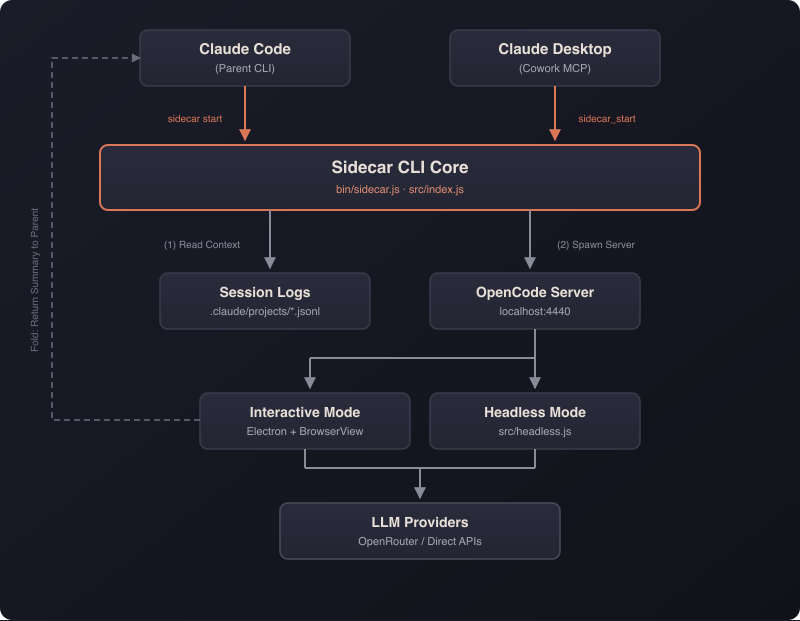
Commands
| Command | What it does |
|---|---|
amicus start |
Launch a new session (interactive or --no-ui). |
amicus fanout |
Run N models on the same prompt in parallel (headless). |
amicus list |
Show previous sessions. |
amicus resume |
Reopen a previous session with full history. |
amicus continue |
Start a new session building on a previous one. |
amicus read |
Output a session's summary / conversation / metadata. |
amicus models |
List, search, refresh the catalog, or audit aliases. |
amicus abort |
Abort a running session (or --all). |
amicus setup |
Configure default model, API keys, and aliases. |
amicus update |
Update to the latest version. |
amicus mcp |
Start the MCP server (stdio transport). |
The am alias is interchangeable with amicus everywhere.
amicus start options
| Option | Description | Default |
|---|---|---|
--model <model> |
Alias, provider/model, or openrouter/provider/model. |
config default |
--prompt <text> |
Task description. | (required unless --prompt-file) |
--prompt-file <path> |
Read the prompt from a UTF-8 file (XOR --prompt). |
|
--agent <agent> |
OpenCode agent: Chat, Build, Plan. |
Chat interactive / Build headless |
--no-ui |
Run headless (autonomous, no window). | off |
--json |
Emit the run result as stable JSON (requires --no-ui). |
off |
--timeout <minutes> |
Headless timeout. | 15 |
--context-turns <N> |
Max conversation turns to include. | 50 |
--context-since <duration> |
Time filter (e.g. 2h); overrides turns. |
|
--context-max-tokens <N> |
Max context tokens. | 80000 |
--no-context |
Skip parent conversation history. | off |
--thinking <level> |
Reasoning effort: none, minimal, low, medium, high, xhigh. |
model default |
--summary-length <length> |
Fold summary verbosity: brief, normal, verbose. |
normal |
--mcp <spec> |
Add an MCP server (name=url or name=command). |
|
--mcp-config <path> |
Path to an opencode.json with MCP config. |
|
--no-mcp |
Don't inherit MCP servers from the parent. | off |
--exclude-mcp <name> |
Exclude a specific inherited MCP server (repeatable). | |
--session-id <id|current> |
Session to pull context from. | current |
--cwd <path> |
Project directory. | cwd |
--client <type> |
Client context: code-local, code-web, cowork. |
code-local |
--position <pos> |
Window position: right, left, center. |
right |
--fold-shortcut <key> |
Customize the fold keyboard shortcut. | Cmd/Ctrl+Shift+F |
--opencode-port <port> |
Port override for the OpenCode server. | |
--session-dir <path> |
Explicit session-data directory. | |
--setup |
Force-open configuration before launching. | |
--no-validate-model |
Skip model-catalog validation before launch. | validation on |
Agents: Chat auto-approves reads and asks before writes/bash (interactive default); Build has full tool access (headless default); Plan is read-only analysis.
--agent Chatis interactive-only and incompatible with--no-ui.
amicus fanout — same prompt, many models
amicus fanout --models gemini,deepseek,gpt --prompt "Review this design" --jsonFanout runs one headless wave: every leg gets the same prompt (this is the shared-prompt model the council's review stages are built on). When all legs are terminal it prints one JSON wave document on stdout.
--models <a,b,c>— comma-separated aliases orprovider/modelIDs (required, unless--council).--council <name>— run a saved council (e.g.free) instead of--models; mutually exclusive with--models.--prompt <text>/--prompt-file <path>— the shared briefing.--prompt-fileavoids the ~32 KB Windows argument cap and is mutually exclusive with--prompt.--wave-id <id>— set the wave ID explicitly (leg IDs become<id>-1..N).--json— emit the wave document.- Shared per-leg knobs:
--agent,--thinking,--timeout,--summary-length,--no-context, the--context-*flags, the--mcp*flags,--no-validate-model,--cwd. - Exit codes:
0all legs complete,2partial wave,1none complete / hard failure.
Other commands
amicus list                          # current project
amicus list --status running         # filter by status (running, complete)
amicus list --all                    # all projects
amicus list --json                   # machine-readable

amicus read <id>                     # summary (default)
amicus read <id> --conversation      # full conversation
amicus read <id> --metadata          # session metadata
amicus read <id> --json              # stable JSON (run or wave document)

amicus resume <id>                   # reopen with full history
amicus continue <id> --prompt "..."  # new session, previous one as read-only context

amicus abort <id>                    # stop one running session
amicus abort --all                   # stop all running sessions in this project

amicus setup --api-keys              # open just the API-key window
amicus setup --add-alias fast=openrouter/google/gemini-2.5-flash   # add/override one alias
Models
Amicus does not ship a frozen table of model names. Aliases and validation resolve against a live catalog fetched from provider APIs and cached at ~/.config/amicus/model-catalog.json (24-hour TTL; the fetch works without an API key).
amicus models                 # list the catalog
amicus models --search gemini # filter by substring over id and name
amicus models --refresh       # force-refresh from provider APIs
amicus models --check         # audit your aliases against the catalog
amicus models --check exits with the number of stale aliases (capped at 100) and prints same-vendor replacement suggestions for each, so it drops cleanly into CI.
Validation on launch. start and fanout validate the model against the catalog before launching. For an explicit --model on continue/resume this is blocking (a typo'd model fails fast with suggestions); for a model inherited from a prior session it's advisory. Skip it any time with --no-validate-model, or fix the catalog with amicus models --refresh.
Aliases are a curated seed, not a fixed list. amicus setup seeds a curated set of short aliases (e.g. gemini, gpt, opus, deepseek), and you add or override them with amicus setup --add-alias name=provider/model. To see exactly what resolves on your machine, run amicus models — that is the source of truth, not this README.
Full-id passthrough. You can always bypass aliases and name a model directly. The prefix decides which credentials are used:
| Format | Example | Credentials |
|---|---|---|
openrouter/provider/model |
openrouter/google/gemini-2.5-flash |
OPENROUTER_API_KEY |
google/model |
google/gemini-2.5-flash |
GOOGLE_GENERATIVE_AI_API_KEY |
openai/model |
openai/gpt-5 |
OPENAI_API_KEY |
anthropic/model |
anthropic/claude-opus-4 (the opus alias resolves here by default) |
ANTHROPIC_API_KEY |
MCP integration
The MCP server is auto-registered on install (Claude Code and Claude Desktop / Cowork). It exposes ten tools:
| Tool | What it does |
|---|---|
amicus_start |
Spawn a session; returns a task ID immediately. |
amicus_status |
Poll a task (or a fanout wave) for completion. |
amicus_read |
Read results: summary, conversation, metadata, or JSON. |
amicus_list |
List past sessions. |
amicus_resume |
Reopen a session. |
amicus_continue |
New session building on a previous one. |
amicus_abort |
Stop a running session. |
amicus_setup |
Open the setup wizard. |
amicus_guide |
Return usage guidance (model choice, briefings, polling). |
amicus_fanout |
Launch a same-prompt wave; returns { waveId, taskIds[] }. |
The async pattern is start → status → read: amicus_start (or amicus_fanout) returns immediately, you poll amicus_status, then amicus_read once it's done — so the calling agent never blocks.
To register manually (user scope):
claude mcp add-json amicus '{"command":"npx","args":["-y","amicus@latest","mcp"]}' --scope userLegacy
sidecar_*tool names are still registered as aliases of eachamicus_*tool for backward compatibility.
Configuration
amicus setup is the recommended way to configure Amicus — it writes API keys to ~/.config/amicus/.env (0600) and persists your default model and aliases. The environment variables below are for overrides and tuning. Dev-only variables (mock/update testing) are documented in docs/configuration.md.
API keys
| Variable | Purpose |
|---|---|
OPENROUTER_API_KEY |
OpenRouter (multi-provider access). |
GOOGLE_GENERATIVE_AI_API_KEY |
Direct Google access. |
OPENAI_API_KEY |
Direct OpenAI access. |
ANTHROPIC_API_KEY |
Direct Anthropic access. |
DEEPSEEK_API_KEY |
Direct DeepSeek access. |
Behavior
| Variable | Purpose | Default |
|---|---|---|
LOG_LEVEL |
Log verbosity: error, warn, info, debug. |
error |
AMICUS_CONFIG_DIR |
Override the config directory (keys, catalog, sessions). | ~/.config/amicus |
AMICUS_FANOUT_MAX_LEGS |
Cap the number of legs in a single fanout wave; non-positive values fall back to 10. | 10 |
AMICUS_SHARED_SERVER |
When 1, multiple MCP sessions share a single OpenCode Go process, eliminating cold-start latency. Set to 0 for per-process isolation or to diagnose a crash loop. |
1 |
Headless poller tuning (advanced — rarely needed)
| Variable | Purpose | Default |
|---|---|---|
AMICUS_POLL_INTERVAL_MS |
Delay between poll cycles. | 2000 |
AMICUS_POLL_CALL_TIMEOUT_MS |
Per-poll call timeout. | 30000 |
AMICUS_STABLE_FINISHED_POLLS |
Stable polls required after a completion signal. | 2 |
AMICUS_STABLE_IDLE_POLLS |
Stable polls required with no completion signal (~60 s at 2 s). | 30 |
AMICUS_MAX_CONSECUTIVE_POLL_FAILURES |
Consecutive poll failures before bailing. | 15 |
GUI & debug
| Variable | Purpose | Default |
|---|---|---|
AMICUS_GUI_LOAD_TIMEOUT_MS |
Max wait for the Electron UI to load before showing what's in flight. | 15000 |
AMICUS_DEBUG_PORT |
Chrome DevTools Protocol port for the Electron window. | 9222 |
Legacy names. The pre-rebrand
SIDECAR_*environment variables are still honored (with a one-time deprecation warning) and map to theirAMICUS_*equivalents. See docs/SHIMS.md for the full mapping.
JSON output
With --json, Amicus emits stable, versioned documents on stdout — built for scripting and agent consumption.
Run document (a single session — start, read, each fanout leg):
{
  "taskId": "...", "model": "...", "modelInput": "...", "agent": "...",
  "status": "complete", "summary": "...", "error": null,
  "createdAt": "...", "completedAt": "...", "durationMs": 0
}
modelInput is the alias you passed; model is the resolved id. status is one of complete | error | timeout | aborted (plus crashed / idle-timeout); summary carries the fold output.
Wave document (fanout, and read <waveId> --json):
{
  "schemaVersion": 1, "waveId": "...",
  "status": "complete",
  "counts": { "total": 0, "complete": 0, "error": 0, "timeout": 0, "aborted": 0 },
  "legs": [ /* one run document per model, in --models order */ ]
}
status is complete | partial | error | aborted. A leg's summary is that model's full response.
Exit codes (for --no-ui / fanout): 0 success / all legs complete · 2 partial wave · 1 error, nothing completed, or hard failure · 130 interrupted (SIGINT) · 143 terminated (SIGTERM).
Windows
Amicus is first-class on Windows — developed and tested on Windows 11, no WSL required.
Most Claude-adjacent tooling assumes macOS/Linux; Amicus doesn't.
- The full unit suite runs green on Windows 11.
- Native-binary PATH handling resolves the OpenCode binary correctly under Windows.
- Session-path encoding is handled natively (the Claude project-path encoding that trips up naive
~/.claude/projectslookups is accounted for). - For long briefings,
--prompt-filesidesteps the ~32 KB Windows command-line argument cap.
Troubleshooting
| Symptom | Likely cause | Fix |
|---|---|---|
| "council review this" does nothing | The second-opinion skill isn't installed |
Check ~/.claude/skills/second-opinion/SKILL.md exists; re-run npm install -g amicus (postinstall installs both skills) |
npm install -g amicus fails with EEXIST: … claude-sidecar |
The old upstream claude-sidecar package is still installed globally; npm won't overwrite another package's bin shims |
npm uninstall -g claude-sidecar, then npm install -g amicus. Your config and sessions carry over (legacy paths are still read). |
401 / auth error |
API key missing, or the model prefix doesn't match the key you have | Run amicus setup; make sure the prefix (openrouter/… vs google/… vs openai/… vs anthropic/…) matches the credentials you configured. |
| Session not found | No session matches the given ID | Run amicus list, or omit --session-id to use the most recent. |
| No conversation history found | Project-path encoding | Check ~/.claude/projects/; / and _ in the project path are encoded as - in the directory name. |
| Headless run never finishes | Task is bigger than the default timeout | Raise it: --timeout 30. |
| Wrong session picked up | Multiple active sessions resolve ambiguously | Pass --session-id explicitly. |
| Fold summary looks corrupted | Debug output leaking into stdout | Re-run with LOG_LEVEL=debug to see what's printing. |
| Model fails catalog validation | The model isn't in the cached catalog (renamed, or cache stale) | amicus models --refresh, or bypass with --no-validate-model. |
fanout exits 2 |
Partial wave — at least one leg failed | Read the wave document's legs[] and inspect each failed leg's status / error. |
Debug logging:
LOG_LEVEL=debug amicus start --model gemini --prompt "test" --no-uiDocumentation
| Doc | Description |
|---|---|
| docs/usage.md | Command-by-command usage guide. |
| docs/configuration.md | Full configuration and environment reference. |
| docs/architecture.md | How the engine, Electron shell, and context sharing fit together. |
| docs/opencode-integration.md | How Amicus drives the OpenCode runtime. |
| docs/troubleshooting.md | Extended troubleshooting. |
| docs/electron-testing.md | Chrome DevTools Protocol patterns for UI testing. |
| docs/testing.md | Test suite layout and how to run it. |
| docs/publishing.md | Release and publish process. |
| docs/SHIMS.md | Legacy SIDECAR_* → AMICUS_* compatibility shims. |
| skills/second-opinion/SKILL.md | The LLM Council skill. |
| skills/sidecar/SKILL.md | The sidecar chat skill. |
| evals/README.md | End-to-end eval harness for LLM interactions. |
Contributing
Contributions are welcome. The dev setup, git-hook wiring, and test commands live in CONTRIBUTING.md.
The autonomous Electron-UI testing approach (driving the real window over the Chrome DevTools Protocol) is documented in docs/electron-testing.md.
Built on OpenCode
Amicus is a harness built on top of OpenCode, the open-source AI coding engine. OpenCode provides the conversation runtime, tool-execution framework, agent system, and web UI. Amicus adds context sharing from Claude Code, the Electron shell, the fold/summary workflow, session persistence, parallel fanout waves, the multi-model council, and multi-client support (CLI, MCP, Cowork). OpenCode handles the hard parts of LLM interaction so Amicus can focus on the council-and-parallel-window workflow.
Attribution & License
Amicus is inspired by Claude Sidecar by John Renaldi, used under the MIT License. The original copyright ( 2025 John Renaldi) is preserved in full in LICENSE. The engine modifications, the multi-model council, and the skill bundling are 2026 Christian Wagner, also under the MIT License. See LICENSE and NOTICE for the complete attribution.
MIT.