
Dogmatic Linter for Agent Skills and Manifestos



A strict, opinionated linter for agentic manifesto files
such as SKILL.md, CLAUDE.md, and AGENTS.md.
These files instruct AI agents.
Vague, bloated, or ambiguous instructions make agents behave unpredictably.
dogent enforces a clear, command-style discipline
so every line earns its place.
Alternatives
Several tools sit near this problem, yet none lint manifesto prose the way we do. Most rewrite prompts for you or score a file, while we enforce line-level discipline and fail the build when one line breaks it.
agent-sh/agnix validates the harness — frontmatter schema, hook JSON, MCP config, tools — while we lint the prose, asking if each line is a tight command.
AgentLinter lints the same files but scores them 0–100 across eight dimensions, while we run a strict pass/fail gate, not a scorer.
microsoft/SkillOpt rewrites
skill.mdagainst benchmarks to raise an agent's task score, while we never rewrite, need no benchmarks, and judge discipline.linshenkx/prompt-optimizer rewrites a prompt through an LLM in the browser, round by round, while we lint manifesto files offline in CI.
DSPy tunes prompts as programs to maximize a metric on a dataset, while we lint hand-written manifestos, demanding clarity over a score.
Prompt platforms like LangSmith, PromptLayer, and Braintrust version, trace, and evaluate prompts from runtime data, while we lint statically and offline, needing no traces or account.
Usage
Run it on any manifesto file, no installation required:
npx @yegor256/dogent@0.12.11 SKILL.mdPoint it at a directory to lint the default manifestos it holds
(AGENTS.md, CLAUDE.md, SKILL.md, SKILLS.md).
The directory is scanned recursively through every subfolder
(skipping node_modules and .git),
and each scanned file is announced on the standard error stream:
npx @yegor256/dogent .Sample output:
CLAUDE.md
  12:  line exceeds 80 symbols
  18:  not an instruction, sounds like description
  24:  article "the" detected, remove noise
  31:  section name too long, use 1-3 words

Locally: 4 problems found, exit code 1
Spotted a false positive? dogent is in beta, please report it at https://github.com/yegor256/dogent/issues
The standalone checks report under their own Locally: summary line.
When a token enables AI verification, a second OpenAI: summary line
follows, reporting the problems the model found on top.
The command exits with a non-zero status when problems are found, so it plugs directly into CI and pre-commit hooks.
Rules
dogent checks that every manifesto obeys these rules:
- Every line must be an instruction.
- Instructions must be grouped in sections.
- Section names must be short, 1-3 words.
- Every section must be a level-2 (
##) heading, below the lone#title. - Every line must be no longer than 80 symbols.
- The whole file must stay under 4000 tokens.
- The whole file must stay short; split detail into referenced files.
- Every line must sound like a command.
- Every sentence must start with a capital and end with a period.
- No articles, no noise, no bloated text.
- Simple grammar, no ambiguity.
- No bare pronoun subjects; name the subject on the line.
- No tangled, multi-clause instructions.
- Sequential steps must be a numbered list, not bullets.
- A
SKILL.mdnamemust equal its parent directory. - No courtesy or scaffolding words.
- No leftover markers or unfilled placeholders.
- A section must hold at most ten instructions.
- A
SKILL.mddescriptionmust say when to use the skill. - A
SKILL.mdmust carry at least one worked example. - A
SKILL.mdthat produces output must declare its format. - Every line must carry exactly one instruction.
- No hedging or soft wording.
- No vague qualifiers; demand a measurable criterion.
- No passive voice; use the active imperative.
- No ALL-CAPS shouting or "!!" markers; state it plainly.
- No persona or role-play; it adds no instruction.
- No negative phrasing; state the positive command instead.
- No instruction may repeat another.
- No unguarded consumption of untrusted external input.
SKILL.mdmust open with valid frontmatter.- Frontmatter must declare only allowed keys.
- A
SKILL.mdnamemust be kebab-case.
AI verification
dogent works standalone by default,
using fast deterministic checks with no network access.
When OPENAI_API_KEY is present in the environment,
dogent first reports the problems found locally,
then asks OpenAI for a second, deeper opinion and reports those apart.
It sends the manifesto together with one instruction per rule,
then prints any violation the model reports for ambiguity,
weak phrasing, and instructions that only pretend to be commands.
Each step closes with its own summary line, Locally: then OpenAI:,
so both counts stay visible even when neither step finds a problem.
The model defaults to gpt-4o-mini; override it with OPENAI_MODEL.
Requests go to https://api.openai.com/v1 by default;
set OPENAI_BASE_URL to any OpenAI-compatible endpoint instead,
such as a local vLLM, Ollama, or LocalAI server, or a private gateway.
For a keyless local server, set OPENAI_API_KEY to any placeholder,
since the server ignores it yet dogent calls the LLM only when it is set.
After the report, dogent prints a one-line usage summary to standard error,
naming the model, the tokens sent and received, and an estimated cost,
for example OpenAI: gpt-4o-mini, 1234 sent, 567 received, ~$0.0005.
export OPENAI_API_KEY=...
npx @yegor256/dogent CLAUDE.md
Point it at a local model the same way:
export OPENAI_BASE_URL=http://localhost:11434/v1
export OPENAI_MODEL=llama3
export OPENAI_API_KEY=dummy
npx @yegor256/dogent CLAUDE.md
Pass --offline to keep dogent away from the LLM,
even when OPENAI_API_KEY is present in the environment:
npx @yegor256/dogent --offline CLAUDE.mdPass --sarif to print the report as SARIF instead of plain text.
Pass --hints to append, for every rule that reported a violation, one
English paragraph explaining how to fix it. This helps you or your agent
repair the manifesto faster:
npx @yegor256/dogent --hints CLAUDE.mdPass --suppress to silence a rule by its id. Repeat the option or
join several ids with commas to silence many at once:
npx @yegor256/dogent --suppress=name-matches-dir,line-length CLAUDE.mdPass --openai-http-header to add one Name: Value header to every OpenAI
call, handy for a gateway that wants its own token beside the API key.
Repeat the option to add several headers:
npx @yegor256/dogent \
  --openai-http-header='X-Api-Key: secret' \
  --openai-http-header='X-Tenant: acme' \
  CLAUDE.md
A header value often holds a secret, so keep it out of your shell history
by listing the option in a .dogent file (see below) instead.
Pass --verbose to print diagnostic notes, the scanned files and the
timings, to standard error in gray; without it dogent stays quiet and
prints only the report:
npx @yegor256/dogent --verbose CLAUDE.mdPass --show-prompt to print, to standard error, the whole prompt that
dogent sends to the AI oracle, handy for debugging a surprising
warning. It works on its own, without --verbose:
npx @yegor256/dogent --show-prompt CLAUDE.mdDefaults file
Tired of repeating the same flags on every run?
Drop a .dogent file beside your project, and dogent reads its options
as defaults before it touches the command line.
The file holds one option per line, written exactly as you would type it,
with the value after a space (for example --suppress name-matches-dir).
A blank line is ignored, and a line that starts with # is a comment:
# project defaults for dogent
--offline
--suppress name-matches-dir
--suppress line-length
dogent looks first in the current directory, then in your home directory,
and reads the first .dogent it finds.
The file only supplies defaults, so any option you type on the command line
overrides the same option in the file.
Thus npx @yegor256/dogent --sarif . still prints SARIF even when the file
says nothing about it, and a hand-typed flag always wins.
GitHub Actions
Because dogent runs through npx, no extra action is needed.
Add a single step to any workflow to lint your manifestos on every push:
name: dogent
on: [push, pull_request]
jobs:
  lint:
    runs-on: ubuntu-latest
    steps:
      - uses: actions/checkout@v4
      - uses: actions/setup-node@v4
        with:
          node-version: 20
      - run: npx @yegor256/dogent .
The job fails when dogent finds problems,
blocking the merge until the manifestos are clean.
To enable AI verification in CI, expose a token as a secret:
      - run: npx @yegor256/dogent CLAUDE.md
        env:
          OPENAI_API_KEY: ${{ secrets.OPENAI_API_KEY }}
Pre-commit hook
Run dogent before every commit so broken manifestos never reach history.
Drop this into .git/hooks/pre-commit and make it executable:
#!/bin/sh
npx @yegor256/dogent CLAUDE.md SKILL.md AGENTS.md
Prefer the pre-commit framework?
Reference dogent as a remote hook in .pre-commit-config.yaml:
repos:
  - repo: https://github.com/yegor256/dogent
    rev: 0.12.11
    hooks:
      - id: dogent
Pin rev to a released tag for reproducible runs.
Alternatively, wire dogent as a local hook:
repos:
  - repo: local
    hooks:
      - id: dogent
        name: dogent
        entry: npx @yegor256/dogent
        language: system
        files: '(CLAUDE|SKILL|AGENTS)\.md$'
Either way, the commit is rejected until every flagged line is fixed.
Architecture
The component diagram below shows how the pieces fit together (source):
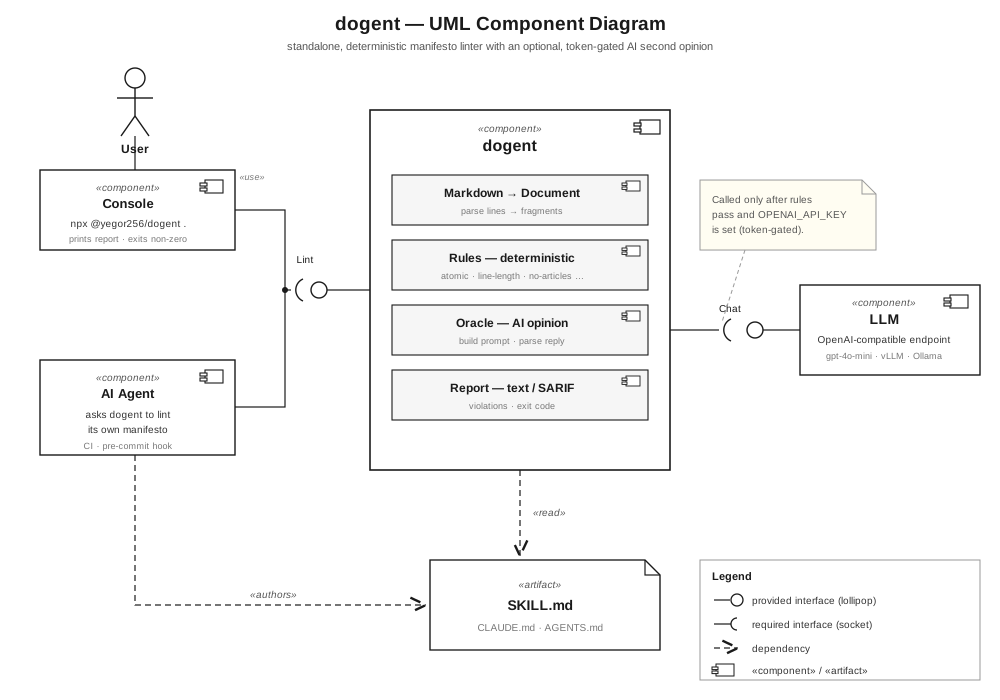
A user, or an AI agent, runs dogent from the console against a manifesto
such as SKILL.md.
dogent parses the file into a document, applies every deterministic rule,
and renders the violations as text or SARIF.
Only after the rules find nothing, and only when a token is present,
it asks an OpenAI-compatible LLM for a second, deeper opinion.
How to Contribute
First, make sure you can build it locally:
npm testThe build has to be clean. If it's not, submit an issue.
Then, make your changes, make sure the build is still clean, and submit a pull request.