
chainq
Prompt chaining for people who live in prompts — not in dashboards.
Wire a few prompts together, run them on the CLI model you already have
(claude -p, codex -m), and watch every step light up on the same canvas you
built it on. One YAML file. No API key. No HTTP. No server to host.
Why chainq
You chain prompts all day — translate then format, draft then critique, extract then assemble. But the tools for "automating" that are built for a different job:
| n8n · Make · Zapier | chainq | |
|---|---|---|
| Where it runs | a server / their cloud | your machine, your CLI model |
| Credentials | API keys, OAuth, billing | none — claude login and go |
| Editing vs. running | build here, check the run log over there | same canvas — edit it, run it, see it |
| The artifact | a config locked in their UI | one YAML file you own and git it |
| Learning curve | a node ecosystem | 8 node types, one page |
If you've ever thought "this is just three prompts in a row, why do I need a whole platform?" — that's the gap chainq fills.
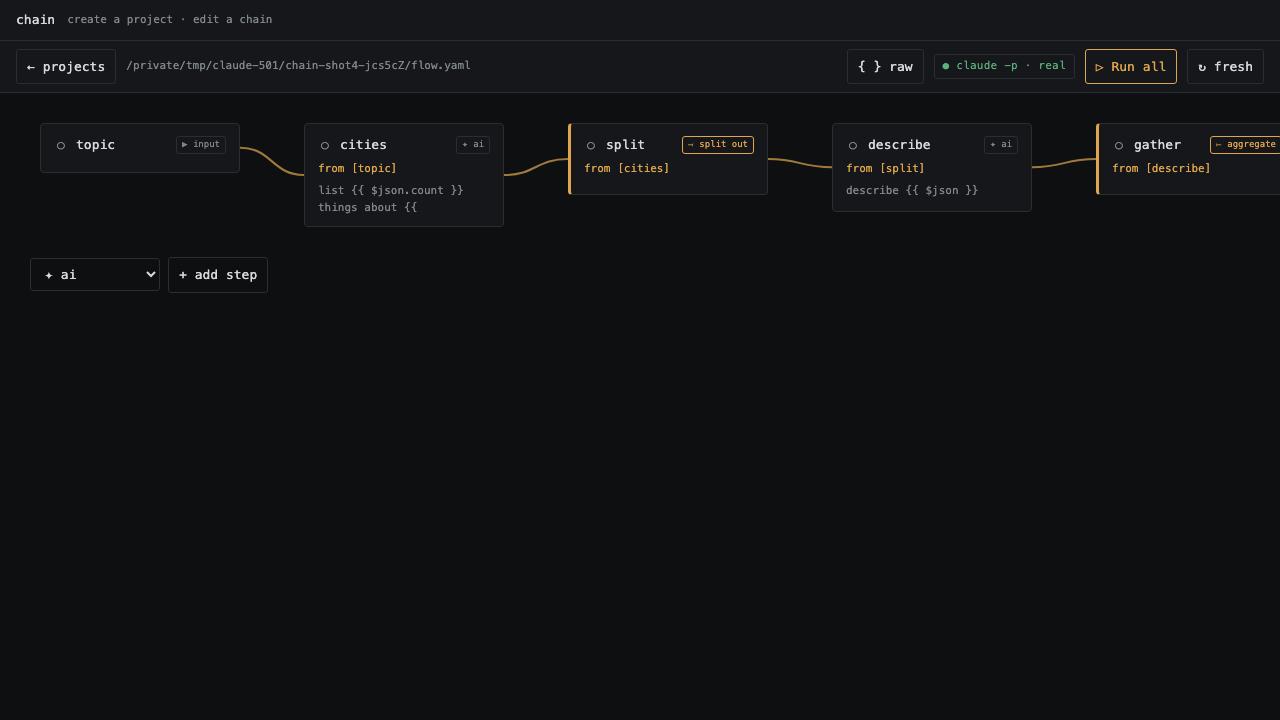
The one thing that's different: edit and run are the same screen
In most automation tools you build a flow, push it to run somewhere, then open a separate "executions" view to see what happened. In chainq there is no over-there.
The canvas you wire is the canvas that runs. Hit Run and each node streams its
own status live — running → ran / cached / failed — with its real output rendered
right on the node card. Tweak one prompt, re-run without even saving (your edit
is kept as a draft; the file stays untouched until you Save or Reset), and tune
one step at a time until the whole chain is right.
That's the loop: see the flow, run the flow, read the result — in one place.
Quickstart
npx @wahengchang2023/chainq init my-flow    # scaffold a project
cd my-flow
npx @wahengchang2023/chainq ui flow.yaml    # open the visual editor
npx @wahengchang2023/chainq run flow.yaml   # …or run it in the terminal
Prefer a permanent command? npm i -g @wahengchang2023/chainq, then call chainq.
Needs Node ≥ 18. ai steps call your real local model — run claude login first.
What a flow looks like
A flow is a small graph of steps in one YAML file. Here a trigger fans out to a
few steps, then ai + schema assembles them into guaranteed-valid JSON and write
saves it — the whole thing readable top to bottom:
steps:
  trigger:                       # input — the data to feed in
    type: input
    params:
      text: { type: string, default: 'The early bird catches the worm.' }

  field_a:                       # assemble — carry the original value through, no model call
    type: assemble
    from: trigger
    prompt: '{{ $json.text }}'

  field_b:                       # ai — call the model for one value
    type: ai
    from: trigger
    prompt: 'Translate to Traditional Chinese, output only the translation: {{ $json.text }}'

  to_json:                       # ai + schema — output is parsed & validated as real JSON
    type: ai
    from: [field_a, field_b]
    schema: { original: string, zh_tw: string }
    prompt: |
      Build a JSON object copying each value verbatim:
        original: {{ $('field_a') }}
        zh_tw:    {{ $('field_b') }}

  result:                        # write — land it as a file
    type: write
    from: to_json
    path: out/result.json
Every step is one of 5 node types: ai (calls the model), cmd (a shell
command), assemble (reshape / combine items), input (the trigger), or
write (save a file). Full runnable version:
examples/generate-json.yaml.
How you drive it
- Visual editor (
chainq ui) — drag-to-connect, insert-a-step-on-a-wire, switch a node's type in place, marquee-select, Space-to-pan, double-click to edit. Data-flow wires (the$jsonmain input) and reference wires ($('id')cross-step lookups, even several steps back) read distinctly — warm-solid vs. cool-dashed, toggle to hide references. Give a slow step room with a per-node ◷ timeout so a longairun isn't killed mid-flight. Binds to127.0.0.1only. - CLI —
chainq init · new · run · validate · ls.runre-runs everything by default; add--cacheto reuse unchanged steps.
Docs
| You want to… | Go to |
|---|---|
| Go from zero to running, step by step | Getting started |
| Look up a command or flow field | CLI reference |
| Follow a hands-on walkthrough | Tutorial · How-to |
| Understand why it works this way | Explanation |
Clear up common confusions (input vs from, schema…) |
FAQ |
| Copy a working example flow | Scenarios · examples/ |
| Read design notes and internals | docs/design.md |
| See what changed | CHANGELOG |
Security
chainq runs local models you already trust; every subprocess is spawned with an argv
array, never a shell string (no command injection). chainq ui binds to 127.0.0.1
on a random port — don't expose it to an untrusted network.
License
MIT wahengchang