
An all-in-one SDK for building frontend applications on VeChain, supporting wallet integration, developer hooks, pre-built UI components, and more.
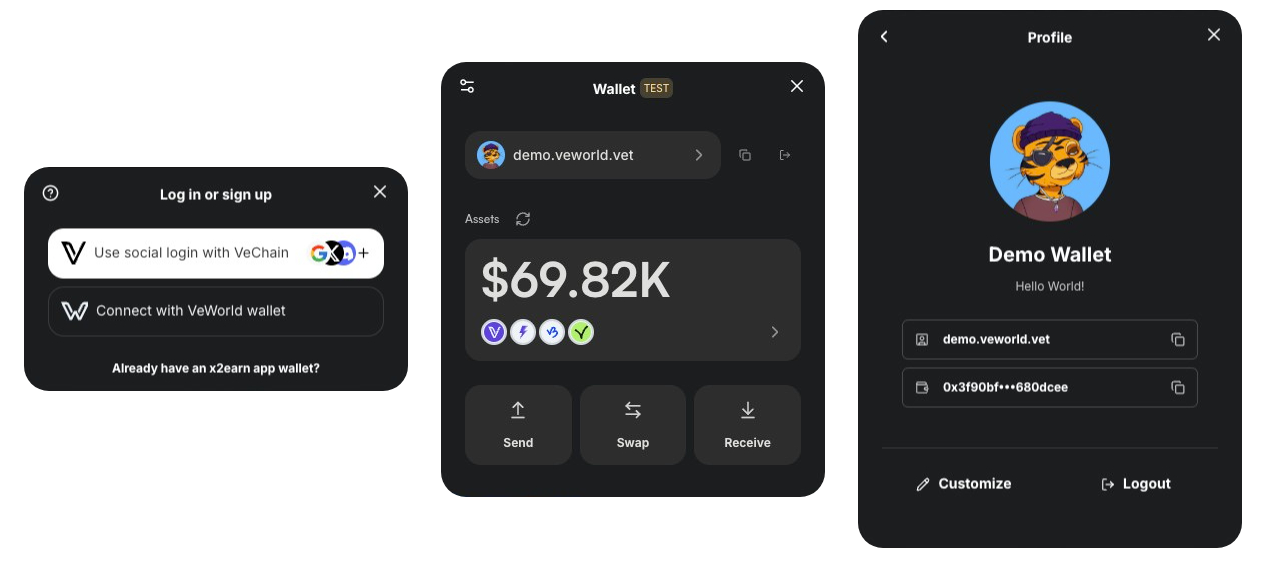
What's inside
- Seamless Wallet Integration: VeWorld, Sync2, WalletConnect, and social logins (Google, Apple, GitHub, X/Twitter, Discord, TikTok, LINE, email, passkey via Privy).
- Custom Connection UI: A themeable connect modal owns the VeWorld and Sync2 flows end-to-end. WalletConnect's QR modal is preserved.
- Developer-Friendly Hooks: Easy-to-use React Hooks that let you read and write data on VeChainThor.
- Pre-Built UI Components: TransactionModal, ProfileModal, SendTokenModal — drop them in and go.
- Token Operations: Send, swap, check balances, manage VET domains.
Note: Currently supports React and Next.js only.
Start with AI (recommended)
The fastest path is to hand a prompt to your coding agent (Claude Code, Cursor, or any agent). The prompts below tell the agent to read the relevant VeChain AI Skill first so it follows current conventions.
Start a new VeChain dApp
Before doing anything, read these VeChain AI Skills so you follow current conventions:
- create-vechain-dapp: https://github.com/vechain/vechain-ai-skills/tree/main/skills/create-vechain-dapp
- vechain-kit: https://github.com/vechain/vechain-ai-skills/tree/main/skills/vechain-kit

Now the task:

Scaffold a new VeChain dApp for me using create-vechain-dapp, with:
- VeChain Kit pre-wired (Privy social login: Google + email, plus VeWorld and WalletConnect)
- Chakra UI v3 (with next-themes) and dark mode by default — follow the next-chakra-v3 example in the vechain-kit repo for wiring the kit's `theme` prop via `useChakraContext().token.var(...)` so theme tokens stay reactive
- A landing page that shows the connected user's address, B3TR balance, and a "Send B3TR" button
- A GitHub Pages deploy workflow ready to use

Name the project "my-vechain-dapp". When done, run `yarn dev` and tell me the URL.
Or: add VeChain Kit to an existing project
Before doing anything, read this VeChain AI Skill so you follow current conventions:
- vechain-kit: https://github.com/vechain/vechain-ai-skills/tree/main/skills/vechain-kit

Now the task:

I already have a Next.js app and I want to add VeChain Kit to it.

1. Install @vechain/vechain-kit and any required peer deps.
2. Find my root layout (app/layout.tsx for App Router or pages/_app.tsx for Pages Router) and wrap it with VeChainKitProvider.
3. Enable Privy social login (Google + email), VeWorld and WalletConnect.
4. Read Privy keys from NEXT_PUBLIC_PRIVY_* and the WalletConnect projectId from NEXT_PUBLIC_WC_PROJECT_ID.
5. Add a <WalletButton /> to my existing header.
6. Don't change my existing Chakra theme.

If you hit peer-dependency conflicts, stop and tell me before applying any fix.
Why this works
VeChain AI Skills give your coding agent up-to-date domain knowledge (wallet UX, smart contracts, VeBetterDAO, StarGate, and more). Install once:
npx skills add vechain/vechain-ai-skillsOr in Claude Code:
/plugin marketplace add vechain/vechain-ai-skillsBrowse all 11 skills and try each in context: https://playground.vechainkit.vechain.org/ai-skills.
Manual install
Prefer to wire it yourself?
yarn add @vechain/vechain-kit \
  @chakra-ui/react@^2.8.2 \
  @emotion/react@^11.14.0 \
  @emotion/styled@^11.14.0 \
  @tanstack/react-query@^5.64.2 \
  @vechain/dapp-kit-react@2.1.0-rc.1 \
  framer-motion@^11.15.0
Wrap your app with the provider:
'use client';

import { VeChainKitProvider } from '@vechain/vechain-kit';

export function Providers({ children }: { children: React.ReactNode }) {
    return <VeChainKitProvider>{children}</VeChainKitProvider>;
}
Add a wallet button anywhere:
'use client';

import { WalletButton } from '@vechain/vechain-kit';

export function Page() {
    return <WalletButton />;
}
That's it — your app is ready to connect to VeChain mainnet with VeWorld.
Customize the login modal
The connect modal renders a grid of login methods. Reorder, hide, or swap them via loginMethods on the provider:
<VeChainKitProvider
    privy={{
        appId: '...',
        clientId: '...',
        loginMethods: ['google', 'apple', 'email'],
        appearance: { /* ... */ },
    }}
    dappKit={{
        allowedWallets: ['veworld', 'sync2', 'wallet-connect'],
        walletConnectOptions: { /* ... */ },
    }}
    loginMethods={[
        { method: 'veworld', gridColumn: 4 }, // primary CTA (filled, recommended)
        { method: 'google',  gridColumn: 4 },
        { method: 'apple',   gridColumn: 4 },
        { method: 'more',    gridColumn: 4 }, // opens an in-modal sub-view
    ]}
    theme={{ accent: '#3b82f6' }}
>
Available method values: veworld, sync2, wallet-connect, google, apple, github, email, passkey, vechain (cross-app), ecosystem, more, and the legacy dappkit.
For full configuration options see the documentation or try every feature live in the playground.
Resources
- VeKit Playground — interactive demos + code + AI prompts for every kit feature
- Homepage
- Documentation
- VeChain AI Skills