
relay
The relay between AI agents and humans — browser boards instead of terminal walls.
rly is a CLI that lets your AI agent ask questions and present work in a
local browser board — real forms, charts, diagrams, sortable tables, images,
and live prototypes instead of terminal text and ASCII art. You click, comment
on any element, and Submit; the agent gets your answers and comments back as
JSON and keeps working.
See it
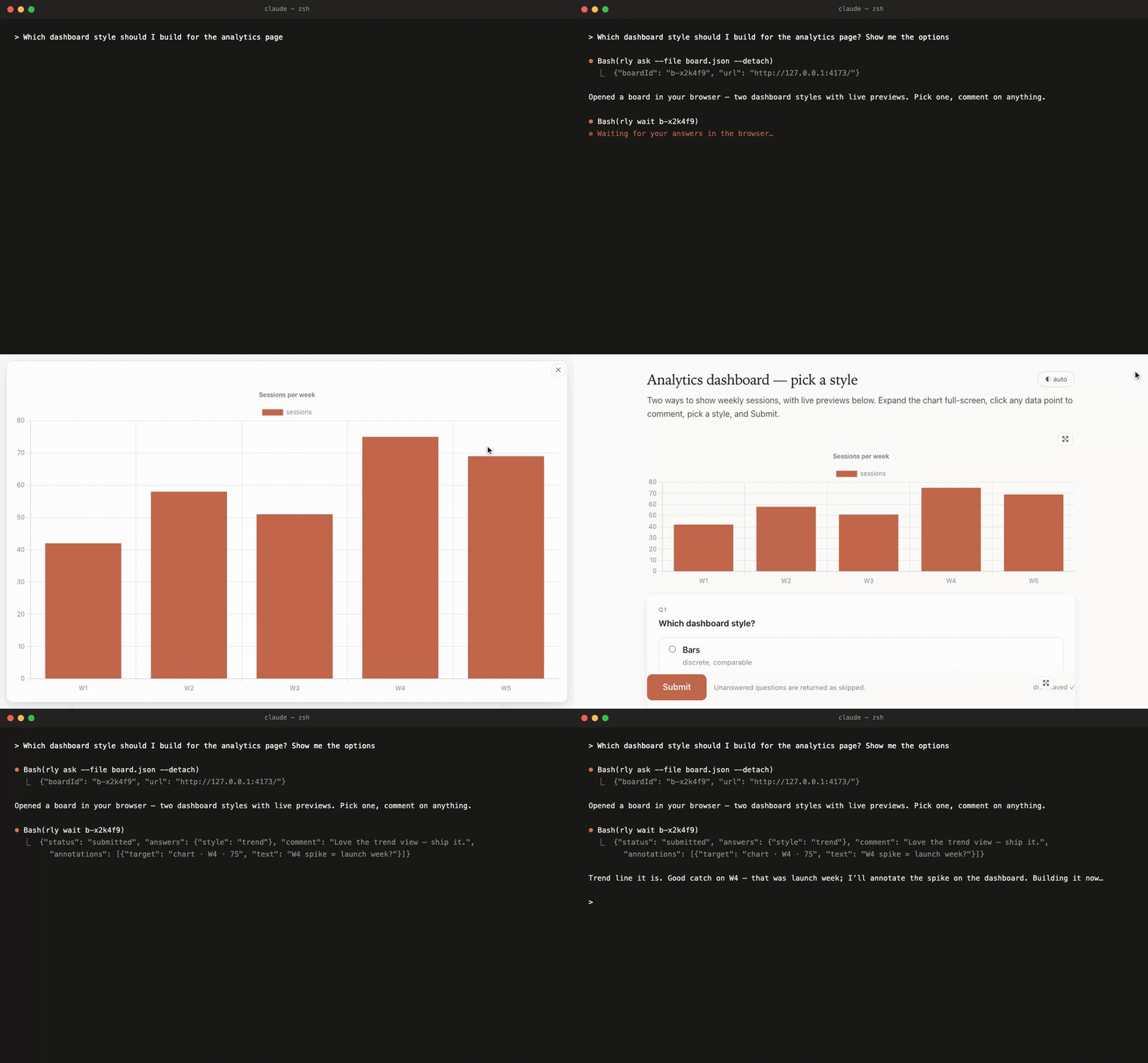
The whole loop — your agent asks in the terminal, a board opens in your browser; you pick a style, expand the chart, comment on a data point, leave a note, Submit — and the agent picks up your answers and keeps going:
Quick start
# the rly CLI
npm i -g @khanglvm/relay

# the agent skill → every detected agent (Claude Code, Codex, Cursor, …)
npx skills add khanglvm/relay --skill relay --all

# enforce it (recommended) — a skill alone is an ignorable hint; `rly install`
# writes relay's usage rules into the file each agent reads (run `rly install`
# with no args to see every supported target and where it lands):
rly install --all          # every agent detected on this machine
That's it. Next time your agent needs a decision or wants to show you a plan, it opens a board like the ones above and waits for your Submit.
Keep relay current with rly upgrade — it installs the latest CLI and
refreshes the skill (via npx skills, falling back to the bundled copy) in one
step, leaving any boards you have open untouched.
Inside the Claude & Codex apps (MCP App)
relay also runs as an MCP App (SEP-1865)
— so the same board renders inline, right in the conversation, on Claude
desktop and mobile and in Codex, no browser tab. rly mcp is a
zero-dependency stdio MCP server; register it once and the agent gets two tools,
relay_ask (collect decisions/feedback with real form controls) and
relay_show (present a plan, diagram, diff, table, or prototype):
# Claude Code
claude mcp add relay -- rly mcp

# Claude Desktop / Codex — write the host config for you
rly mcp install --target claude     # claude_desktop_config.json
rly mcp install --target codex      # ~/.codex/config.toml

# or print the snippet for any MCP host (incl. the raw JSON/TOML)
rly mcp config
When the agent calls a relay tool, the host renders relay's ui://relay/board
resource in a sandboxed iframe, hands it the board spec, and the user's answers
flow back to the agent over the bridge (ui/update-model-context) — markdown,
code, diffs, tables, charts, mermaid/graphviz diagrams, images, and forms, all
in-chat. The classic browser board (rly ask / rly show) is unchanged; pick
whichever surface fits.
What it improves
| Without relay | With relay |
|---|---|
| Six questions asked one at a time in the terminal | One board, all questions, real form controls, optional "Other" + notes |
| "Option B is the one with caching (see my last message)" | Each answer option carries its own image / chart / diagram — pick by looking |
| ASCII architecture art | Mermaid, Graphviz, PlantUML — zoomable, full-screen, even user-editable |
| Numbers buried in prose | Charts and sortable tables; screenshots and HTML prototypes in a sandbox |
| "Here's the diff — paste it in your editor" | Side-by-side diff blocks, syntax-highlighted code, video walkthroughs, and file paths you click to open in the default app |
| "Type done when finished reviewing" | A Submit button; answers, notes, and inline comments returned as JSON |
| Feedback = another wall of text | Click any chart point, diagram node, table cell, or sentence to comment — the agent replies and the thread grows on the board |
Everything autosaves in real time (drafts survive timeouts), multiple boards run at once, and the package has zero runtime dependencies — plain Node ≥ 18; Chart.js / Mermaid / Graphviz are vendored and lazy-loaded offline.
Learn more
rly help |
every command at a glance |
rly view <file.md> … |
open a quick read-only board that renders local markdown file(s) — library-free; great for plans, READMEs, reports |
rly install --target <agent> |
write relay's rules into an agent's instruction file — claude codex cursor copilot kiro windsurf cline gemini opencode droid agents; --all, --scope, --print, --list |
rly upgrade |
update the CLI and refresh the skill in one step (safe around open boards; --dry-run, --cli-only, --skill-only) |
rly mcp |
run relay as an MCP App server so boards render inline in the chat — stdio for local desktop hosts (Claude Desktop, Codex), or rly mcp --http (Streamable HTTP) for web/mobile/remote; rly mcp config / rly mcp install --target claude|codex to register it |
rly agent |
the full agent guide — spec format, all block types, annotations, patterns (docs/AGENT.md) |
rly schema |
board spec JSON Schema |
| skills/relay/SKILL.md | the bundled skill |
Development
npm test # zero-dep smoke tests (spawns real servers, fake-submits)Changelog
0.11.0 — render inline inside the Claude & Codex apps (MCP App)
rly mcp— relay as an MCP App (SEP-1865, extensionio.modelcontextprotocol/ui). A zero-dependency stdio MCP server that declares aui://relay/boardresource (text/html;profile=mcp-app) and two tools,relay_askandrelay_show, linked to it via_meta.ui.resourceUri(plusopenai/outputTemplatefor ChatGPT/Codex). The host renders the board inline in the conversation — Claude desktop and mobile, Codex — instead of opening a browser tab.- Same board, postMessage transport. The inline board reuses relay's block
renderer (markdown, code, diff, table, chart, mermaid, graphviz, image, html)
over the MCP Apps JSON-RPC bridge: the spec arrives as the tool result, the
user's answers go back via
ui/update-model-context, the iframe auto-sizes viaui/notifications/size-changed, and vendored Chart.js / Mermaid / Viz.js load on demand through the host'sresources/read(no/vendorroute, no server in the sandbox). - One-command setup —
rly mcp install --target claude|codexwrites the host config;rly mcp configprints the snippet for any MCP host. The classic browser board is untouched. - Streamable HTTP transport for web/mobile/remote —
rly mcp --http [--port N --host H --token SECRET --allow-origin ORIGIN]serves the same tools over MCP's Streamable HTTP transport (single/mcpendpoint, JSON responses, CORS, Origin validation, bearer auth,Mcp-Session-Id,$PORT-aware). relay is stateless, so one instance serves everyone — deploy it once with the repoDockerfileon any free MCP host (mcpdeploy.dev, mcphosting.io, Render/Railway/Fly, Glama) or publish to Smithery, then add the URL as a custom connector. Only the relay CLI is required — no tunnel/tailscale. stdio stays the zero-setup path for local desktop. - Native look — the inline board color-blends onto the host's SEP-1865
style variables (surfaces, text, borders, primary button, fonts), pins
color-schemesolight-dark()tokens resolve, and uses the host's own full-screen control (centering content to a readable column in fullscreen). After submit it collapses to a one-line confirmation so the iframe shrinks. - Progressive rendering — when the host streams the tool call
(
ui/notifications/tool-input-partial), the board renders valid blocks as they arrive (a "Composing…" preview) instead of waiting for the whole spec. paletteblock — color palettes as swatch cards (hover reveals hex, click copies); mark onefeaturedfor a spotlight.colorquestion type — native picker + hex field + optionalpresets, returns a hex string. Both work on the browser board and inline.- Element annotations inline — comment on chart points, diagram nodes, table
cells, images and text selections in the MCP board too, returned in
annotationsexactly like the CLI board.
0.10.0 — open files, richer code, diffs & video
- Clickable local file-links. Write a path in any markdown (
~/clip.mp4,./src/app.ts,/abs/report.pdf, afile://URL, a backtick-wrapped path, or[label](path)) and it renders as a link that opens the file in the OS default app — guarded by a same-origin check + an allowlist of paths the board actually references.RLY_OPEN_CMDoverrides the opener. codeblocks leveled up — syntax highlighting for ~20 languages (js, ts, py, go, rust, java, c, cpp, csharp, ruby, php, swift, kotlin, sql, yaml, json, sh, css, html…), a line-number gutter, a filename/lang header, andcodeFileto load source straight from a local file.diffblock — render a unified git diff as a colored, line-numbered comparison with a live Unified ⇄ Split (side-by-side) toggle. No git required; the agent supplies the diff text (diff/diffFile,view).videoblock — YouTube/Vimeo embeds, a direct media URL, or a local video file streamed from the server with HTTP Range (seekable), never embedded in the payload.- Durable drafts / rescue — every autosave mirrors to
localStorage; a board whose connection drops blocks further input instead of losing it, andrly rescue <id>re-serves on the same port so an open tab reconnects. - Still zero runtime dependencies, offline, and cross-platform.
0.9.1
- The board intro renders as markdown (bold/italic/code/links/lists).
0.9.0 — interactive visual annotations
- Drag/zoom/full-screen viewer, per-element and whole-block comments, chart data-point comment badges, and inline-SVG PlantUML rendering.
0.8.1
rly installadds OpenCode (~/.config/opencode/AGENTS.md) and Droid / Factory (~/.factory/AGENTS.md) targets.- README documents
rly installandrly upgrade.
0.8.0 — install into any agent
rly install --target <agent>writes relay's usage rules into the right file for Claude Code, Codex, Cursor, GitHub Copilot (VS Code / Visual Studio / JetBrains), Kiro, Windsurf, Cline, Gemini, or the genericAGENTS.md— cross-platform (macOS / Linux / Windows), idempotent, with--all,--scope, and--print.- Fixed
rly skill installcrashing when the target skill dir was a symlink.
0.7.0 — sturdier boards, self-update
- Markdown blocks render GFM tables; element comments moved to an Outline-style right sidebar with inline highlights on commented text.
- Seamless timeouts — a detached board that runs past its deadline keeps
serving so you can still submit (it lands as
submitted); the page shows a calm note instead of disconnecting. rly upgrade— install the latest CLI and refresh the skill in one step.- Per-question notes are multi-line textboxes.
0.6.0 — comment on anything
- Comment on any part of a custom-HTML mockup. Hover any element — a heading,
a button, a card, the price — and a pin appears to leave an inline note. No
setup needed; the agent writes zero annotation code. Want to scope it? Mark
specific elements with
data-relay-annotate="label". - Radio questions can carry a note. Pick an option and say why, in one
optional field — now shown by default (set
"note": falseto hide it). - Edge-to-edge fullscreen for charts and HTML mockups, with the toolbar pinned to the top while you scroll.
- The board title and intro are commentable too.
0.5.0
- Visual answer options, image blocks, viewer redesign, adoption rules.
Migration from quest-board
relay was formerly @khanglvm/quest-board (CLI: qbd) — that package is
deprecated. Storage moved from ~/.quest-board to ~/.relay (override with
RLY_HOME); legacy "html" / "htmlFile" spec fields keep working.
License
MIT Le Vu Minh Khang