
React Flow Smart Edge
Smart edges for React Flow that route around your nodes instead of straight through them.
Drop-in custom edges that use grid-based A* pathfinding to find a clean path between nodes, plus floating endpoints, draggable waypoints, and circuit-style hops over crossing wires.


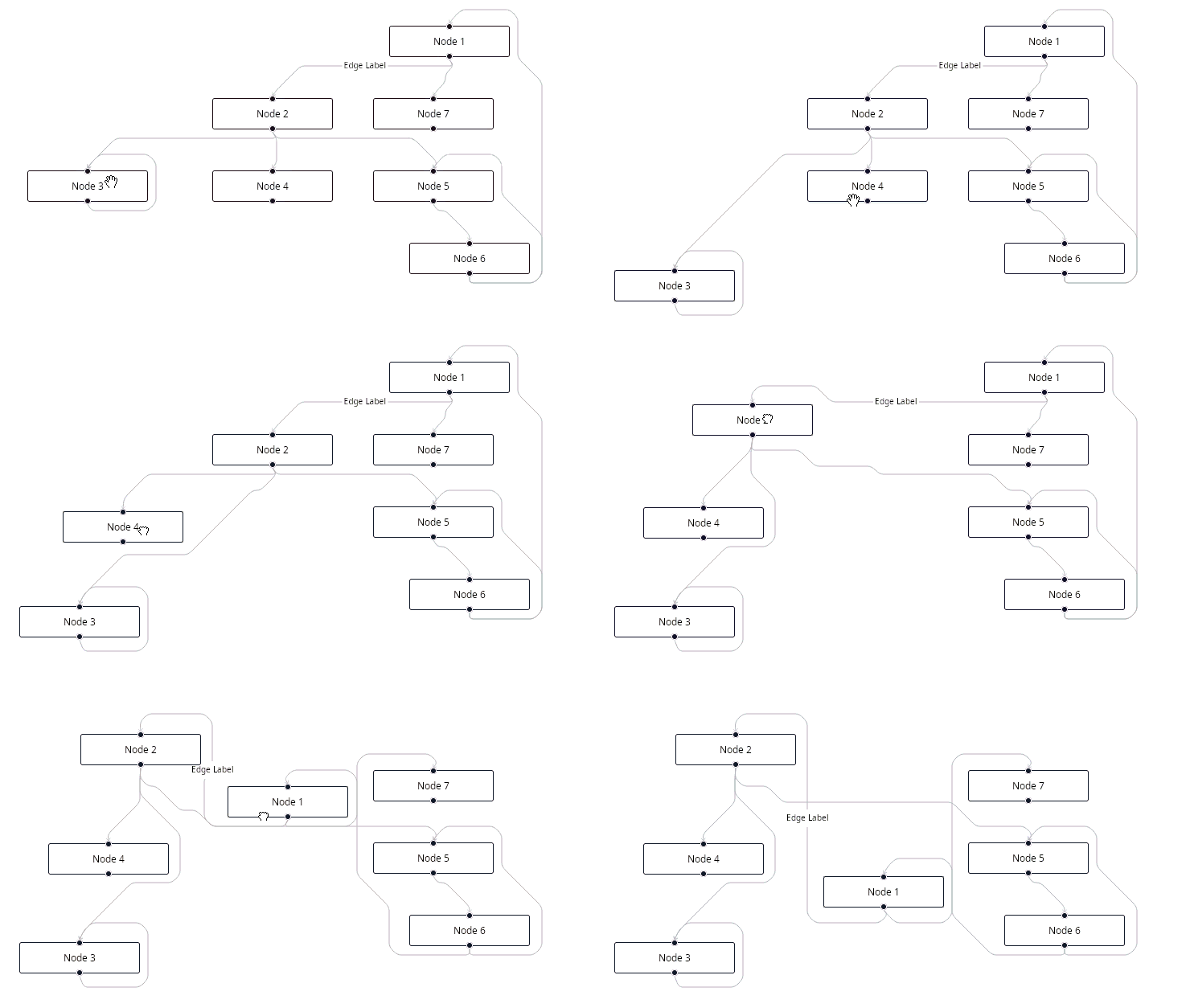
Why?
React Flow's built-in edges draw a direct line from source to target, which often means edges cut straight across your nodes. React Flow Smart Edge computes a path that goes around them, so your graphs stay readable even as they grow and as nodes move.
It's a tiny, dependency-light library (just @xyflow/react as a peer) that ships ready-to-use edge components and a low-level API for building your own.
Features
- Grid-based A* / jump-point pathfinding finds a path that never crosses your nodes.
- Five edge styles: smart equivalents of every React Flow edge (bezier, straight, step, smooth-step, and simple-bezier).
- Step edges can draw a small bridge arc where they cross each other, so intersections read cleanly. (new!)
- Floating edges connect to the nearest node border instead of a fixed handle.
- Editable waypoints let you drag control points to reshape a route; each segment still avoids nodes.
- Checkpoints route through fixed points without the editing UI.
- Avoid areas keep edges clear of arbitrary regions (e.g. labels), not just nodes.
- Subflow aware routing works correctly inside React Flow groups/subflows.
- Web Worker batch routing keeps large graphs responsive by routing edges off the main thread. (new!)
- If no path is found, the edge drops back to the native React Flow edge.
- Swap the pathfinding or SVG drawing functions, or build custom edges with
getSmartEdge. - Written in strict TypeScript, with browser-based interaction tests.
Install
npm install @tisoap/react-flow-smart-edgeRequires React Flow v12+ (@xyflow/react).
Quick start
import { ReactFlow } from "@xyflow/react";
import { SmartBezierEdge } from "@tisoap/react-flow-smart-edge";
import "@xyflow/react/dist/style.css";

const nodes = [
  { id: "1", data: { label: "Node 1" }, position: { x: 300, y: 100 } },
  { id: "2", data: { label: "Node 2" }, position: { x: 300, y: 200 } },
];

const edges = [{ id: "e21", source: "2", target: "1", type: "smart" }];

const edgeTypes = { smart: SmartBezierEdge };

export function Graph() {
  return (
    <ReactFlow
      defaultNodes={nodes}
      defaultEdges={edges}
      edgeTypes={edgeTypes}
      fitView
    />
  );
}
Edge components
| Export | React Flow equivalent |
|---|---|
SmartBezierEdge |
BezierEdge |
SmartStraightEdge |
StraightEdge |
SmartStepEdge |
StepEdge |
SmartSmoothStepEdge |
SmoothStepEdge |
SmartSimpleBezierEdge |
SimpleBezierEdge |
SmartFloatingEdge |
Floating edges example |
SmartEditableEdge |
Editable edge example |
SmartCheckpointEdge |
No equivalent |
Configure any preset with createSmartEdge, or build custom edges with getSmartEdge:
import { createSmartEdge } from "@tisoap/react-flow-smart-edge";

const edgeTypes = {
  // finer routing grid:
  fineStep: createSmartEdge("step", { gridRatio: 5 }),
};
Circuit-style hops
Give the step variants the hops option and crossing wires bridge over each
other like a schematic. The edge on top draws a small arc over the one beneath:
import { createSmartEdge } from "@tisoap/react-flow-smart-edge";

const edgeTypes = {
  hop: createSmartEdge("step", { hops: true }),
  // or smooth-step with rounded corners + bridges:
  smoothHop: createSmartEdge("smoothstep", { hops: { borderRadius: 8 } }),
};
See the hops docs for tuning and a live demo.
Web Worker batch routing
For large graphs, route every edge together on a background Web Worker so
pathfinding stays off the main thread and the canvas stays responsive. Wrap your
flow in SmartEdgeBatchRoutingProvider and read each edge's path with
useSmartEdgeRoute:
import {
  ReactFlow,
  ReactFlowProvider,
  BaseEdge,
  BezierEdge,
} from "@xyflow/react";
import {
  SmartEdgeBatchRoutingProvider,
  useSmartEdgeRoute,
} from "@tisoap/react-flow-smart-edge";

function WorkerEdge(props) {
  const routed = useSmartEdgeRoute(props);
  if (!routed) return <BezierEdge {...props} />;
  return (
    <BaseEdge
      id={props.id}
      path={routed.svgPathString}
      markerEnd={props.markerEnd}
    />
  );
}

const edgeTypes = { worker: WorkerEdge };

function Flow({ nodes, edges }) {
  return (
    <ReactFlowProvider>
      <SmartEdgeBatchRoutingProvider
        nodes={nodes}
        options={{ preset: "bezier" }}
      >
        <ReactFlow nodes={nodes} edges={edges} edgeTypes={edgeTypes} />
      </SmartEdgeBatchRoutingProvider>
    </ReactFlowProvider>
  );
}
It is opt-in and additive: the default edge components are unchanged, and the provider falls back to main-thread routing when Web Workers are unavailable. See the Web Worker batch routing docs.
Documentation
Full documentation: tisoap.github.io/react-flow-smart-edge/docs
Guides, the full API reference, and live interactive demos for every feature.
Interactive Storybook examples are also published on Chromatic.
Support


Development
npm ci
npm run storybook    # demos + tests (port 6006)
npm run docs         # Docusaurus dev server → http://localhost:3000/docs
npm run check        # lint, types, spellcheck
npm run test         # Storybook interaction tests
npm run build-docs   # static docs site → website/build