
pair-review
Your AI-powered code review partner - Close the feedback loop between you and AI coding agents



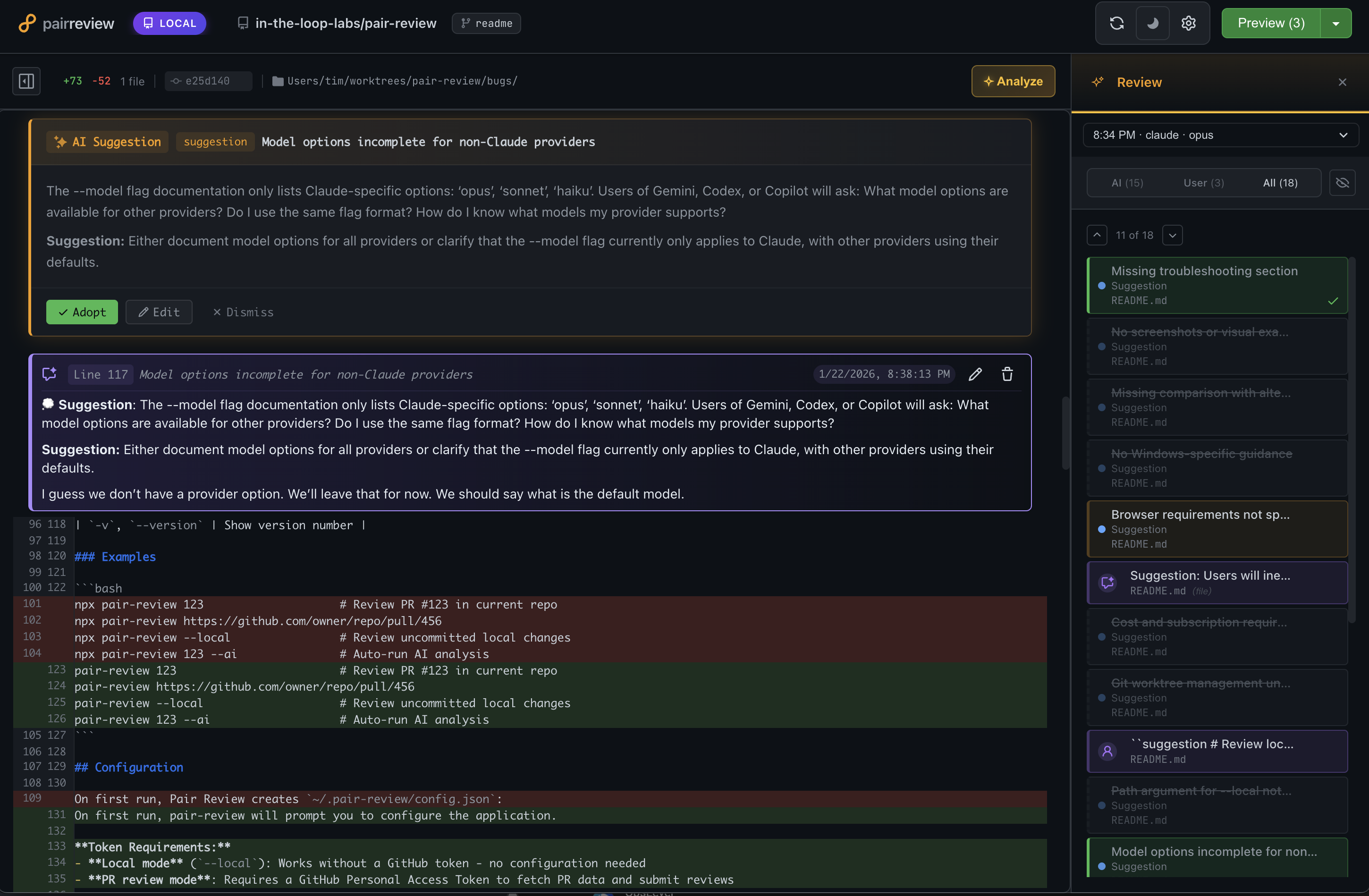
Table of Contents
- What is pair-review?
- Why pair-review?
- Workflows
- Quick Start
- Command Line Interface
- Configuration
- Features
- Claude Code Plugins
- MCP Integration
- Development
- FAQ
- Contributing
- License
What is pair-review?
pair-review is a local web application for keeping humans in the loop with AI coding agents. Calling it an AI code review tool would be accurate but incomplete — it supports multiple workflows beyond automated review, from reviewing agent-generated code before committing, to judging AI suggestions instead of reading every line, to using AI to guide your attention during a thorough review. You pick what fits your situation.
Two Core Value Propositions
Tight Feedback Loop for AI Coding Agents
- Review AI-generated code with clarity and precision
- Provide structured feedback in markdown format
- Copy and paste feedback directly back to your coding agent
- Create a continuous improvement cycle where you stay in control
AI-Assisted Human Review Partner
- Get AI-powered suggestions to accelerate your reviews
- Highlight potential issues and noteworthy code patterns
- You make the final decisions - adopt, edit, or discard AI suggestions
- Add your own comments alongside AI insights
Why pair-review?
- Local-First: All data and processing happens on your machine - no cloud dependencies
- GitHub-Familiar UI: Interface feels instantly familiar to GitHub users
- Human-in-the-Loop: AI suggests, you decide
- Multiple AI Providers: Support for Claude, Gemini, Codex, Copilot, OpenCode, Cursor, and Pi. Use your existing subscription!
- Progressive: Start simple with manual review, add AI analysis when you need it
Workflows
There are no hard boundaries between these — mix and match as needed.
1. Local Review: Human Reviews Agent-Generated Code
When to use: You're working with a coding agent and want to review its changes before committing.
This is the core feedback loop workflow. When an agent generates code, open pair-review to review the uncommitted changes. With the GitHub-like UI, you can add comments at specific file and line locations, then copy that formatted feedback and paste it back into whatever coding agent you're using (or use MCP/skills to read comments directly into Claude Code).
Compared to giving feedback in chat, this feels like moving from a machete to a scalpel. Instead of trying to capture everything in one message, you can leave targeted comments at dozens of specific locations — and the agent addresses each one with surgical precision.
How it works:
- Run
pair-review --localto open the diff UI - Review changes in a familiar GitHub-like interface
- Add comments with specific file and line locations
- Copy formatted feedback and paste into your coding agent
- Iterate until you're satisfied
Tips:
- Stage previous changes in git, then only review new modifications in the next round
- Local mode only shows unstaged changes and untracked files (opinionated by design)
2. Meta-Review: Judging AI Suggestions
When to use: You're not going to read every line of code. Let AI be your reader.
Instead of reviewing thousands of lines of code, you review a dozen AI suggestions. The AI reads the code; you review its recommendations. Each suggestion comes with enough context to evaluate it — even when you're not deeply familiar with the language or codebase.
Adopt suggestions you agree with, dismiss the rest, then feed adopted suggestions back to your coding agent. This is "supervised collaboration" — you stay in the loop without getting in the weeds.
How it works:
- Open
pair-review --localorpair-review <PR-URL>and click Run Analysis - AI performs three levels of review in parallel (see Three-Level AI Analysis below)
- Results are deduplicated and combined by an orchestration step
- Adopt suggestions you agree with, dismiss the rest
- Feed adopted suggestions back to your coding agent
3. AI-Guided Review: When You're Accountable
When to use: You're reviewing code where someone is relying on your judgment. You're still reading the code — AI helps guide your attention and articulate feedback.
You're responsible for the review, but pair-review helps you be more thorough. Kick off the AI analysis and either wait for it to finish or start reading while it runs in the background. The AI suggestions guide you to areas worth attention and help you write clearer explanations. You can also do your own review first, then check whether the AI found the same things — a useful sanity check in both directions.
How it works:
- Run AI analysis on the PR (in background or wait for results)
- Read through the code with AI suggestions visible
- Adopt suggestions you agree with, dismiss the rest, add your own comments
- Submit as a rich, detailed review to GitHub
Quick Start
Installation
Option 1: No installation required (npx)
npx @in-the-loop-labs/pair-review <PR-number-or-URL or --local>Option 2: Global install
npm install -g @in-the-loop-labs/pair-review
pair-review <PR-number-or-URL>
Tip: Create an alias for frequent use:
alias pr='npx @in-the-loop-labs/pair-review'
Either way, pair-review will:
- Check out the PR branch locally (using git worktrees)
- Open the web UI in your browser
- Show you a familiar diff view
Note: The examples below use the shorter
pair-reviewcommand. If you're using npx without a global install, substitutenpx @in-the-loop-labs/pair-reviewinstead.
Review a Pull Request
# By PR number (in a GitHub repo)
pair-review 123

# By full GitHub URL
pair-review https://github.com/owner/repo/pull/123

# Review local uncommitted changes
pair-review --local
Basic Workflow
- Review the diff - See all file changes in a familiar GitHub-like interface
- Optional: Trigger AI analysis - Get 3-level AI review insights:
- Level 1: Issues in changed lines only
- Level 2: Consistency within file context
- Level 3: Architectural consistency across codebase
- Add comments - Adopt AI suggestions or write your own
- Export feedback - Copy as markdown to paste back to your coding agent
- Submit review - Post to GitHub with approval status (or keep it local)
Command Line Interface
Basic Usage
# Review a pull request by number
pair-review <PR-number>

# Review a pull request by URL
pair-review <PR-URL>

# Review local uncommitted changes in the current directory or a specified path
pair-review --local [path]
Options
| Option | Description |
|---|---|
<PR-number> |
PR number to review (requires being in a GitHub repo) |
<PR-URL> |
Full GitHub PR URL (e.g., https://github.com/owner/repo/pull/123) |
--ai |
Automatically run AI analysis when the review loads |
--ai-draft |
Run AI analysis and save suggestions as a draft review on GitHub |
--headless |
Run AI analysis, store it in the local database, report the results, then exit. No server, no browser, no GitHub post. Implies analysis (does not require --ai). Works with a <PR-number-or-URL> or with --local. See Headless analysis mode. |
--json |
With --headless, emit the completed run plus its consolidated suggestions as a single JSON document on a clean stdout. For any outcome of the headless run (success, zero findings, or an error raised while running it), stdout carries a JSON document with an ok field; failures emit an { "ok": false, "error": … } envelope on stdout with a non-zero exit. (Pre-flight config/startup failures are the exception: they exit non-zero with a stderr message and no JSON envelope — branch on the exit code first.) stderr is quiet by default (only warnings/errors) — add --debug for verbose progress logs. Only valid together with --headless. |
--instructions <text> |
Per-run custom instructions for this analysis. Applies to any mode that runs analysis — --headless, --ai-draft, --ai-review (consumed directly), and --ai/--council (carried into the browser-triggered analysis). Rejected with a clear error if no analysis mode is selected, so it is never silently dropped. Default: none. |
--instructions-file <path> |
Read per-run custom instructions from a file (5000-character cap). Mutually exclusive with --instructions. |
--council <handle> |
Run analysis with a saved multi-voice council. Implies analysis. The handle resolves by council name, name-slug, id (prefix), or a partial name fragment (resolving when it matches a single council, otherwise listing the candidates). When set, --model is ignored (council voices use their own per-voice models). Works in headless PR (--ai-draft/--ai-review/--headless), interactive PR (--ai), and local (--local --ai) modes. |
--list-councils |
List saved councils with their handles, names, types, and last-used repo, then exit. Use a printed handle with --council. |
--configure |
Show setup instructions and configuration options |
-d, --debug |
Enable verbose debug logging for troubleshooting |
-h, --help |
Show help message with full CLI documentation |
-l, --local [path] |
Review local uncommitted changes. Optional path defaults to current directory |
--model <name> |
Override the AI model for any provider. Model availability depends on provider configuration. |
--register |
Register pair-review:// URL scheme handler (macOS only) |
--unregister |
Unregister pair-review:// URL scheme handler (macOS only) |
--command <cmd> |
Custom CLI command for --register (default: npx @in-the-loop-labs/pair-review) |
-v, --version |
Show version number |
Examples
pair-review 123                        # Review PR #123 in current repo
pair-review https://github.com/owner/repo/pull/456
pair-review --local                    # Review uncommitted local changes
pair-review 123 --ai                   # Auto-run AI analysis
pair-review --list-councils            # List saved councils and their handles
pair-review 123 --ai-draft --council security-review  # Headless draft with a council
pair-review --local --ai --council security-review    # Local review with a council
pair-review --local --headless         # Analyze local changes, print a summary, exit
pair-review --local --headless --json  # Analyze local changes, emit JSON, exit
pair-review 123 --headless             # Analyze a PR, print a summary, exit
pair-review --register                 # Register pair-review:// URL scheme (macOS)
pair-review --register --command "node bin/pair-review.js"  # Custom command
Councils are saved multi-voice review configurations created and managed in the web UI (under Analysis settings).
--council <handle>selects one from the CLI; the handle can be the council's name, its name-slug, an id prefix, or a partial name fragment (which resolves when it uniquely identifies a council, otherwise lists the candidates). Runpair-review --list-councilsto discover available handles.
Repo default review config: when neither
--councilnor--modelis given, pair-review uses the repository's configured default — its default council if one is set, otherwise its default provider/model, otherwise the global config default. This applies to--headless, the submit modes, and the web UI's default Analyze action, so--council/--modelare optional when a repo default is configured.
Headless analysis mode
--headless runs an AI analysis (single provider or council), stores the results
in the local SQLite database exactly as the web UI does, reports them, and exits.
It never starts the server, opens a browser, or posts to GitHub — it is the
analysis core without the interactive or submit steps.
# Analyze uncommitted local changes, print a human-readable summary
pair-review --local --headless

# Analyze a PR (no review is created on GitHub)
pair-review 123 --headless

# Use a council and per-run instructions
pair-review --local --headless --council security-review \
  --instructions "Focus on auth and input validation."
Exit codes: a successful analysis exits 0 regardless of how many findings it
surfaces (zero findings is still success, with an empty suggestions array).
Non-zero exit is reserved for operational errors — invalid flags, an unreadable
--instructions-file, or an analysis failure.
Machine-readable output (--json): add --json to emit the completed run
plus its consolidated final suggestions as a single JSON document on stdout, so
stdout is a clean, parseable document suitable for scripting and AI coding
agents:
pair-review --local --headless --json | jq '.suggestions | length'Because this mode is consumed mostly by coding agents — whose shell tools capture
stderr alongside stdout — stderr is quiet by default: only genuine warnings
and errors are emitted, not progress narration. Add --debug to restore the full
verbose log stream on stderr when diagnosing a run.
The JSON document has this shape (fields reflect the stored run and the consolidated suggestion layer the app shows by default):
{
  "ok": true,                 // false on failure (see below)
  "mode": "local",            // "pr" or "local"
  "run": {
    "id": "…",                 // analysis run id
    "review_id": 1,
    "provider": "claude",      // for a council run: "council"
    "model": "opus",           // for a council run: the council id
    "tier": "balanced",
    "config_type": "standard", // or "council" / "advanced"
    "status": "completed",
    "summary": "…",
    "total_suggestions": 3,
    "files_analyzed": 5,
    "started_at": "…",
    "completed_at": "…",
    "head_sha": "…",
    "parent_run_id": null,
    "custom_instructions": null,
    "global_instructions": null,
    "repo_instructions": null,
    "request_instructions": "Focus on auth…",  // from --instructions[-file]
    "levels_config": { /* parsed */ },
    "level_outcomes": { /* parsed */ }
  },
  "suggestions": [
    {
      "id": 42,
      "ai_run_id": "…",
      "ai_level": null,        // consolidated layer (per-level rows excluded)
      "ai_confidence": 0.9,
      "file": "src/app.js",
      "line_start": 120,
      "line_end": 124,
      "type": "bug",
      "title": "…",
      "body": "…",
      "severity": "high",
      "status": "active",      // active or adopted
      "is_file_level": 0,
      "reasoning": { /* parsed */ },
      "created_at": "…"
    }
  ],
  "count": 1                   // suggestions.length
}
On failure (invalid flags, an unreadable --instructions-file, or an
analysis error raised while running the headless flow) --json emits a JSON
document on stdout — a compact failure envelope — and the exit code is non-zero,
so a consumer parses one stream and branches on ok:
{
  "ok": false,
  "mode": "local",            // "pr" or "local"
  "error": { "message": "…" }
}
The envelope covers errors raised once the headless run is under way. A fatal
pre-flight failure — an unreadable or malformed ~/.pair-review/config.json, an
unwritable config directory, or an invalid port — exits non-zero with a message
on stderr and does not emit a JSON envelope on stdout. Branch on the exit
code first (as the example below does), then parse stdout.
Agent workflow. A coding agent can run a headless analysis against its own uncommitted work, parse the JSON, and act on the suggestions:
result=$(pair-review --local --headless --json \
  --council security-review \
  --instructions "Review the changes I just made for security issues.")

# Bail out on failure: non-zero exit, and `ok` is false in the JSON envelope.
if [ $? -ne 0 ] || [ "$(echo "$result" | jq -r '.ok')" != "true" ]; then
  echo "analysis failed: $(echo "$result" | jq -r '.error.message')" >&2
  exit 1
fi

# Act on high-severity findings
echo "$result" | jq -r '.suggestions[]
  | select(.severity == "high")
  | "\(.file):\(.line_start) [\(.type)] \(.title)"'
Once the run starts, --json produces a JSON document on stdout for any outcome
— { "ok": true, … } on success (any number of findings, including zero) and
{ "ok": false, … } with a non-zero exit on an error raised while running it —
so the agent reads exactly one stream and branches on ok. Because a pre-flight
config/startup failure is the one case that exits without a JSON envelope,
checking the exit code first (as above) covers every outcome.
Configuration
On first run, pair-review will prompt you to configure the application.
Token Requirements:
- Local mode (
--local): Works without a GitHub token - no configuration needed - PR review mode: Requires a GitHub Personal Access Token to fetch PR data and submit reviews
Configuration is stored in ~/.pair-review/config.json:
{
  "github_token": "ghp_your_token_here",
  "port": 7247,
  "theme": "light",
  "default_provider": "claude",
  "default_model": "opus"
}
On first run, pair-review creates ~/.pair-review/config.example.json with comprehensive examples of all available options, including custom provider and model configurations. Use this as a reference when customizing your setup.
For advanced configuration with custom providers and models, see AI Provider Configuration below.
Feature toggles
| Key | Default | Description |
|---|---|---|
external_comments |
false |
Opt-in: set to true to fetch and display GitHub PR review comments inline. Enables the External segment, the refresh button, and /api/reviews/*/external-comments* routes. |
enable_chat |
true |
Enables the chat panel feature (uses chat_provider). |
enable_graphite |
false |
Show Graphite links alongside GitHub links. |
skip_update_notifier |
false |
Suppress the "update available" notification on exit. |
Configuration Files
pair-review loads configuration from multiple files, merged in order of increasing precedence:
| Priority | File | Purpose |
|---|---|---|
| 1 (lowest) | Built-in defaults | Sensible defaults for all settings |
| 2 | ~/.pair-review/config.json |
Global user configuration |
| 3 | ~/.pair-review/config.local.json |
Personal overrides (gitignored) |
| 4 | .pair-review/config.json |
Project-specific configuration (can be checked in) |
| 5 (highest) | .pair-review/config.local.json |
Personal project overrides (gitignored) |
Nested objects (like chat, providers, chat_providers, monorepos) are deep-merged across layers — you only need to specify the keys you want to override.
config.local.json files are intended for personal overrides that should not be committed to version control. Add config.local.json to your .gitignore.
Alternate Git Hosts
pair-review can review pull requests on self-hosted Git platforms that expose a GitHub-compatible REST API, configured per-repository via repos["owner/repo"].api_host and related keys. See docs/alt-host.md for the full configuration guide.
Environment Variables
pair-review supports several environment variables for customizing behavior:
| Variable | Description | Default |
|---|---|---|
GITHUB_TOKEN |
GitHub Personal Access Token (takes precedence over config file) | - |
PAIR_REVIEW_CLAUDE_CMD |
Custom command to invoke Claude CLI | claude |
PAIR_REVIEW_GEMINI_CMD |
Custom command to invoke Gemini CLI | gemini |
PAIR_REVIEW_CODEX_CMD |
Custom command to invoke Codex CLI | codex |
PAIR_REVIEW_COPILOT_CMD |
Custom command to invoke Copilot CLI | copilot |
PAIR_REVIEW_OPENCODE_CMD |
Custom command to invoke OpenCode CLI | opencode |
PAIR_REVIEW_CURSOR_AGENT_CMD |
Custom command to invoke Cursor Agent CLI | agent |
PAIR_REVIEW_PI_CMD |
Custom command to invoke Pi CLI | pi |
PAIR_REVIEW_MODEL |
Override the AI model to use (same as --model flag) |
Provider default |
Note: GITHUB_TOKEN is the standard environment variable used by many GitHub tools (gh CLI, GitHub Actions, etc.). When set, it takes precedence over the github_token field in the config file.
Note: The --model CLI flag is shorthand for setting PAIR_REVIEW_MODEL. If both are specified, the CLI flag takes precedence.
These variables are useful when:
- Your CLI tools are installed in a non-standard location
- You need to use a wrapper script or custom binary
- You want to force a specific model for all reviews
Examples:
# Use GitHub token from environment variable (CI/CD friendly)
GITHUB_TOKEN="ghp_xxxx" pair-review 123

# Use a custom path for Claude CLI
PAIR_REVIEW_CLAUDE_CMD="/usr/local/bin/claude" pair-review 123

# Use a wrapper command (supports multi-word commands)
PAIR_REVIEW_CLAUDE_CMD="devx claude" pair-review 123

# Use Gemini with npx
PAIR_REVIEW_GEMINI_CMD="npx gemini" pair-review --local

# Force a specific model for this review
PAIR_REVIEW_MODEL="opus" pair-review 123

# Combine multiple settings
PAIR_REVIEW_CLAUDE_CMD="/opt/claude/bin/claude" PAIR_REVIEW_MODEL="haiku" pair-review 123
Note: Multi-word commands (containing spaces) are supported. The application automatically handles these by using shell mode for execution.
GitHub Token
Create a Personal Access Token (PAT) with these scopes:
repo(full control of private repositories)read:org(if reviewing organization repos)
AI Provider Configuration
pair-review integrates with AI providers via their CLI tools:
- Claude: Uses Claude Code CLI
- Gemini: Uses Gemini CLI
- Codex: Uses Codex CLI
- GitHub Copilot: Uses Copilot CLI
- OpenCode: Uses OpenCode CLI (requires model configuration)
- Cursor: Uses Cursor Agent CLI (streaming output with sandbox mode)
- Pi: Uses Pi coding agent CLI (requires model configuration)
You can select your preferred provider and model in the repository settings UI.
Built-in vs. Configurable Providers
Most providers (Claude, Gemini, Codex, Copilot) come with built-in model definitions. OpenCode and Pi are different - they have no built-in models and require you to configure which models to use.
Configuring Custom Models
You can override provider settings and define custom models in your config file. This is useful for:
- Adding models to OpenCode or Pi (required for these providers)
- Overriding default commands or arguments
- Setting provider-specific environment variables
Full provider configuration example:
{
  "github_token": "ghp_your_token_here",
  "default_provider": "opencode",
  "default_model": "anthropic/claude-sonnet-4",
  "providers": {
    "opencode": {
      "command": "opencode",
      "extra_args": ["--verbose"],
      "env": { "OPENCODE_TELEMETRY": "off" },
      "default_model": "anthropic/claude-sonnet-4",
      "models": [
        {
          "id": "anthropic/claude-sonnet-4",
          "tier": "balanced",
          "name": "Claude Sonnet 4",
          "description": "Fast and capable for most reviews",
          "tagline": "Best balance of speed and quality"
        },
        {
          "id": "anthropic/claude-opus-4",
          "tier": "premium",
          "name": "Claude Opus 4",
          "description": "Most capable model for complex reviews"
        },
        {
          "id": "openai/gpt-4.1",
          "tier": "thorough",
          "name": "GPT-4.1",
          "description": "OpenAI's latest model"
        }
      ]
    }
  }
}
Provider Configuration Fields
| Field | Description |
|---|---|
command |
CLI command to execute (overrides default and environment variable) |
extra_args |
Additional arguments to pass to the CLI |
env |
Environment variables to set when running the CLI |
installInstructions |
Custom installation instructions shown in UI |
availability_timeout_seconds |
Seconds to allow for the startup availability probe before the provider is reported unavailable (default 10). Raise it for providers whose check runs a slow build/compile step. Also supported per chat provider under chat_providers.<id>. |
availability_command |
Command run to decide availability. Executable providers default to always-available when omitted; chat providers fall back to <command> --version (or, for the built-in Pi, the cached AI-provider status). Pair with availability_timeout_seconds when the probe runs a slow build. |
models |
Array of model definitions (see below) |
default_model |
Model id to use as the provider's default (in the picker and when no model is specified). Preferred over the per-model default: true flag. If it names an unknown or disabled model, the provider falls back to automatic selection. |
disabled_models |
Array of model selectors to hide, matched by model id or alias. Disabled models disappear from the model picker for that provider. Works on built-in models too, so you can remove a built-in option without redefining the rest. A list that would hide every model is ignored. |
Model Configuration Fields
| Field | Required | Description |
|---|---|---|
id |
Yes | Model identifier passed to the CLI |
tier |
Yes | One of: fast, balanced, thorough (aliases: free→fast, premium→thorough) |
name |
No | Display name in the UI |
description |
No | Longer description of the model |
tagline |
No | Short description shown in model picker |
badge |
No | Badge text (e.g., "NEW", "BETA") |
badgeClass |
No | CSS class for badge styling |
default |
No | Deprecated — use the provider-level default_model field instead. Set to true to make this the default model for the provider. Still honored for backward compatibility, but default_model takes precedence when both are present. |
extra_args |
No | Model-specific CLI arguments |
env |
No | Model-specific environment variables |
Choosing and Hiding Models
Use the provider-level default_model and disabled_models fields to tailor which models a provider exposes — these work on built-in models too, so you can adjust a provider without redefining its entire model list.
{
  "providers": {
    "claude": {
      "default_model": "sonnet-4.6",
      "disabled_models": ["haiku", "fable"]
    }
  }
}disabled_modelsremoves those models from the picker. It matches by model id or alias, so either a canonical id (opus-4.8-xhigh) or a convenience alias (opus) works. To find the built-in IDs for a provider, see the comments inconfig.example.json(e.g. Claude shipsopus-4.8-xhigh,sonnet-4.6,haiku, …).default_modelselects which of the remaining models is the default. If it points at a model that is unknown or also disabled, the provider falls back to automatic selection (the model markeddefault: true, then the firstbalanced-tier model, then the first model).- Prefer
default_modelover the per-modeldefault: trueflag, which is deprecated. Settingdefault_modelsuppresses the deprecation warning.
Model Tiers
Models are grouped by tier to help users choose appropriately:
- fast: Quick analysis, lower cost, good for simple reviews
- balanced: Best mix of speed and quality (recommended)
- thorough: Most comprehensive analysis, higher cost
Aliases are available for convenience: free (maps to fast), premium (maps to thorough).
Command Precedence
The CLI command used for a provider follows this precedence (highest to lowest):
- Environment variable (e.g.,
PAIR_REVIEW_OPENCODE_CMD) - Config file
providers.<provider>.command - Built-in default
Features
Three-Level AI Analysis
pair-review's AI analysis system examines your code changes at increasing levels of context:
- Level 1 - Isolation: Analyzes only the changed lines for bugs and issues
- Level 2 - File Context: Checks consistency within the entire file
- Level 3 - Codebase Context: Validates architectural patterns across the codebase
This progressive approach keeps analysis focused while catching issues at every scope.
Analysis Configuration
There are three ways to configure which models run your analysis, each building on the last:
Single Model — Pick one provider and model. All enabled analysis levels run with that model, and consolidation uses the same model. The simplest option.
Review Council — Pick multiple provider+model combinations that all run in parallel across the selected analysis levels. You pick a separate consolidation model that merges everything together.
- Each reviewer can have its own timeout, instructions, and prompt tier (see Model Tiers)
- Results consolidate first across levels for each reviewer, then across reviewers
- Individual reviewer results are available alongside the overall council result
Advanced — For each enabled analysis level, pick different provider+model combinations. Level 1 might use a fast model while Level 3 uses a thorough one. Supports the same per-model options as Review Council (timeout, instructions, tier). Consolidation model is selected separately. Results consolidate first within each level (if multiple reviewers), then across levels.
The key difference from Review Council is consolidation order: Advanced consolidates within each level first, then across levels, so there are no per-reviewer rollups.
Example use cases:
- Large changesets with Opus 4.6: Use review council instructions to tell the model to use a Team — it will spawn sub-agents to divide the work
- Multi-model parallel review: Give each model a specific focus area (security, performance, correctness) via per-model instructions and get combined results
- Cross-model perspectives: Run the same analysis across different providers (e.g., Claude, Gemini, GPT) — where models agree signals high-confidence findings, but unique outliers from a single model can be equally valuable, catching issue types that only that model excels at spotting
Chat
Chat with a full coding agent while you review — it can read the codebase, answer questions, and interact with pair-review on your behalf. Powered by Pi.
What you can do:
- Ask questions about the code, architecture, or intent behind changes
- Have the agent pull related code into the diff panel as context files — see how changed code connects to the rest of the codebase without leaving the review
- Adopt, dismiss, or discuss AI suggestions directly from the conversation
- Create and edit review comments through chat
- Trigger new analysis runs with custom instructions
- Start conversations from context — an analysis run, an AI suggestion, a comment, any line or file
Setup:
npm install -g @mariozechner/pi-coding-agentConfigure your preferred models in providers.pi.models — see AI Provider Configuration for details. Everything else in pair-review works without Pi installed.
Chat provider command overrides: To customize CLI commands for chat providers (e.g., to use a wrapper script), use the chat_providers config key:
{
  "chat_providers": {
    "claude": { "command": "devx", "args": ["claude", "--"] },
    "codex": { "command": "devx", "args": ["codex", "--", "app-server"] },
    "opencode-acp": { "command": "devx", "args": ["opencode", "acp"] }
  }
}
Available chat provider IDs: pi, claude, codex, copilot-acp, gemini-acp, opencode-acp, cursor-acp. Each supports command, args (replaces defaults), extra_args (appends), and env overrides. Codex chat also supports sandbox: use workspace-write by default, or read-only for discussion-only sessions.
Keyboard shortcut: Press p then c to toggle the chat panel.
Customization
Tailor AI analysis to your team's standards and your current needs:
- Repo-level instructions: Always included when generating suggestions for a specific repo. Point to codebase best practices docs, highlight common review mistakes, or include other helpful resources. Reviews will actively cite this guidance when relevant.
- Review-level instructions: Customize individual reviews on the fly. Request deeper analysis with detailed code suggestions, ask for a "blockers only" final review, or adjust the focus for a particular set of changes.
There's a compounding benefit: if you run pair-review with the same coding agent you use for development — one already configured with your rules and instructions — it will actively search for violations and enforce them. The review reflects your standards, not generic best practices.
Review Feedback Export
The killer feature for AI coding agent workflows:
- Add comments during your review (manual or AI-assisted)
- Click "Preview Review" to see formatted markdown
- Copy the markdown
- Paste into your coding agent's chat
- Agent iterates based on your feedback
The markdown includes file paths, line numbers, and your comments - everything the agent needs to understand and act on your feedback.
Inline Comments
- Add comments directly on specific lines
- See all comments in context with the diff
- Edit or discard AI suggestions before finalizing
- Comments include file and line number for precision
GitHub Review Comments
When reviewing a PR, pair-review fetches existing inline review comments from GitHub and shows them in the diff alongside AI suggestions (orange) and your own draft comments (purple). External comments render as read-only blue-themed bubbles, with threads preserved (root plus replies). Each comment and each thread has a "Chat about this" button that opens the AI chat panel with the comment as context, so you can quickly ask the agent to investigate, explain, or draft a response.
Sync runs automatically when the PR page loads (non-blocking) and on demand via a refresh button — there's no need to reload the page to pick up new comments.
Current scope:
- Read-only. No reply, resolve, or adopt actions in this iteration — pair-review surfaces the conversation but doesn't write back to GitHub from these bubbles. Use your usual GitHub workflow to reply or resolve.
- Inline (line-anchored) comments only. The PR conversation tab (general issue comments) is not included.
- Outdated comments are kept. If later commits removed the anchor line, the comment renders at its original location with an "outdated" badge so historical context isn't lost.
- No dedup of your own comments yet. If you submitted a review from pair-review and later replied via the GitHub web UI, those replies may appear in the list under your GitHub username. Deduplication of pair-review-originated comments is on the roadmap.
- GitHub only, PR mode only. The fetcher is built on an adapter pattern in
src/external/so additional sources (GitLab, Linear, etc.) can be added later, but GitHub is the only supported source today. Local mode reviews don't fetch external comments.
Comment Format
When AI suggestions are adopted as review comments, pair-review formats them with an emoji and category prefix by default. You can customize this format via the comment_format setting in ~/.pair-review/config.json.
Presets:
| Preset | Template | Example Output (without suggestion) |
|---|---|---|
legacy |
{emoji} **{category}**: {description}{?suggestion}\n\n**Suggestion:** {suggestion}{/suggestion} |
Bug: Missing null check |
minimal |
[{category}] {description}{?suggestion}\n\n{suggestion}{/suggestion} |
[Bug] Missing null check |
plain |
{description}{?suggestion}\n\n{suggestion}{/suggestion} |
Missing null check |
emoji-only |
{emoji} {description}{?suggestion}\n\n{suggestion}{/suggestion} |
Missing null check |
maximal |
{emoji} **{category}**{?title}: {title}{/title}\n\n{description}{?suggestion}\n\n**Suggestion:** {suggestion}{/suggestion} |
Bug: Null Safety Issue (includes title) |
To use a preset:
{
  "comment_format": "minimal"
}
Custom templates:
You can provide a custom template using these placeholders: {emoji}, {category}, {title}, {description}, {suggestion}.
Conditional sections: Use {?field}...{/field} to conditionally include content. When the field value is truthy, the delimiters are stripped and the content is kept. When the field is empty/null/undefined, the entire block (including surrounding text within the delimiters) is removed. For example, {?suggestion}\n\n**Suggestion:** {suggestion}{/suggestion} will omit the entire suggestion line when there is no remediation text.
{
  "comment_format": {
    "template": "{emoji} **{category}**: {description}{?suggestion}\n\n**Suggestion:** {suggestion}{/suggestion}",
    "emojiOverrides": {
      "bug": "🔴"
    }
  }
}
Category overrides:
Use categoryOverrides to rename categories in the formatted output. This is a string-to-string mapping where keys are the original category names (lowercase) and values are the replacement names.
{
  "comment_format": {
    "template": "{emoji} **{category}**: {description}{?suggestion}\n\n**Suggestion:** {suggestion}{/suggestion}",
    "categoryOverrides": { "bug": "defect", "performance": "perf" }
  }
}{title}uses the suggestion's title field if available.emojiOverrideslets you replace the default emoji for specific categories.categoryOverrideslets you rename categories (e.g., "bug" to "defect").
Templates typically include {description} to render the suggestion body.
Builtin categories: bug, improvement, praise, suggestion, design, performance, security, code-style
Local Mode
Review unstaged, uncommitted changes before creating a PR:
pair-review --localPerfect for:
- Self-review before committing
- Getting AI feedback on work-in-progress
- Iterating with a coding agent on local changes
- Reviewing only the unstaged files that are still changing
- Staging the files you've already reviewed and viewing the next round of changes
Claude Code Plugins
pair-review provides two Claude Code plugins that bring AI-powered code review directly into Claude Code.
code-critic — Standalone Analysis
AI-powered code review analysis that works without any server or MCP dependency. Install this plugin for three-level AI analysis and implement-review-fix loops directly in your coding agent.
Install via Marketplace:
/plugin marketplace add in-the-loop-labs/pair-review
/plugin install pair-review@code-critic
Available Skills:
| Skill | Description |
|---|---|
/code-critic:analyze |
Run three-level AI analysis using Task agents directly (standalone, no server needed) |
/code-critic:loop |
Implement code, review with AI, fix issues, and repeat until clean |
These skills work standalone. If the pair-review MCP server happens to be available (from the pair-review plugin), code-critic:analyze will use it for prompts and push results to the web UI — but it's entirely optional.
pair-review — App Integration
Full integration with the pair-review web UI via MCP. Install this plugin to open reviews in the browser, run server-side AI analysis, and address review feedback.
Install via Marketplace:
/plugin marketplace add in-the-loop-labs/pair-review
/plugin install pair-review@pair-review
Available Skills:
| Skill | Description |
|---|---|
/pair-review:pr |
Open the current branch's GitHub PR in the pair-review web UI |
/pair-review:local |
Open local uncommitted changes in the pair-review web UI |
/pair-review:analyze |
Run AI analysis via the pair-review MCP server (results appear in web UI) |
/pair-review:user-critic |
Fetch and address human review comments from pair-review |
/pair-review:ai-critic |
Fetch and address AI-generated suggestions from pair-review |
This plugin includes the pair-review MCP server, which starts automatically when the plugin is enabled.
Alternative: Load Plugins Locally
If you prefer not to use the marketplace, load plugins directly from an npm-installed or cloned copy:
# From a local clone
claude --plugin-dir ./path/to/pair-review/plugin-code-critic
claude --plugin-dir ./path/to/pair-review/plugin

# From a globally installed npm package
claude --plugin-dir "$(npm root -g)/@in-the-loop-labs/pair-review/plugin-code-critic"
claude --plugin-dir "$(npm root -g)/@in-the-loop-labs/pair-review/plugin"
Team Setup
To pre-configure plugins for all contributors on a repository, add this to your .claude/settings.json:
{
  "extraKnownMarketplaces": {
    "pair-review": {
      "source": {
        "source": "github",
        "repo": "in-the-loop-labs/pair-review"
      }
    }
  },
  "enabledPlugins": {
    "pair-review@code-critic": true,
    "pair-review@pair-review": true
  }
}
Team members will be prompted to install the marketplace and plugins when they trust the repository folder.
MCP Integration
pair-review exposes a Model Context Protocol (MCP) interface, allowing AI coding agents to programmatically read review feedback. The MCP server is included automatically when you install the pair-review Claude Code plugin. For standalone MCP setup (without the plugin), see Standalone MCP Setup below.
Transport Modes
stdio (recommended) — run pair-review as a stdio MCP server. The agent communicates via stdin/stdout JSON-RPC while the web UI launches on a local port for the human reviewer:
npx @in-the-loop-labs/pair-review --mcpHTTP — the Streamable HTTP endpoint at http://localhost:7247/mcp (stateless mode) is available whenever the pair-review web server is running.
Available Tools
| Tool | Description | Availability |
|---|---|---|
get_server_info |
Get pair-review server info including web UI URL and version | stdio only |
get_analysis_prompt |
Get rendered analysis prompts for a review level and tier | stdio + HTTP |
get_user_comments |
Get human-curated review comments (authored or adopted), grouped by file | stdio + HTTP |
get_ai_analysis_runs |
List all AI analysis runs for a review | stdio + HTTP |
get_ai_suggestions |
Get AI-generated suggestions from the latest analysis run, or from a specific run via runId |
stdio + HTTP |
start_analysis |
Start an AI analysis in the app for local or PR changes | stdio + HTTP |
All review tools accept lookup parameters:
- Local reviews:
path+headSha - PR reviews:
repo(e.g."owner/repo") +prNumber
get_ai_suggestions also accepts an optional runId to target a specific analysis run (discovered via get_ai_analysis_runs), bypassing the need for review lookup parameters.
Standalone MCP Setup (Without Plugin)
If you want just the MCP tools without the full plugin (no skills), you can add the MCP server directly to any coding agent that supports MCP (Claude Code, Cursor, Windsurf, etc.).
Generic MCP Configuration
stdio transport (recommended) — run pair-review as a child process. The agent communicates via stdin/stdout JSON-RPC:
- Command:
npx @in-the-loop-labs/pair-review --mcp - Environment variables: Set
GITHUB_TOKENif you want PR review support (not needed for local-only reviews). GitHub token will also be read from~/.pair-review/config.jsonif configured.
HTTP transport — connect to a running pair-review instance:
- URL:
http://localhost:7247/mcp(stateless Streamable HTTP) - Start the server first with
npx @in-the-loop-labs/pair-reviewor by opening a PR review, then point your agent at the HTTP endpoint.
You can also copy the plugin/.mcp.json file from this package into your project for agents that support .mcp.json discovery.
Claude Code Specific
Add the MCP server via the Claude Code CLI:
stdio transport (recommended):
claude mcp add pair-review -- npx @in-the-loop-labs/pair-review --mcpHTTP transport:
claude mcp add --transport http pair-review http://localhost:7247/mcpThese commands update your MCP configuration in ~/.claude/settings.json (user-level) or your project's .claude/settings.json (project-level).
Development
Prerequisites
- Node.js 20.0.0 or higher
- pnpm 10.x
- Git
Running Locally
# Install dependencies
pnpm install

# Run tests
pnpm test

# Run tests in watch mode
pnpm run test:watch

# Run E2E tests
pnpm run test:e2e

# Run E2E tests with visible browser
pnpm run test:e2e:headed

# Start development server
pnpm run dev
Architecture
- Backend: Node.js + Express
- Frontend: Vanilla JavaScript (no framework)
- Database: SQLite for local storage
- AI Integration: CLI-based adapter pattern for multiple providers
- Git: Uses git worktrees for clean PR checkout
FAQ
Q: Does my code get sent to the cloud? A: Not by pair-review. Pair-review keeps all its data locally. AI providers that you use for review may communicate with their servers.
Q: Do I need to use AI analysis? A: No. pair-review works great as a local review UI without AI. Trigger analysis only when you want it.
Q: Which AI provider should I use? A: Any that you have configured locally. Claude excels at code review, but try different providers to see what works best for you.
Q: Can I use this for non-GitHub repos?
A: Local mode (--local) works with any git repository. PR review mode requires GitHub.
Q: How do I give feedback to a coding agent? A: Add comments during review, click "Preview Review", copy the markdown, and paste it into your coding agent's chat interface.
Q: Something isn't working right. What should I try first? A: Try refreshing your browser. Many transient issues resolve with a simple page refresh.
Q: How do I use OpenCode as my AI provider?
A: OpenCode has no built-in models, so you must configure them in your ~/.pair-review/config.json. Add a providers.opencode.models array with at least one model definition. See the AI Provider Configuration section for a complete example.
Q: How do I use Pi as my AI provider?
A: Like OpenCode, Pi has no built-in models. Configure them in your ~/.pair-review/config.json by adding a providers.pi.models array with at least one model definition. Pi supports many providers (Google, Anthropic, OpenAI, etc.) via its --provider and --model flags. See the AI Provider Configuration section and config.example.json for examples.
Q: Why does chat use Pi instead of Claude or other providers? A: Pi provides persistent interactive sessions with a full agent — it can read files and run commands in the context of the codebase. Pi is model-agnostic and uses your existing provider subscriptions — no separate API keys needed.
Contributing
Contributions welcome! Please:
- Check existing issues or create a new one
- Fork the repository
- Create a feature branch
- Write tests for changes, especially bug fixes
- Submit a pull request
License
Apache-2.0 License - see LICENSE file for details
Start reviewing better code today:
npx @in-the-loop-labs/pair-review <PR-number-or-URL or --local>