
Crucible


Lightweight bare-metal server monitoring agent. Collects hardware and OS health every 60 seconds at the default interval and pushes snapshots to the Glassmkr Dashboard, which evaluates 61 alert rules across 9 categories and sends notifications.
Open source. MIT licensed. Built by Glassmkr. Crucible is the open-source product; the optional Glassmkr Dashboard is a hosted SaaS that consumes Crucible's snapshots.
Resource usage: under 1% of host RAM on every host we tested. Crucible 0.13.6 measured across all 10 validation hosts at steady state shows a median 108 MB RSS (range 81 to 116 MB; varies primarily with the bundled Node version). Effectively 0% CPU at the default 60-second snapshot interval. Random-read I/O throughput delta under 1.5% under fio saturation (no measurable impact on customer workloads).
Security: See glassmkr.com/trust for the full list of what Crucible does and does not collect.
Screenshots
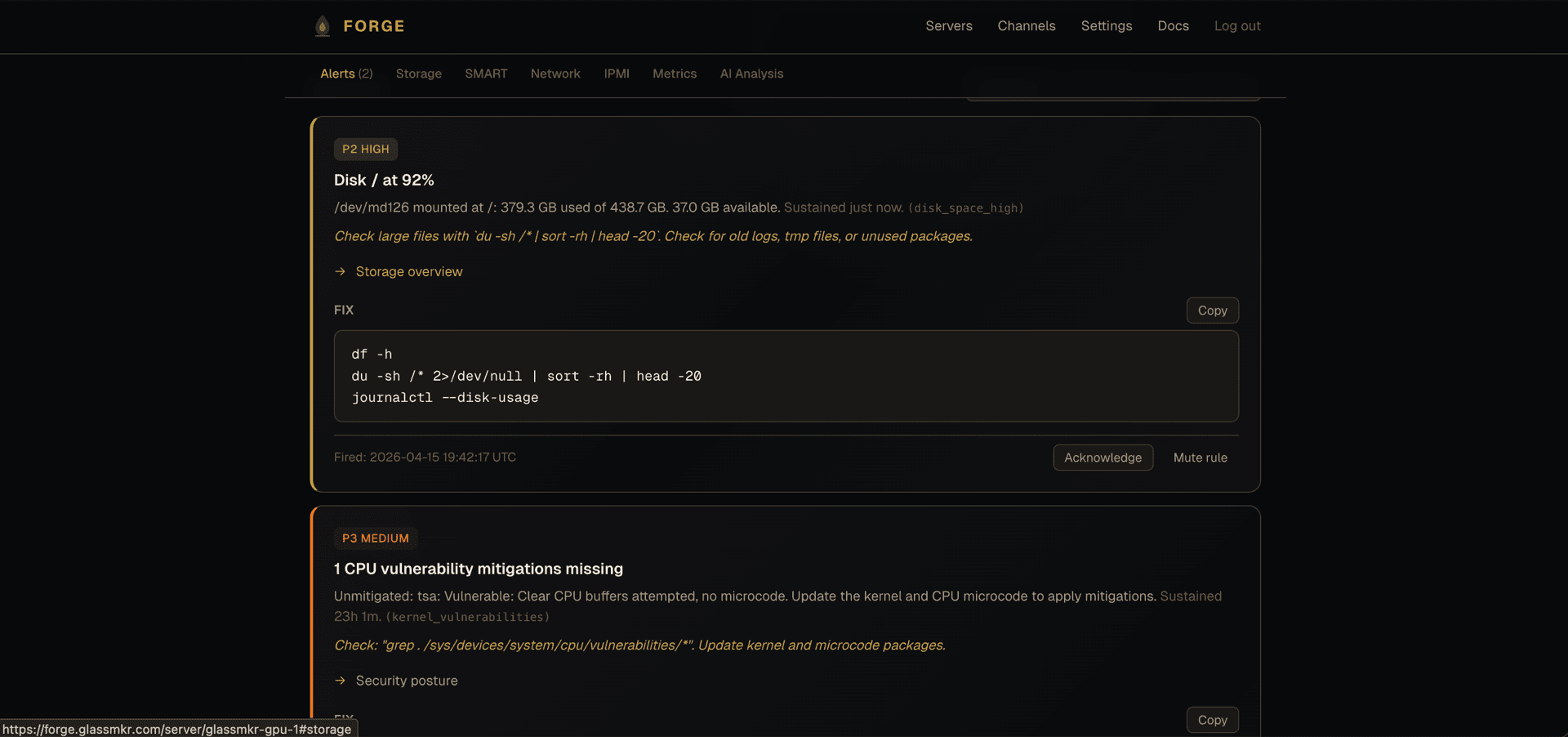 A P1 alert showing the rule trigger, evidence, and the exact remediation
commands. Each rule ships pre-written fix content; the agent does not write
to your server.
A P1 alert showing the rule trigger, evidence, and the exact remediation
commands. Each rule ships pre-written fix content; the agent does not write
to your server.
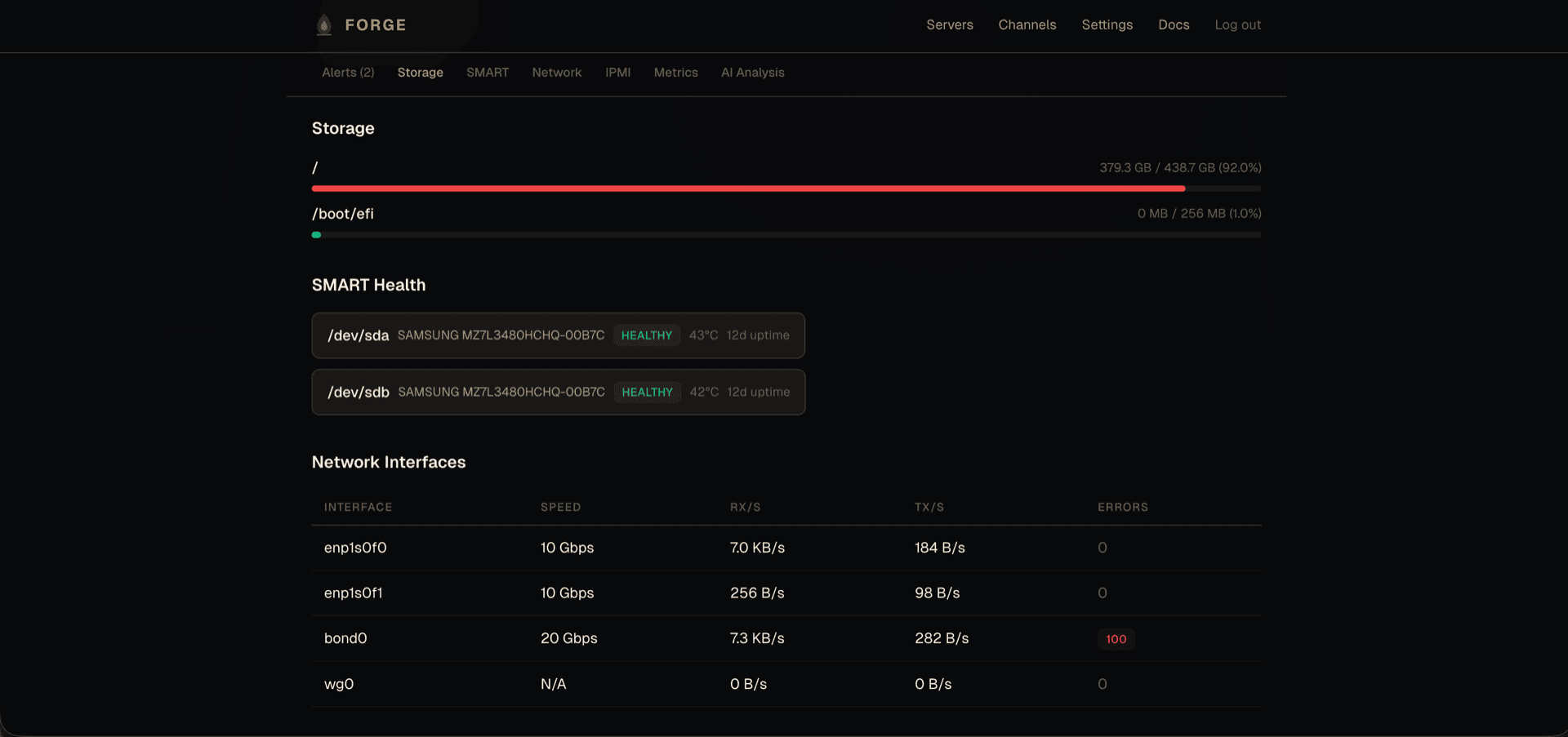 Per-mount capacity and per-disk SMART status. Drives are checked against
SMART attributes, NVMe Critical Warning bits, and ZFS pool state.
Per-mount capacity and per-disk SMART status. Drives are checked against
SMART attributes, NVMe Critical Warning bits, and ZFS pool state.
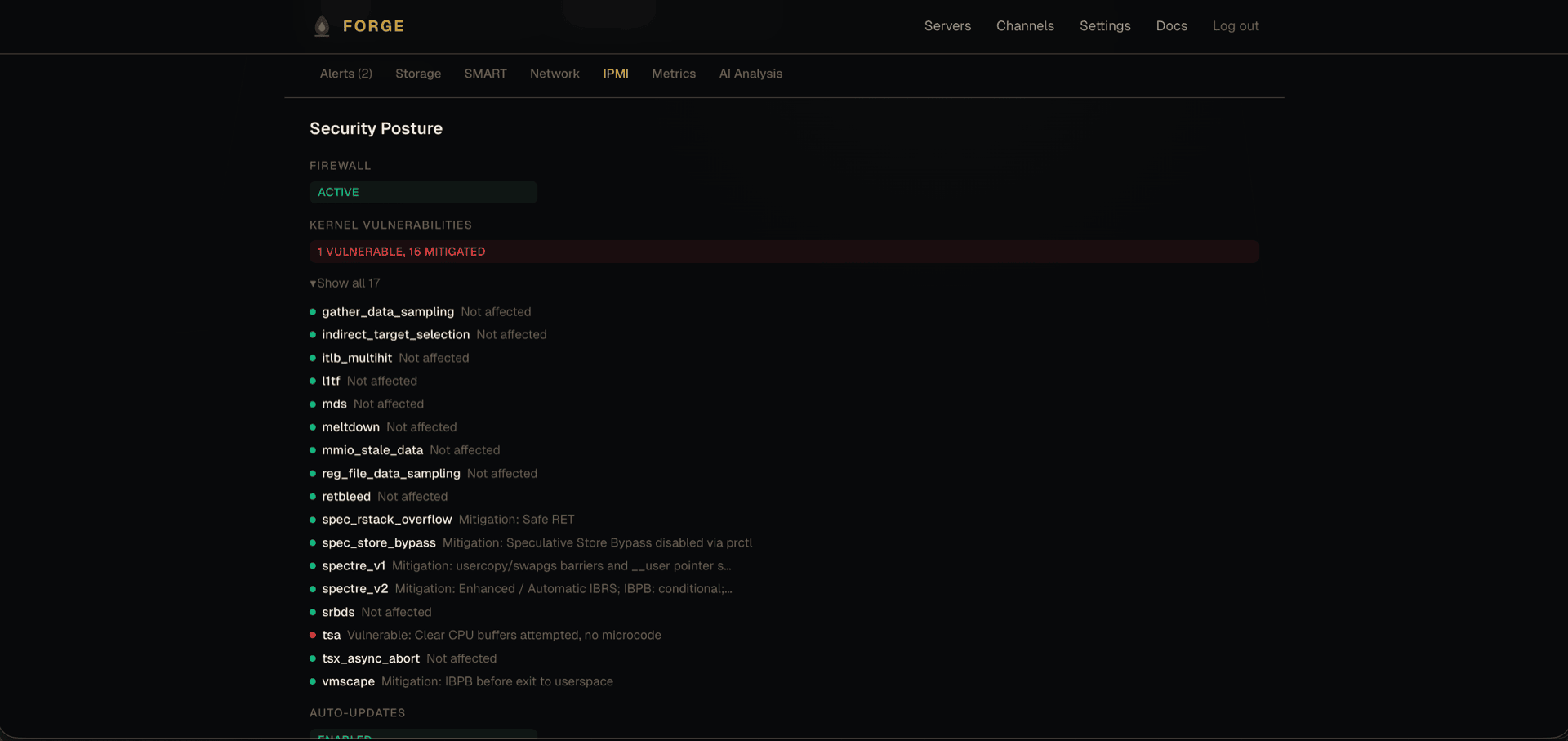 Fleet view with per-server status, distro, IP, and last-seen timestamp.
Alerted servers surface a counter at a glance.
Fleet view with per-server status, distro, IP, and last-seen timestamp.
Alerted servers surface a counter at a glance.
Install
The fastest path: bootstrap script. Detects Node and npm, installs the
agent, and runs glassmkr-crucible init to validate your key, write
/etc/glassmkr/crucible.yaml, write the systemd unit, and start the
service.
curl -sf https://glassmkr.com/install.sh | bash -s -- --api-key gmk_cru_live_<your-key>Or run the steps yourself:
sudo npm install -g @glassmkr/crucible
sudo glassmkr-crucible init --api-key gmk_cru_live_<your-key>
init is the canonical first-run path. It validates the key shape,
optionally probes the ingest endpoint, writes config + systemd unit
with the right binary path for your distro, and enables the service.
Run glassmkr-crucible init --help for the full flag list.
Docker
# Create config directory
sudo mkdir -p /etc/glassmkr

# Create config (replace with your Dashboard credentials)
sudo tee /etc/glassmkr/crucible.yaml << 'EOF'
server_name: "web-01"
collection:
  interval_seconds: 60
  ipmi: true
  smart: true
dashboard:
  enabled: true
  url: "https://app.glassmkr.com"
  api_key: "gmk_cru_live_YOUR_KEY_HERE"
EOF

# Run with docker compose
curl -O https://raw.githubusercontent.com/glassmkr/crucible/main/docker-compose.yml
docker compose up -d

# Check logs
docker compose logs -f crucible
The image is published to docker.io/glassmkr/crucible (public; the compose file above pulls :latest from there). It is also mirrored to ghcr.io/glassmkr/crucible, which currently requires authentication to pull. The container needs --privileged and network_mode: host for IPMI, SMART, and accurate host network monitoring. Details in the compose file.
Quick Start
Create an API key in the Glassmkr Dashboard (Servers → Add server).
Run
init:sudo glassmkr-crucible init --api-key gmk_cru_live_<your-key>This writes
/etc/glassmkr/crucible.yaml, writes the systemd unit, and starts the service. Pass--nameto override the dashboard server name (defaults to the host's hostname). Pass--no-startif you want to inspect the unit before enabling it. Pass--api-key -to read the key from stdin (handy for password-manager pipes).Snapshots appear in the Glassmkr Dashboard within seconds of the first push.
If you can't or won't run init (config-management is doing it for
you, or you're customising the systemd unit), the manual flow is in
the Manual install section below.
CLI Reference
glassmkr-crucible [options]
glassmkr-crucible init        --api-key <K> [--name <N>] [--ingest-url <U>] [--no-start] [--force] [--no-verify]
glassmkr-crucible mark-reboot [--reason TEXT] [--ttl DURATION]
glassmkr-crucible reboot      [--reason TEXT] [--ttl DURATION]

Options:
  -v, --version    Print version and exit
  -h, --help       Print this help and exit
  -c, --config     Path to config file (default: /etc/glassmkr/crucible.yaml)
--config=PATH and the legacy positional form glassmkr-crucible /path/to.yaml both work. Without options, Crucible runs as a long-lived collector daemon.
Configuration
init writes /etc/glassmkr/crucible.yaml. (Installs predating v0.13.5 have the file at /etc/glassmkr/collector.yaml; the agent reads either path, preferring the new name. Run glassmkr-crucible init to migrate the legacy file lossless.) The schema:
server_name: "web-01"
collection:
  interval_seconds: 60
  ipmi: true
  smart: true
dashboard:
  enabled: true
  url: "https://app.glassmkr.com"
  api_key: "gmk_cru_live_<...>_<4>"
Hand-edit any time. The agent re-reads on restart. Run
glassmkr-crucible init --help for the full flag list.
Migrating from 0.9.x to 0.10.x
Breaking change in 0.10.0: the top-level config block was renamed
from forge: to dashboard:, and the default endpoint changed from
forge.glassmkr.com to app.glassmkr.com. Edit your existing
/etc/glassmkr/crucible.yaml (or the legacy /etc/glassmkr/collector.yaml on pre-0.13.5 installs):
# OLD (0.9.x):
forge:
  enabled: true
  url: "https://forge.glassmkr.com"
  api_key: "gmk_cru_live_..."

# NEW (0.10+):
dashboard:
  enabled: true
  url: "https://app.glassmkr.com"
  api_key: "gmk_cru_live_..."
The api_key value itself is unchanged; only the parent key
(forge: → dashboard:) and the endpoint hostname need updating.
After the edit, restart the service:
sudo systemctl restart glassmkr-crucibleFor a clean reinstall from scratch, prefer init --force:
sudo systemctl stop glassmkr-crucible
sudo glassmkr-crucible init --api-key <K> --force
Rebooting without noise
Crucible distinguishes planned reboots from unplanned ones and gives each rule a short grace period after boot so that transient conditions (bond slave still negotiating, clock not synced yet) do not page you.
Before a planned reboot:
sudo glassmkr-crucible reboot --reason "kernel update"Or, if you prefer to trigger the reboot yourself:
sudo glassmkr-crucible mark-reboot --reason "kernel update"
sudo reboot
Both write a short-lived marker to /var/lib/crucible/reboot-expected. The agent reads it once on startup, sets expected_reboot: true on the first post-boot snapshot, and deletes the file. Dashboard reads that flag and suppresses the server_rebooted_unexpectedly alert for that boot only.
The marker is single-use and expires 10 minutes after it is written (override with --ttl 5m / --ttl 1h), so a forgotten marker cannot silence a genuine crash reboot next week. If systemd fails to reboot the host, the marker simply expires on its own.
Per-rule grace windows are applied separately: bond-slave-down and CPU-temperature get 60 s, interface errors 120 s, clock-sync / NTP 300 s, others 0 s. Suppressed evaluations are recorded in alert history with status suppressed_boot_grace or suppressed_planned_reboot so you can audit exactly why a rule didn't fire during a given boot.
Manual install
The canonical install path is glassmkr-crucible init (see "Install"
above). For ops engineers writing config-management modules, init
gives you a stable interface that's covered by the test suite; prefer
it over hand-rolling the equivalent.
If you need or want to do this by hand, the npm prefix differs across
distros: Ubuntu's global npm puts binaries in /usr/bin/, while
Debian's defaults to /usr/local/bin/. The systemd unit's
ExecStart must point at wherever glassmkr-crucible actually landed
on your host, so detect the path before writing the unit:
BIN_PATH=$(command -v glassmkr-crucible)
if [ -z "$BIN_PATH" ]; then
  echo "ERROR: glassmkr-crucible binary not found on PATH after npm install. Aborting." >&2
  exit 1
fi

sudo tee /etc/systemd/system/glassmkr-crucible.service >/dev/null <<UNIT
[Unit]
Description=Glassmkr Crucible - Bare Metal Monitoring
After=network.target

[Service]
Type=simple
User=root
ExecStart=$BIN_PATH /etc/glassmkr/crucible.yaml
Restart=on-failure
RestartSec=10

[Install]
WantedBy=multi-user.target
UNIT
Enable and start:
sudo systemctl daemon-reload
sudo systemctl enable --now glassmkr-crucible
sudo systemctl status glassmkr-crucible
If you ever upgrade @glassmkr/crucible and the binary moves (rare, but
possible on a distro change), re-run the command -v step and update the
unit file. The bootstrap script at https://glassmkr.com/install.sh does
this detection automatically; the manual flow above is just the equivalent.
What It Collects
| Module | Data |
|---|---|
| CPU | Aggregate and per-core utilization (user, system, iowait, idle) |
| Memory | RAM usage, swap usage, EDAC counters, vmstat pswpin/pswpout |
| Pressure (PSI) | cpu / io / memory some and full stall avg + total (kernel >= 4.20) |
| Disks | Space per mount point, inode counts, mount options, filesystem type, LVM thin metadata |
| SMART | Drive health, model, temperature, power-on hours, reallocated sectors, NVMe wear, NVMe Critical Warning decode |
| Network | Interface traffic, delta error/drop counters, link speed, ethtool advertised modes, softnet per-CPU drops |
| RAID | mdadm array status, degraded detection; hardware RAID via storcli/perccli (fleet-tested), ssacli/arcconf (stub) |
| IPMI | Sensor readings, ECC errors, SEL events, fan RPM, PSU redundancy state; vendor SEL parsers (Dell/Supermicro/HPE fleet-tested, Lenovo/Cisco/OpenBMC stub) |
| Security | SSH config, firewall status, pending updates, kernel vulnerabilities, kernel-needs-reboot, CVE collection |
| ZFS | Pool state, vdev redundancy class, SLOG/L2ARC split, scrub age, scrub errors |
| GPU (NVIDIA) | nvidia-smi tier 1 (default), DCGM tier 2 (enrichment), Redfish OEM tier 3 (stub); per-GPU XID events, temperature, ECC, power draw, PCIe link state |
| I/O | Per-device latency, IOPS, dmesg I/O errors, structured dmesg events |
| Conntrack | nf_conntrack table usage, insert_failed rate |
| Network process | Per-process FD scan, LACP partner state, TCP retrans rate |
| Systemd | Failed unit count, Result codes (oom-kill, watchdog, signal) |
| NTP | Sync state and source |
| File descriptors | System-wide allocation |
| Reboot evidence | pstore / kdump / wtmp; expected-vs-unexpected reboot classification |
Dashboard evaluates 61 alert rules server-side across 9 categories (storage, zfs, filesystem, memory & CPU, network, hardware/BMC, time & services, security & patching, GPU), with priorities P1 Urgent through P4 Low. 20 rules ship with deep FIX content (copy-pasteable remediation + verdict prior + rollback notes); 30+ are verified end-to-end on real hardware. Full list: glassmkr.com/docs/rules.
Requirements
- Linux (any distribution: Ubuntu, Debian, RHEL, Rocky, Alma, Arch, Alpine)
- Node.js 24+
- Root access (for SMART, IPMI, dmesg, and
/procaccess) - Optional:
smartmontoolsfor SMART data,ipmitoolfor IPMI data,zfsutils-linuxfor ZFS pools
Documentation
License
MIT. See LICENSE.