
pptx-renderer






A high-fidelity, browser-native PPTX renderer that parses Office Open XML (.pptx) files and renders slides as HTML/SVG DOM.
Supports shapes, text, images, tables, charts, SmartArt, groups, backgrounds, gradients, pattern fills, and the full OOXML color pipeline — covering the vast majority of real-world PowerPoint content.
Rendering Example
A complex slide with charts, text styles, shapes, and SmartArt — PowerPoint ground truth vs browser-rendered output:
| PowerPoint (Ground Truth) | pptx-renderer (Browser) |
|---|---|
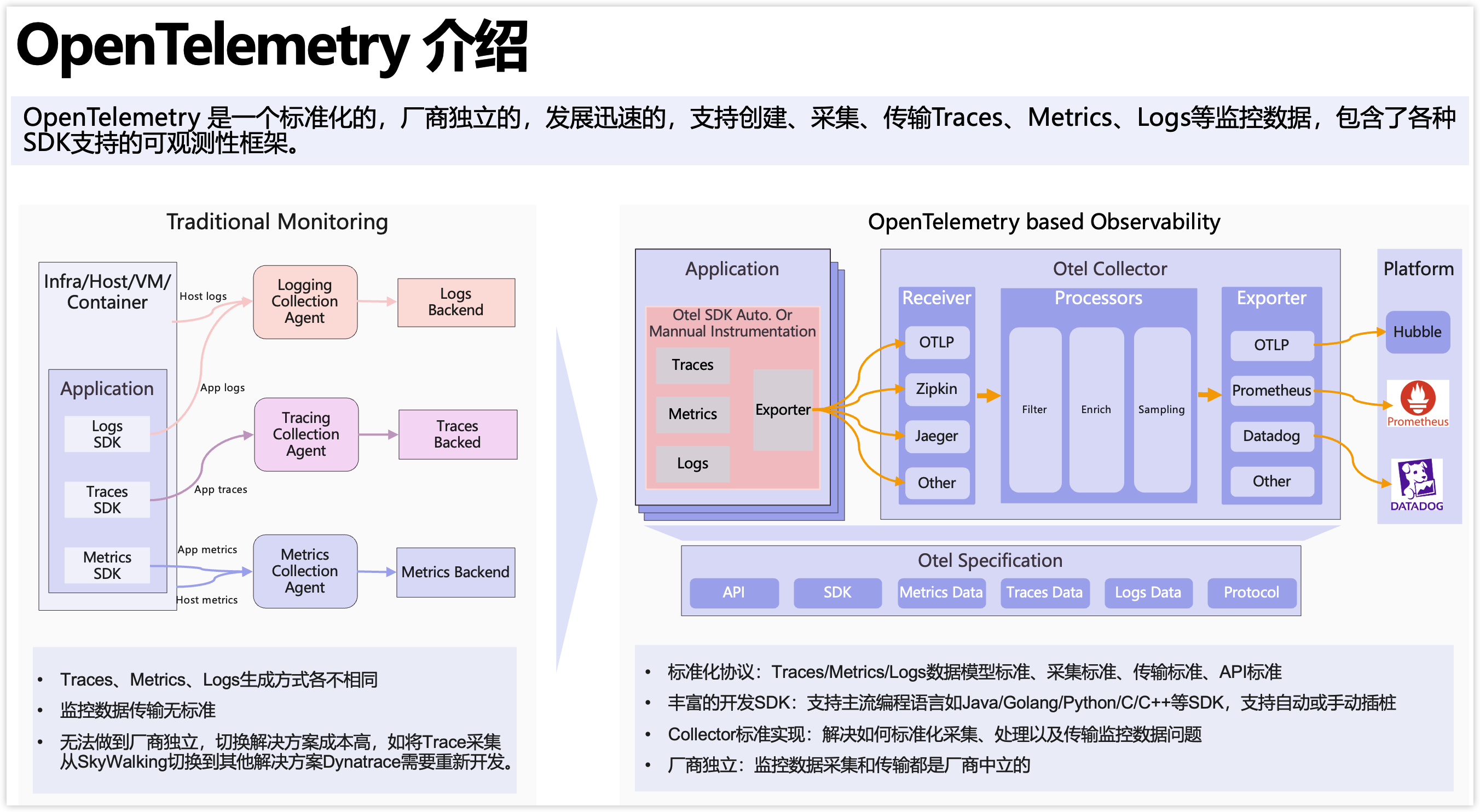 |
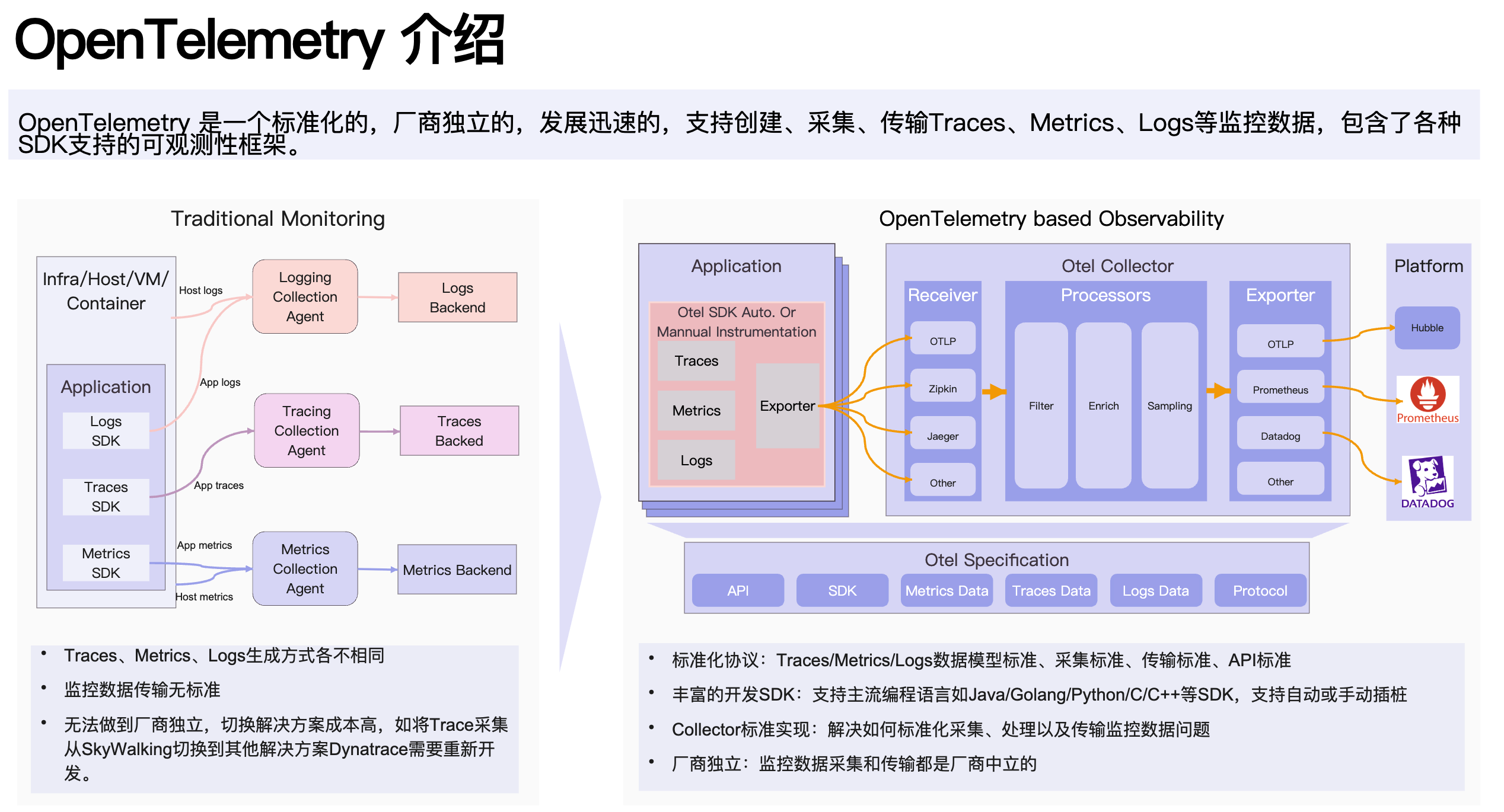 |
Visual Regression Testing
Every rendering capability is automatically verified against PowerPoint output. 452+ visual regression cases with zero failures — covering 187+ preset shapes, 134+ SmartArt layouts, 36+ fill/stroke/gradient variants, and 101 python-pptx cases (text, shape adjustments, composites, charts).
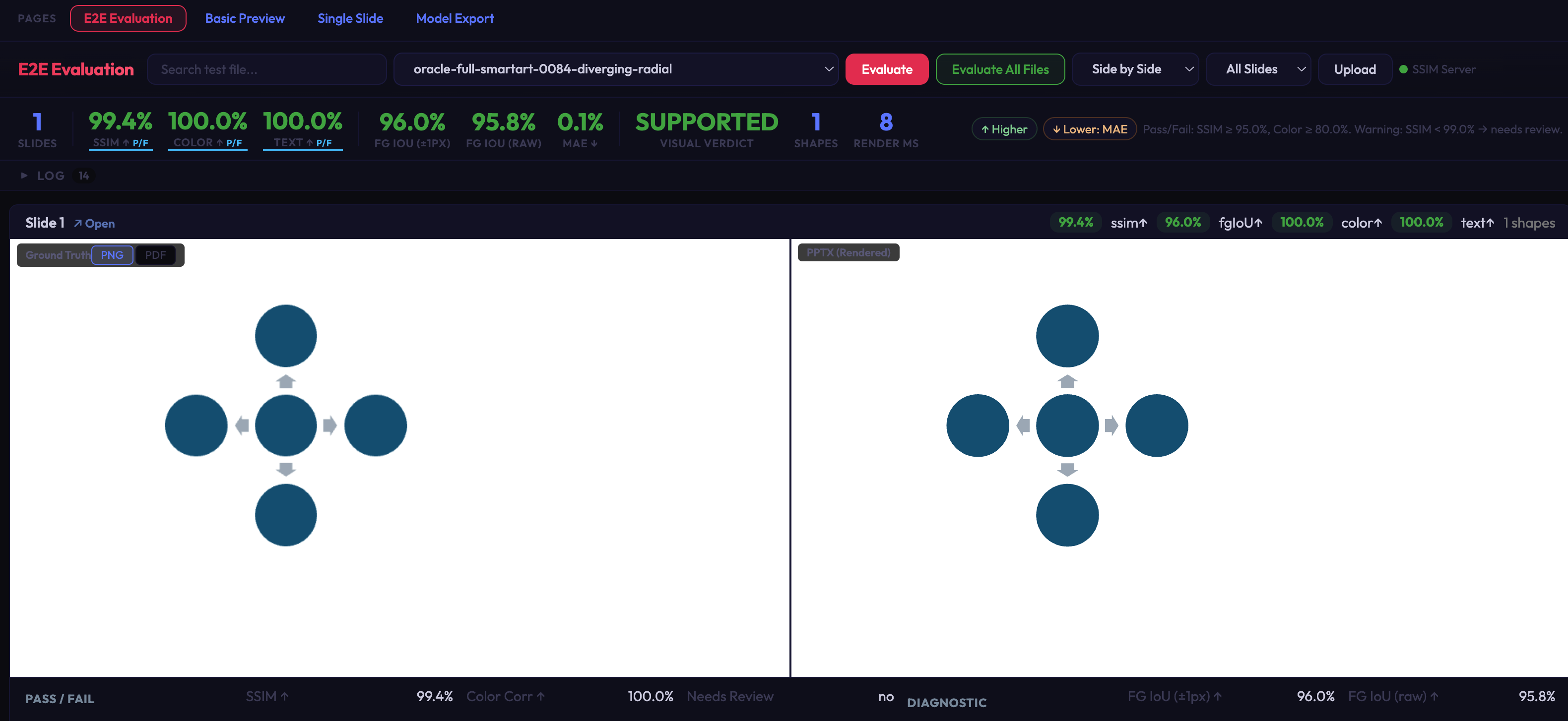
E2E evaluation dashboard: side-by-side ground truth vs rendered output with SSIM, color histogram, and IoU metrics per slide.
Ground truth data (PPTX + PDF pairs) is not committed to the repository due to file size. It can be regenerated locally via
scripts/one_shot_full_ground_truth.pywith Microsoft PowerPoint installed (macOS and Windows both supported) — seedocs/TESTING.mdfor details.
Install
npm install @aiden0z/pptx-renderer
# or
pnpm add @aiden0z/pptx-renderer

# Optional: only needed for SmartArt / EMF files with embedded PDF fallback previews
pnpm add pdfjs-dist
Requires Node.js 20+ for development. Runtime is browser-only.
Quick Start
import { PptxViewer, RECOMMENDED_ZIP_LIMITS } from '@aiden0z/pptx-renderer';

const container = document.getElementById('pptx-container')!;
const resp = await fetch('/slides/demo.pptx');

// One-liner: parse, build model, and render
const viewer = await PptxViewer.open(await resp.arrayBuffer(), container, {
  zipLimits: RECOMMENDED_ZIP_LIMITS,
  listOptions: { windowed: true },
});
For large decks, combine windowed mounting with on-demand slide parsing and media decoding:
const viewer = await PptxViewer.open(buffer, container, {
  zipLimits: RECOMMENDED_ZIP_LIMITS,
  lazySlides: true,
  lazyMedia: true,
  listOptions: { windowed: true, initialSlides: 4, batchSize: 4 },
});
Optional PDF.js Fallback for SmartArt/EMF Preview Images
PowerPoint often stores SmartArt or pasted vector artwork as EMF fallback images. This library does not implement a full EMF/WMF vector renderer. It can render the common Office fallback cases where an EMF contains an embedded PDF preview or bitmap preview.
For EMF files with embedded PDF previews, install pdfjs-dist and pass explicit asset
URLs. This keeps PDF.js optional and avoids forcing every consumer bundle to include it.
This is only needed for EMF-PDF fallback previews; ordinary PPTX rendering does not
require any code changes.
import { PptxViewer } from '@aiden0z/pptx-renderer';

const pdfjs = {
  moduleUrl: new URL('pdfjs-dist/build/pdf.min.mjs', import.meta.url).toString(),
  workerUrl: new URL('pdfjs-dist/build/pdf.worker.min.mjs', import.meta.url).toString(),
};

const viewer = await PptxViewer.open(buffer, container, {
  pdfjs,
});
If your app uses a CDN or pre-copied assets, point those fields at your hosted files.
Set pdfjs: false to disable EMF-PDF fallback rendering entirely. With no pdfjs
configuration, the renderer attempts only a best-effort automatic resolution and
otherwise degrades gracefully.
type PdfjsConfig =
  | {
      moduleUrl?: string;
      workerUrl?: string;
    }
  | false;
Or with more control over each step:
import {
  PptxViewer,
  parseZip,
  buildPresentation,
  RECOMMENDED_ZIP_LIMITS,
} from '@aiden0z/pptx-renderer';

const container = document.getElementById('pptx-container')!;
const viewer = new PptxViewer(container, { fitMode: 'contain' });

const files = await parseZip(arrayBuffer, RECOMMENDED_ZIP_LIMITS);
const presentation = buildPresentation(files);
viewer.load(presentation);
await viewer.renderList({ windowed: true, batchSize: 8 });
To delay both media decompression and slide node parsing until rendered slides actually need
them, use parseZipLazyMedia() and pass { lazySlides: true } to buildPresentation():
import {
  PptxViewer,
  parseZipLazyMedia,
  buildPresentation,
  RECOMMENDED_ZIP_LIMITS,
} from '@aiden0z/pptx-renderer';

const files = await parseZipLazyMedia(arrayBuffer, RECOMMENDED_ZIP_LIMITS);
const presentation = buildPresentation(files, { lazySlides: true });

const viewer = new PptxViewer(container);
viewer.load(presentation);
await viewer.renderList({ windowed: true, initialSlides: 4 });
API
PptxViewer (primary, extends EventTarget)
PptxViewer.open(input, container, options?) — Static Factory
Parse, build, and render in one call. Returns a Promise<PptxViewer>.
const viewer = await PptxViewer.open(buffer, container, {
  renderMode: 'list', // 'list' (default) | 'slide'
  zipLimits: RECOMMENDED_ZIP_LIMITS,
  listOptions: { windowed: true, batchSize: 8 },
  signal: abortController.signal, // optional AbortSignal
  // ...ViewerOptions
});
new PptxViewer(container, options?)
| Option | Type | Default | Description |
|---|---|---|---|
width |
number |
-- | Container width hint (omit for auto-detect) |
fitMode |
'contain' | 'none' |
'contain' |
Responsive fit or fixed size |
zoomPercent |
number |
100 |
Zoom level (10–400) |
scrollContainer |
HTMLElement |
-- | Scroll container for IntersectionObserver root |
zipLimits |
ZipParseLimits |
-- | Security limits for ZIP parsing (used by .open()). Use RECOMMENDED_ZIP_LIMITS for untrusted input. |
lazyMedia |
boolean |
false |
Decode embedded media on demand instead of during ZIP parsing. Best for large decks with windowed list rendering. |
lazySlides |
boolean |
false |
Parse slide shape/table/chart nodes on demand. Best for large decks with windowed list rendering. |
pdfjs |
PdfjsConfig |
-- | Optional PDF.js URLs for EMF-embedded PDF fallback rendering, or false to disable it. |
onSlideChange |
(index) => void |
-- | Shorthand for slidechange event |
onSlideRendered |
(index, element) => void |
-- | Shorthand for sliderendered event |
onSlideError |
(index, error) => void |
-- | Shorthand for slideerror event |
onSlideUnmounted |
(index) => void |
-- | Shorthand for slideunmounted event |
onNodeError |
(nodeId, error) => void |
-- | Shorthand for nodeerror event |
onRenderStart |
() => void |
-- | Shorthand for renderstart event |
onRenderComplete |
() => void |
-- | Shorthand for rendercomplete event |
All shorthand callbacks are also available as EventTarget events (e.g. viewer.addEventListener('slidechange', ...)).
Instance Methods
viewer.load(presentation);                              // Load a PresentationData model (no render)
await viewer.renderList({ windowed: true });             // Render all slides in scrollable list
await viewer.renderSlide(0);                             // Render a single slide (no built-in nav UI)

// Load from binary input (parse → build → render). Cleans up previous state on re-open.
await viewer.open(buffer, { renderMode: 'list', signal: abortController.signal });

await viewer.goToSlide(index);                           // Jump to slide (0-based), returns Promise<void>
await viewer.goToSlide(index, { behavior: 'instant' }); // Custom ScrollIntoViewOptions (list mode)
await viewer.setZoom(150);                               // Runtime zoom (10–400)
await viewer.setFitMode('none');                         // Switch fit mode
const matches = viewer.searchText('GPU');                 // Search parsed model text
const hit = await viewer.highlightSearchResult(matches[0]); // Default node overlay highlight
hit?.dispose();
viewer.clearSearchHighlights();                          // Remove active search overlays

// Render a single slide into an external container (React/Vue integration, thumbnails).
// Returns a SlideHandle; caller owns it and must call handle.dispose() when done.
const handle = viewer.renderSlideToContainer(index, container, scale?);
handle.dispose();                                        // Clean up slide-specific resources

// Render a lightweight scaled slide preview into an external container.
// This preserves the original slide layout and uses transform scaling; it is
// not a bitmap thumbnail generator, so use lazy/windowed mounting for decks.
const thumb = viewer.renderThumbnailToContainer(index, sidebarItem, { width: 180 });
await thumb?.ready;
thumb?.dispose();

// Query which slides are currently mounted in the DOM
viewer.isSlideMounted(index);   // boolean
viewer.getMountedSlides();      // number[] (sorted)

// Typed event helpers (return `this` for chaining)
viewer.on('slidechange', (e) => console.log(e.detail.index));
viewer.off('slidechange', listener);

viewer.destroy();               // Cleanup blob URLs, observers, and DOM
viewer[Symbol.dispose]();       // TC39 Explicit Resource Management (calls destroy)
Text Search
PptxViewer.searchText(query, options?) searches the parsed PresentationData model,
not the rendered DOM. This keeps search available before or after a slide is mounted and
avoids mutating renderer-generated text runs.
String queries are case-insensitive by default. Pass matchCase: true when you need
exact casing. RegExp queries keep their own flags, so /GPU/ remains case-sensitive
and /GPU/i remains case-insensitive.
import type { TextSearchResult } from '@aiden0z/pptx-renderer';

const matches: TextSearchResult[] = viewer.searchText('GPU', {
  matchCase: false,
  wholeWord: true,
  snippetRadius: 48,
});

const exactMatches = viewer.searchText('GPU', { matchCase: true });
const regexMatches = viewer.searchText(/GPU|CPU/i);

for (const match of matches) {
  await viewer.goToSlide(match.slideIndex, { behavior: 'smooth', block: 'center' });
  // Use match.bounds for node-level highlight overlays in your own UI.
}
Each TextSearchResult includes slideIndex, nodeId, nodePath, nodeType,
textKind, full text, matchStart, matchEnd, snippet, and bounds.
bounds is the matched shape or table bounds in intrinsic slide coordinates, so
application code can draw node-level highlight overlays on top of a rendered slide.
The renderer intentionally does not rewrite text nodes for character-level text highlighting. Character-level text highlighting would require mapping match offsets back to shaped Office text runs and line layout, which is a separate, higher-risk renderer feature. Today the stable API boundary is model-level search plus node-level bounds.
For the common UI case, highlightSearchResult(result, options?) draws a node-level
overlay using a default highlight style. Pass SearchHighlightOptions for custom colors,
spacing, shadows, and class names:
const hit = await viewer.highlightSearchResult(matches[0], {
  className: 'my-search-hit',
  borderColor: '#22c55e',
  backgroundColor: 'rgba(34, 197, 94, 0.18)',
  borderRadius: 6,
  borderWidth: 2,
  boxShadow: '0 0 0 2px rgba(15, 23, 42, 0.35)',
  padding: 3,
});

// The caller owns returned highlight handles.
hit?.dispose();
viewer.clearSearchHighlights();
Scaled Slide Previews
PptxViewer.renderThumbnailToContainer(index, container, options?) renders a slide at
its intrinsic layout size and applies CSS transform scaling inside a clipped wrapper.
This avoids the layout drift that can happen if a PPTX slide is rendered directly into a
small thumbnail-sized container.
const thumb = viewer.renderThumbnailToContainer(slideIndex, thumbnailEl, { width: 96 });
await thumb?.ready;

// The caller owns externally rendered previews.
thumb?.dispose();
This is not a bitmap thumbnail generator: it still creates a scaled DOM/SVG slide
preview, so large decks should mount previews lazily with IntersectionObserver or a
windowed list and dispose handles when they scroll out of view.
ListRenderOptions
| Option | Type | Default | Description |
|---|---|---|---|
windowed |
boolean |
false |
Use IntersectionObserver windowing |
batchSize |
number |
12 |
Slides per render batch |
initialSlides |
number |
4 |
Initial slides to mount (windowed) |
overscanViewport |
number |
1.5 |
Viewport overscan multiplier |
ZipParseLimits and Resource Safety
parseZip(buffer) defaults to no ZIP limits for backward compatibility. For files from users or other untrusted sources, pass RECOMMENDED_ZIP_LIMITS or stricter values:
| Limit | Recommended value | What it protects |
|---|---|---|
maxEntries |
4000 |
Archives with excessive file counts |
maxEntryUncompressedBytes |
32 MiB |
A single oversized XML/media entry |
maxTotalUncompressedBytes |
256 MiB |
Total decompressed archive size |
maxMediaBytes |
192 MiB |
Total media payload size under ppt/media/ |
maxConcurrency |
8 |
Parallel ZIP entry reads |
When ZIP metadata does not expose a reliable uncompressed size, the parser falls back to the actual decoded entry size before accepting the entry. This keeps maxEntryUncompressedBytes, maxTotalUncompressedBytes, and maxMediaBytes effective for XML/text entries and media entries alike.
Renderer-level guards also apply after ZIP parsing:
- Chart caches do not allocate from oversized
c:ptCount; chart point indexes are capped at10,000per cache. - EMF bitmap previews are rejected when decoded size exceeds
16,777,216pixels, dimensions exceed8192x8192, or pixel payload is shorter than the declared bitmap. - External audio/video relationships only render for safe
http/httpsURLs withTargetMode="External"and are created withpreload="none".
Events (PptxViewerEventMap)
viewer.addEventListener('renderstart', () => {
  /* render cycle began */
});
viewer.addEventListener('rendercomplete', () => {
  /* render cycle finished (fires even on error) */
});
viewer.addEventListener('slidechange', (e) => console.log(e.detail.index));
viewer.addEventListener('sliderendered', (e) => console.log(e.detail.index, e.detail.element));
viewer.addEventListener('slideerror', (e) => console.error(e.detail.index, e.detail.error));
viewer.addEventListener('slideunmounted', (e) => console.log(e.detail.index));
viewer.addEventListener('nodeerror', (e) => console.warn(e.detail.nodeId, e.detail.error));
slidechange fires both on goToSlide() navigation and after each render cycle (initial render included). renderstart/rendercomplete bracket every render cycle (renderList, renderSlide, setZoom, setFitMode). When calls overlap, the newer render request supersedes older queued or batched work, so stale list batches stop before appending more DOM.
Instance Properties (read-only)
viewer.presentationData; // PresentationData | null — the parsed model, null before load()
viewer.slideCount; // number — total slides (0 if not loaded)
viewer.slideWidth; // number — intrinsic slide width in px
viewer.slideHeight; // number — intrinsic slide height in px
viewer.currentSlideIndex; // number — currently active slide (0-based)
viewer.isRendering; // boolean — true between renderstart and rendercomplete
viewer.zoomPercent; // number — current zoom level (e.g. 100, 200)
viewer.fitMode; // FitMode — current fit mode ('contain' | 'none')
PptxRenderer (deprecated v1 compat)
PptxRenderer extends PptxViewer and provides the legacy preview(input) API with built-in nav buttons in slide mode. Migrate to PptxViewer for new code.
import { PptxRenderer } from '@aiden0z/pptx-renderer';

const renderer = new PptxRenderer(container, { mode: 'list', listMountStrategy: 'windowed' });
await renderer.preview(buffer); // deprecated — use PptxViewer.open() instead
PptxRenderer accepts the same optional lazyMedia, lazySlides, and pdfjs
configuration as PptxViewer, so legacy users can enable performance options or
EMF-PDF fallback rendering without changing APIs.
Utility Exports
import {
  parseZip,
  parseZipLazyMedia,
  buildPresentation,
  materializeAllSlideNodes,
  serializePresentation,
  buildTextIndex,
  searchText,
  searchPresentation,
  RECOMMENDED_ZIP_LIMITS,
} from '@aiden0z/pptx-renderer';

const files = await parseZip(arrayBuffer, RECOMMENDED_ZIP_LIMITS); // PptxFiles
const lazyFiles = await parseZipLazyMedia(arrayBuffer, RECOMMENDED_ZIP_LIMITS); // media resolves on demand
const presentation = buildPresentation(files); // PresentationData
const lazyPresentation = buildPresentation(lazyFiles, { lazySlides: true }); // slide nodes parse on demand
materializeAllSlideNodes(lazyPresentation); // optional: force full model materialization
const json = serializePresentation(presentation); // SerializedPresentation (JSON-safe)
const index = buildTextIndex(presentation); // TextIndexEntry[]
const matches = searchText(index, '算力'); // TextSearchResult[]
const directMatches = searchPresentation(presentation, /GPU|CPU/i); // TextSearchResult[]
Headless Slide Rendering
For advanced use cases (server-side screenshot, custom rendering pipeline):
import { renderSlide } from '@aiden0z/pptx-renderer';
import type { SlideHandle } from '@aiden0z/pptx-renderer';

const handle = renderSlide(presentation, presentation.slides[0], {
  onNodeError: (nodeId, err) => console.warn(nodeId, err),
  mediaUrlCache: new Map(), // optional shared cache for blob URLs
  pdfjs, // optional, only for EMF-embedded PDF fallback rendering
});
document.body.appendChild(handle.element);

// Await async media such as EMF-PDF fallback previews before screenshots/exports.
await handle.ready;

// Clean up when done (disposes charts + blob URLs in standalone mode)
handle.dispose();
Model Types
All model types are exported for consumers building custom tooling:
import type {
  PresentationData,
  BuildPresentationOptions,
  SlideData,
  SlideNode,
  ThemeData,
  BaseNodeData,
  ShapeNodeData,
  PicNodeData,
  TableNodeData,
  GroupNodeData,
  ChartNodeData,
  TextBody,
  TextParagraph,
  TextRun,
  Position,
  Size,
  NodeType,
  SerializedPresentation,
  SerializedSlide,
  SerializedNode,
  PptxFiles,
  ZipParseLimits,
  FitMode,
  PreviewInput,
  ViewerOptions,
  ListRenderOptions,
  ThumbnailRenderOptions,
  SearchHighlightHandle,
  SearchHighlightOptions,
  PptxViewerEventMap,
  SlideHandle,
  PdfjsOptions,
  PdfjsConfig,
  TextBounds,
  TextIndexEntry,
  TextIndexOptions,
  TextSearchOptions,
  TextSearchResult,
} from '@aiden0z/pptx-renderer';
Rendering Capabilities
Shapes — 187+ Presets + Custom Geometry
All commonly used OOXML DrawingML preset shapes, organized by category:
| Category | Count | Highlights |
|---|---|---|
| Basic & Geometric | 70 | Rectangles, ovals, polygons, stars, arcs, clouds, gears, etc. |
| Flowchart | 30 | All standard flowchart shapes |
| Arrows | 22 | Directional, bent, curved, striped, chevron |
| Stars & Banners | 17 | N-point stars, explosions, ribbons, scrolls |
| Callouts | 17 | Rectangular, rounded, oval, cloud, line callout variants |
| Connectors | 12 | Straight, bent, curved (2-5 segments) |
| Action Buttons | 9 | Multi-path 3D with darken/lighten face modifiers |
| Math & Brackets | 12 | Plus, minus, multiply, division, brackets, braces |
| Multi-path 3D | 33+ | Bevel, cube, can, ribbons — multi-layer SVG with 3D appearance |
Custom geometry (<a:custGeom>) is also supported via a general-purpose OOXML path interpreter.
Text — 7-Level Style Inheritance
Full OOXML text cascade: master → layout → shape → paragraph → run. Supports theme fonts, numbered/symbol/picture bullets, multi-level indent, vertical text, superscript/subscript, hyperlinks, and per-shape text insets.
Charts via ECharts
Powered by ECharts. Supports Bar/Column (clustered, stacked, 100% stacked), Line/Area (standard, stacked, 100% stacked), Pie, multi-ring Doughnut, Radar, Scatter, Bubble, and Stock/Candlestick charts, with axis labels, legends, data labels, grid lines, chart color-style palettes, marker symbols, and custom number formats.
OOXML 3D chart elements such as bar3DChart, line3DChart, pie3DChart, area3DChart, and surface3DChart are parsed as graceful 2D fallbacks where possible. True 3D perspective, depth walls, and surface meshes are not PowerPoint-perfect.
Fill, Stroke & Color
- Fills: solid, linear/radial/rectangular gradient, 52+ pattern fills, image (stretch/tile)
- Strokes: 8 dash styles, 5 arrowhead types, compound lines, line joins
- Colors: full OOXML pipeline —
schemeClr→colorMapremap → theme lookup → modifiers (lumMod, lumOff, tint, shade, alpha, satMod, etc.). All 6 color spaces supported.
SmartArt, Tables, Images & More
- SmartArt: 134+ layouts via PowerPoint fallback data. EMF-embedded PDF previews can be rendered with optional pdfjs-dist configuration.
- Tables: OOXML table styles, cell merge, border inheritance
- Images: blob URL with crop, stretch/tile, video/audio placeholders
- Groups: coordinate remapping with recursive child rendering
- Backgrounds: slide → layout → master inheritance chain
Architecture
Three-layer pipeline: Parse -> Model -> Render
ArrayBuffer (.pptx)
  -> ZipParser (jszip extraction)
  -> XmlParser (DOMParser + SafeXmlNode null-safe wrapper)
  -> buildPresentation() (assembles slides/layouts/masters/themes with relationship chains)
  -> SlideRenderer (background -> master shapes -> layout shapes -> slide shapes -> DOM)
Key design decisions:
- SafeXmlNode: Null-safe XML traversal — returns empty nodes instead of null, enabling deep chaining without null checks.
- Lazy slide parsing: Optional
lazySlidesmode keeps per-slide nodes deferred until render, search, serialization, or explicit materialization. - Lazy group parsing: Group children stored as raw XML, parsed during rendering to avoid deep recursion in model layer.
- Error isolation: Per-node try/catch. A failed shape renders as a dashed-red placeholder; the slide continues.
- No external CSS: All styles inline. The library outputs self-contained HTML fragments.
- Blob URL lifecycle: Created for images/media, tracked in
mediaUrlCache, revoked ondestroy().
Performance
The default behavior stays eager for compatibility: parse the package, build the full model, and render according to the selected mode. For large or media-heavy decks, opt into the lazy/windowed path so the first visible slides can render without materializing every slide and every media entry up front.
Use this preset for interactive viewers:
const viewer = await PptxViewer.open(buffer, container, {
  zipLimits: RECOMMENDED_ZIP_LIMITS,
  lazySlides: true,
  lazyMedia: true,
  listOptions: {
    windowed: true,
    batchSize: 8,
    initialSlides: 4,
    overscanViewport: 1.5,
  },
});
Recommended choices:
| Scenario | Recommended options | Main benefit |
|---|---|---|
| User-uploaded PPTX | zipLimits: RECOMMENDED_ZIP_LIMITS |
Bounds ZIP parsing work and decoded payloads |
| Long scrollable viewer | listOptions.windowed: true |
Keeps off-screen slides out of the DOM |
| Large decks with many slide elements | lazySlides: true plus windowed list rendering |
Defers per-slide node parsing until needed |
| Media-heavy decks | lazyMedia: true plus windowed list rendering |
Defers image/audio/video byte decoding |
| Export, print, or full comparison job | Eager defaults, or explicitly materialize before export | Ensures all slides are ready in one pass |
In local benchmarks, lazySlides reduced model build time by roughly 52-66% on medium
and large decks, and lowered first-window parse + build + render time by roughly 16-22%.
For media-heavy windowed viewers, lazyMedia reduced initially decompressed media bytes
by about 72-97%, depending on deck content. These options preserve rendering semantics;
they mainly move work from initial load to the moment a slide or media item is actually
needed.
Manual pipelines can use the same building blocks:
const files = await parseZipLazyMedia(buffer, RECOMMENDED_ZIP_LIMITS);
const presentation = buildPresentation(files, { lazySlides: true });

const viewer = new PptxViewer(container);
viewer.load(presentation);
await viewer.renderList({ windowed: true, initialSlides: 4 });
Details: docs/PERFORMANCE.md
Security
- Treat PPTX input as untrusted. Start with
RECOMMENDED_ZIP_LIMITS, then tighten for your deployment. - External hyperlinks are protocol-filtered (no
javascript:,data:, etc.). - Reporting:
docs/SECURITY.md
Development
pnpm install
pnpm dev          # Vite dev server
pnpm test         # Unit tests (vitest)
pnpm test:coverage # Coverage report → coverage/
pnpm build        # Production build
pnpm dev:e2e      # Dev server + Python E2E API server
pnpm lint         # ESLint
pnpm typecheck    # tsc --noEmit
pnpm knip         # Dead code / unused exports detection
Dev pages at http://127.0.0.1:5173:
| Page | Purpose |
|---|---|
/test/pages/index.html |
Upload preview with search and thumbnails |
/test/pages/render-slide.html |
Single slide at native resolution |
/test/pages/e2e-compare.html |
Side-by-side PDF vs HTML with SSIM scores |
/test/pages/export.html |
Model JSON tree viewer |
Documentation
| Doc | Content |
|---|---|
ARCHITECTURE.md |
Parse/model/render pipeline design |
PERFORMANCE.md |
Tuning options and presets |
TESTING.md |
Unit/E2E strategy, two-layer metric system, visual regression workflow |
CONTRIBUTING.md |
PR checklist, code quality tools, and workflow |
SECURITY.md |
Vulnerability reporting |
What's Not Yet Supported
3D effects, true 3D chart perspective/depth/surface meshes, animations/transitions, equations (OMML), full EMF/WMF vector rendering, shadow/reflection/glow effects, embedded OLE objects, and slide notes rendering.
FAQ
Does this run on Node.js? No. Rendering depends on browser DOM APIs.
Why is my PPTX rendering incomplete? OOXML is a vast spec. Please open a compatibility issue with a minimal PPTX sample — the visual regression pipeline makes it straightforward to add coverage for new cases.
How do I render 100+ slide decks efficiently?
Use windowed: true in listOptions, and enable lazySlides: true. For media-heavy
decks, also enable lazyMedia: true.
License
Apache License 2.0. See LICENSE.